18
[Screen Display]
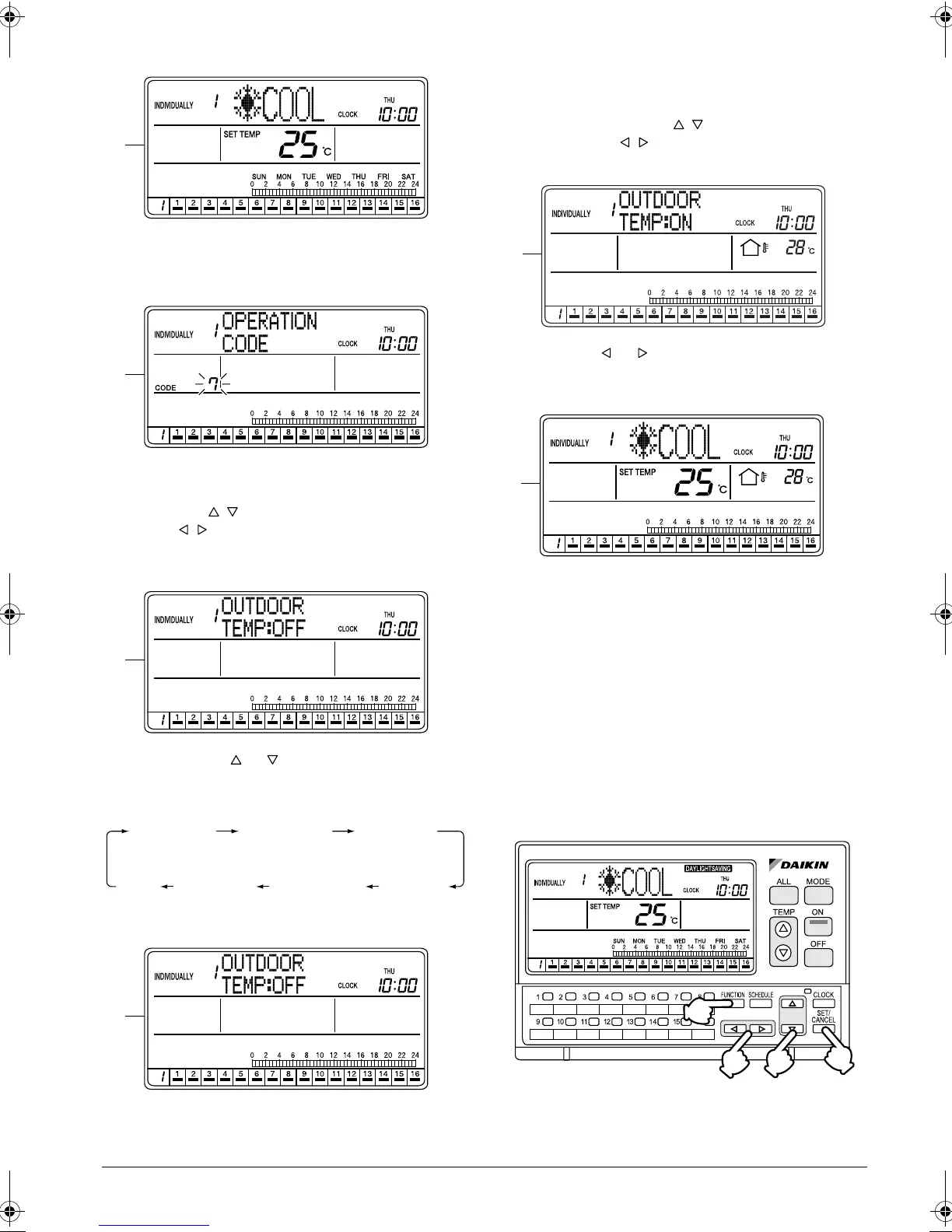
A. To set the Outdoor Temp Display, press the FUNC-
TION button (1) once while the ALL or INDIVIDU-
ALLY screen is displayed.
B. The Function Menu appears.
If no button is pressed for 2 seconds, a guidance
message, “ BUTTONS: CHANGE FUNC-
TION, BUTTONS: CHANGE OPERATION
CODE, SET/CANCEL BUTTON: SET,” appears in
the operation mode display section (dot matrix).
C. Each time the or button (2) is pressed, the
Function Menu changes in the following sequence:
Display the Outdoor Temp Display setting screen.
D. The Outdoor Temp Display setting screen
appears.
If no button is pressed for 2 seconds while the dis-
play shows screen C to screen E on page 18, a
guidance message, “ BUTTONS: CHANGE
FUNCTION, BUTTONS: DISPLAY ON/OFF,
SET/CANCEL BUTTON: SET,” appears.
E. Using the or button, display or hide the Out-
door Temp Display. This completes the Outdoor
Temp Display setting procedure.
F. If no button is operated for 1 minute or the FUNC-
TION button (1) is pressed once, the display
returns to the INDIVIDUALLY screen.
If the Outdoor Temp Display has been set to ON,
the outdoor temperature will be displayed.
* The outdoor temperature display time is
1 minute.
DAYLIGHT SAVING
Automatic advancement of the current
time for daylight saving period
A
B
C
OPERATION
CODE
RESET
FILTER SIGN
OUTDOOR
TEMP
DISPLAY
DAYLIGHT
SAVING
SET DAYLIGHT
SAVING TIME
CONTRAST
KEY
LOCK
D
E
F
(1)
(4)
(2)
(3)
01_EN_3P124623-10N.fm Page 18 Monday, January 28, 2008 4:58 PM



 To Next Page