42
[Operating Procedure]
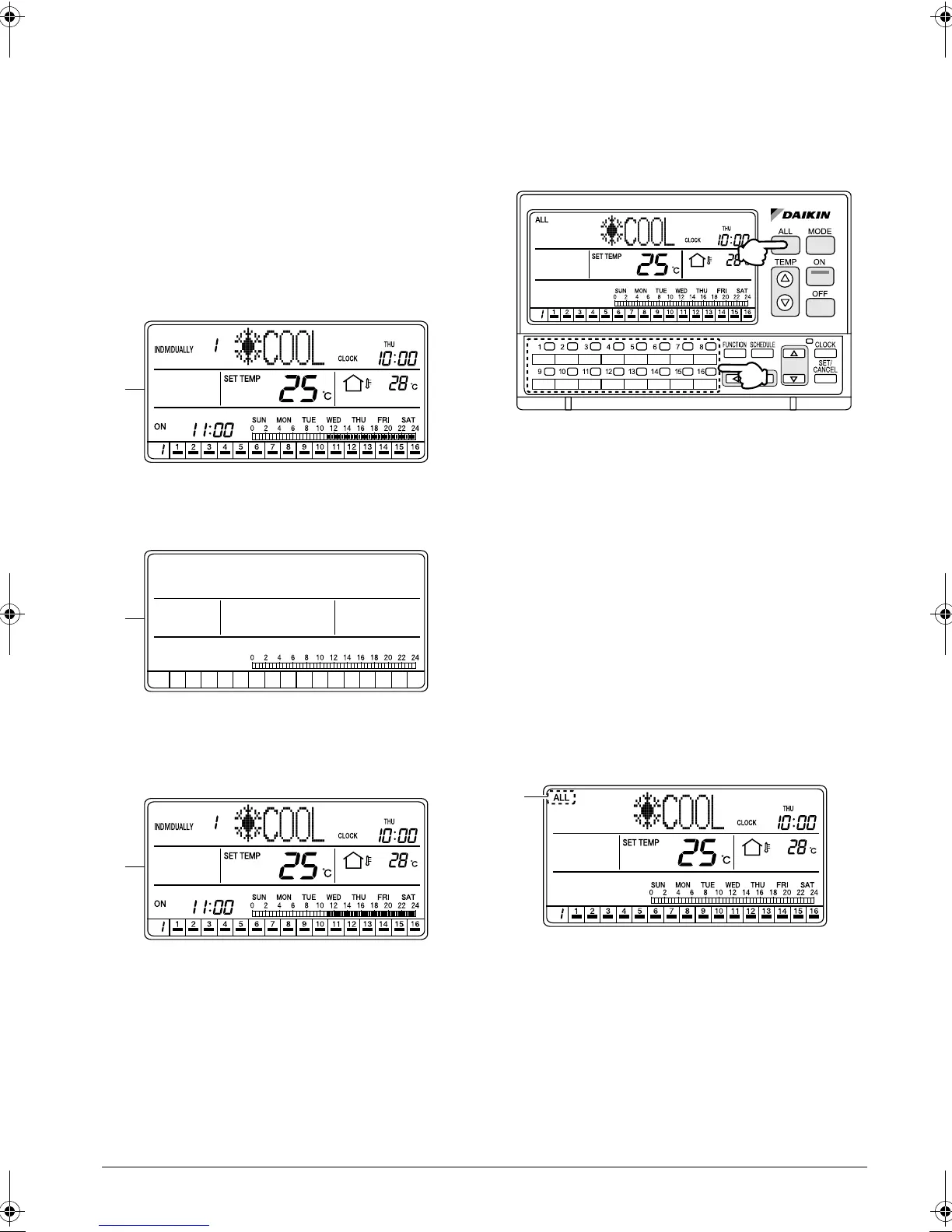
1. Hold the OFF button (1) pressed for more than
10 seconds while the ALL screen or INDIVIDU-
ALLY screen is displayed.
2. The LCD turns Off and the standby mode (energy-
saving mode) will be activated.
While in the standby mode, the ON and other but-
tons are inoperable.
3. Holding the ON button (2) pressed for more than
5 seconds cancels the standby mode (energy-sav-
ing mode), and the LCD turns back On.
[Screen Display]
A. Hold the OFF button (1) pressed for more than
10 seconds while the ALL screen or INDIVIDU-
ALLY screen is displayed.
B. The LCD turns Off and the standby mode (energy-
saving mode) will be activated.
While in the standby mode, the ON and other but-
tons are inoperable.
C. Holding the ON button (2) pressed for more than
5 seconds cancels the standby mode (energy-sav-
ing mode), and the LCD turns back On.
OUTDOOR TEMPERATURE
DISPLAY
Displaying the outside temperature
detected by the outdoor unit con-
nected to an air conditioner
[Operating Procedure]
1. When the ALL button (1) is pressed, the display
shows the outdoor temperature detected by the
outdoor unit connected to the air conditioner
(group) with a cooling/heating selection privilege
(*) that has the smallest unit No.
(* An air conditioner (group) with a cooling/heating
selection privilege is a unit which allows switching
of the operation mode between cooling and heat-
ing.)
2. When an air conditioner (group) is selected by
pressing one of the individual group selection but-
tons (2) (1 - 16), the display shows the outdoor
temperature detected by the outdoor unit con-
nected to the selected air conditioner (group).
[Screen Display]
A. Press the ALL button (1) or one of the individual
group selection buttons (2) (1 - 16) to select an air
conditioner (group) for the display of the outdoor
temperature.
A
B
C
(2)
(1)
A
01_EN_3P124623-10N.fm Page 42 Monday, January 28, 2008 4:58 PM



 To Next Page