5
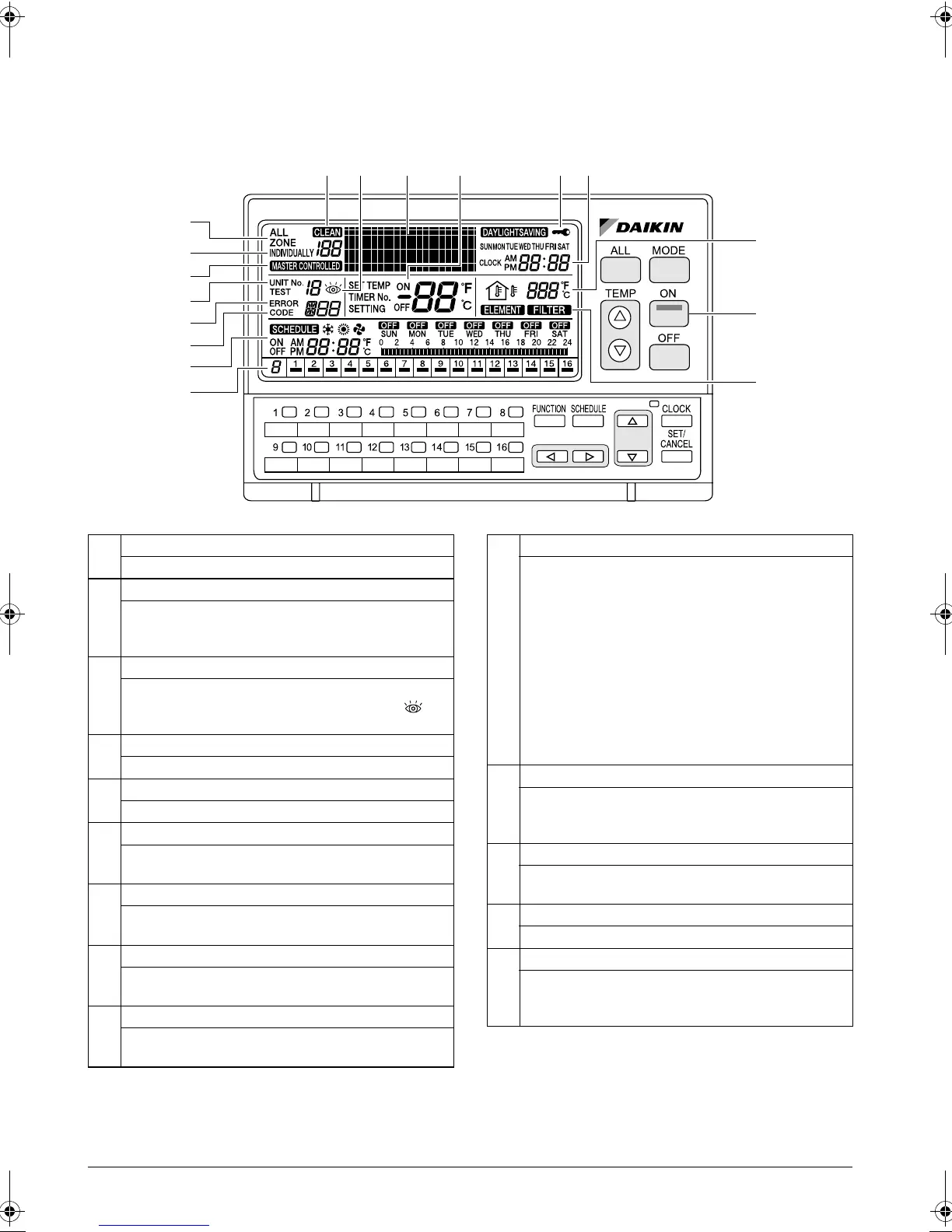
NAMES AND FUNCTIONS OF THE OPERATING SECTION
External View
(All indications are displayed in the following diagram of screen for the explanation purpose. Actual indications
displayed during operation will vary.)
2
6
10
7
1
12 3-3
11
3-1
3-2
14
4 8 135
12
9
1
ALL
This indicates that the display shows the ALL screen.
2
INDIVIDUALLY
This indicates that the display shows the INDIVIDU-
ALLY screen for the currently selected air conditioner
No.
3
ERROR CODE DISPLAY
When an equipment malfunction occurs, the malfunc-
tion UNIT No. (
3-1
), ERROR CODE (
3-2
) and (
3-
3
) indications blink.
4
OPERATION MODE DISPLAY (Dot Matrix)
This section displays the operation status.
5
SET TEMP DISPLAY
This section displays the set temperature.
6
ON LAMP
This lamp lights when one or more indoor units under
control are operating.
7
SCHEDULE SETTING DISPLAY
This section displays the programmed operation
details.
8
KEY LOCK DISPLAY
This symbol appears when the key lock has been acti-
vated.
9
OPERATION MONITOR
Each box shows the No. of connected air conditioner
(group) and its operation status.
10
OUTDOOR TEMP DISPLAY
In the ALL screen, this displays the outside tempera-
ture detected by the outdoor unit connected to the air
conditioner (group) with a cooling/heating selection
privilege(*) that has the smallest unit No.
In the INDIVIDUALLY screen, this displays the outside
temperature detected by the outdoor unit connected to
the selected air conditioner (group).
If Total Heat Exchanger is selected, outdoor tempera-
ture is not displayed.
(*An air conditioner (group) with a cooling/heating
selection privilege is a unit which allows switching of
the operation mode between cooling and heating.)
11
MASTER-CONTROLLED DISPLAY
This indication appears when the selected air condi-
tioner (group) does not have a cooling/heating selec-
tion privilege.
12
CLEAN SIGN
The FILTER and ELEMENT indications appear when
the filter and element need to be cleaned.
13
CLOCK DISPLAY
This shows the current time.
14
OPERATION CODE DISPLAY
This displays the operation code (prohibit remote con-
troller, central control priority, last button priority, etc.)
during the setting of operation details.
01_EN_3P124623-10N.fm Page 5 Monday, January 28, 2008 4:58 PM



 To Next Page