6
NAMES AND FUNCTIONS OF
THE OPERATING SECTION
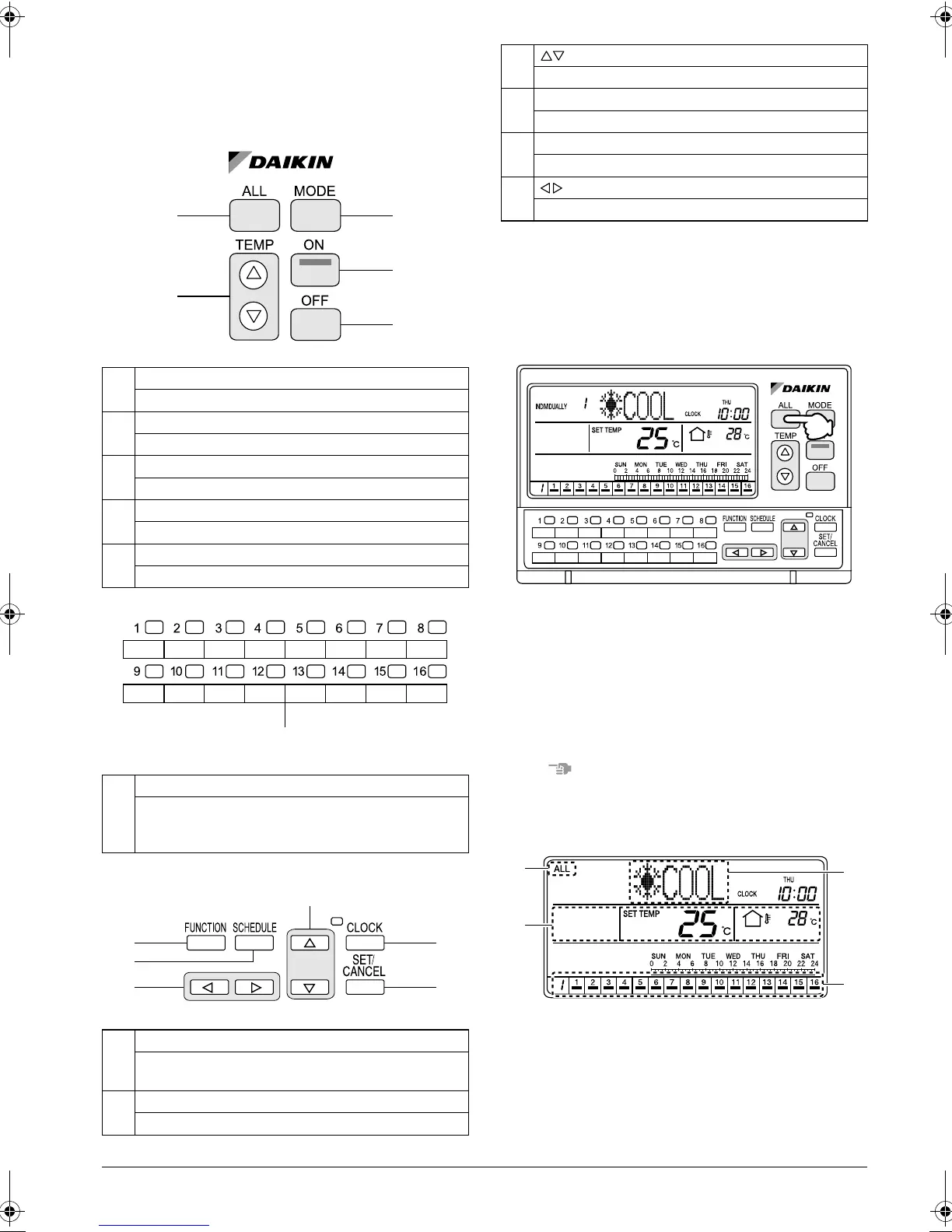
Names of Operation Buttons
SCREENS
HOW TO DISPLAY THE ALL
SCREEN
Displaying the ALL screen
[Operating Procedure]
Press the ALL button (1).
When one or more connected air conditioners (groups)
are operating, if no button is operated for 20 seconds,
the display changes to the INDIVIDUALLY screen. If all
air conditioners are in non-operation, the display does
not change to the INDIVIDUALLY screen.
NOTE
Operate buttons while the backlights are lit.
[Screen Display]
A. The ALL screen appears, and “ALL” is indicated at
the upper left corner of the screen.
B. This section displays the operation information of
the air conditioner in operation that has the small-
est unit No. in the air conditioners (groups) with
cooling/heating selection privilege.
15
ALL BUTTON
Changes the display to the ALL screen.
16
MODE BUTTON
Used to select the operation mode.
17
TEMP BUTTONS
Used to set the temperature.
18
ON BUTTON
Turns on all indoor units or individual unit (group).
19
OFF BUTTON
Stops all indoor units or individual unit (group).
20
INDIVIDUAL UNIT (GROUP) SELECTION BUTTONS
Changes the display to the INDIVIDUALLY screen for
monitoring or setting the air conditioner (group) of the
indicated No.
21
FUNCTION BUTTON
Changes the display to the Function Menu setting
screen.
22
SCHEDULE BUTTON
Changes the display to the SCHEDULE setting screen.
15 16
18
19
17
20
24
25
21
22
26
23
23
BUTTONS
Used to select a menu.
24
CLOCK BUTTON
Changes the display to the current time setting screen.
25
SET/CANCEL BUTTON
Enters or cancels settings.
26
BUTTONS
Used to set an operation schedule or current time.
(1)
A
D
B
C
01_EN_3P124623-10N.fm Page 6 Monday, January 28, 2008 4:58 PM



 To Next Page