17
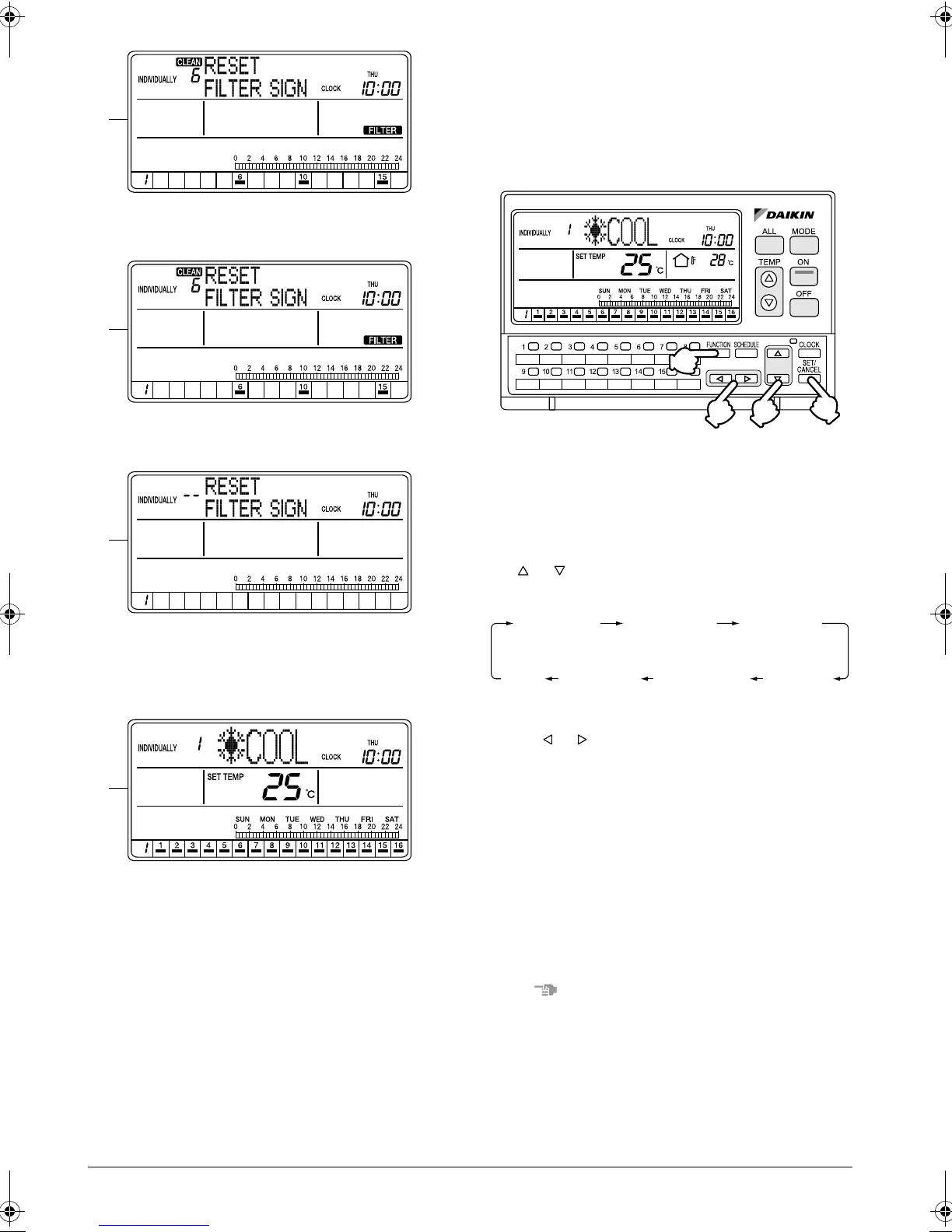
F. The Filter sign in the selected air conditioner has
been reset.
G. To reset the Filter sign in all units, hold the SET/
CANCEL button pressed for more than 4 seconds.
H. The Filter sign has been reset in all units.
If no button is operated for 1 minute or the FUNC-
TION button (1) is pressed, the display returns to
the INDIVIDUALLY screen.
I. The display shows the INDIVIDUALLY screen.
The Filter sign has been reset.
OUTDOOR TEMPERATURE
DISPLAY
Displaying the temperature of the out-
door unit connected to the selected air
conditioner
[Operating Procedure]
1. While the ALL or INDIVIDUALLY screen is dis-
played, press the FUNCTION button (1) once.
2. The Function Menu appears.
The Function Menu changes as follows when the
or button (2) is pressed.
3. In the Outdoor Temp Display setting screen, press
the or button (3) to display or hide the temper-
ature indication.
* The Outdoor Temp Display is turned Off by
default.
4. Press the SET/CANCEL button (4) to complete the
Outdoor Temp Display setting procedure.
5. If no button is operated for 1 minute or the FUNC-
TION button (1) is pressed, the display returns to
the ALL screen when the setting was made in the
ALL screen, or to the INDIVIDUALLY screen when
the setting was made in the INDIVIDUALLY
screen.
NOTE
1. In each of steps 2 through 4, if no button is operated
for 1 minute, the display returns to the ALL screen
when the setting was made in the ALL screen, or to
the INDIVIDUALLY screen when the setting was
made in the INDIVIDUALLY screen.
In the above-mentioned case, the setting being
entered will not be applied.
F
G
H
I
(1)
(4)
(2)
(3)
OPERATION
CODE
RESET
FILTER SIGN
OUTDOOR
TEMP
DISPLAY
DAYLIGHT
SAVING
SET DAYLIGHT
SAVING TIME
CONTRAST
KEY
LOCK
01_EN_3P124623-10N.fm Page 17 Monday, January 28, 2008 4:58 PM



 To Next Page