7
C. This section displays the Nos. of all connected air
conditioners (groups).
The indication lights under the Nos. of air con-
ditioners that are operating.
D. “System Down” is indicated when all air condition-
ers in the system are in non-operation.
HOW TO DISPLAY THE INDIVID-
UALLY SCREEN
Displaying the INDIVIDUALLY screen
[Operating Procedure]
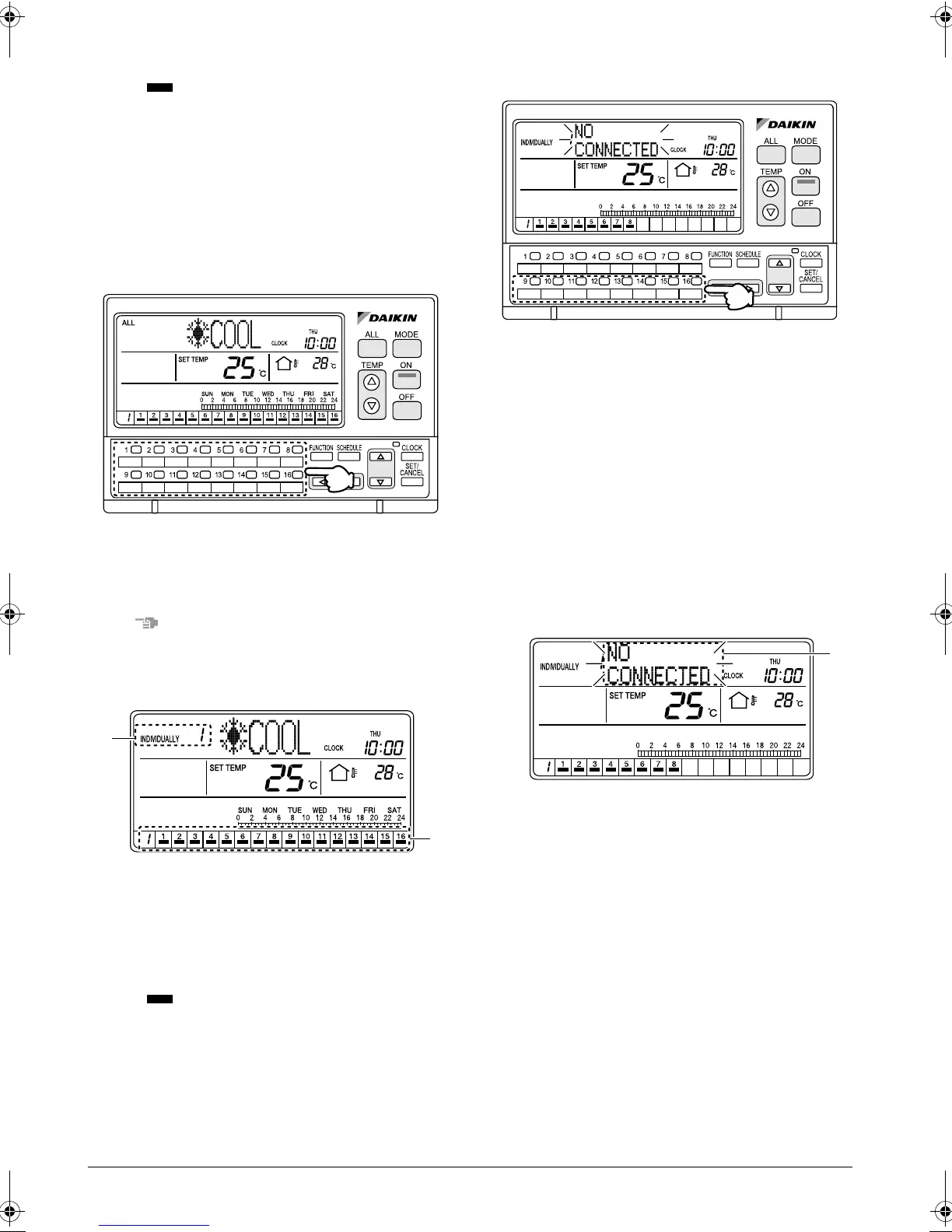
Press one of the individual group selection buttons (1)
(1 - 16).
NOTE
Operate buttons only when the backlights are lit.
[Screen Display]
A. The INDIVIDUALLY screen appears, and the No.
of the selected air conditioner is indicated at the
upper left corner of the screen.
(In the above screen, unit No. 1 is selected.)
B. This section displays the Nos. of all connected air
conditioners (groups).
The indication lights under the Nos. of air con-
ditioners that are operating.
When an unconnected air conditioner
(group) is selected
[Operating Procedure]
If the No. of an unconnected air conditioner is selected
with one of the individual group selection buttons (1)
(1 - 16), the operation mode display section (dot matrix)
shows a blinking “NO CONNECTED” indication for 2
seconds.
After the indication blinks for 2 seconds, the display
returns to the air conditioner screen that was displayed
prior to the selection of the unconnected air conditioner
(group).
* In the above diagram, unconnected air conditioners
are unit Nos. 9 through 16.
[Screen Display]
A. If the No. of an unconnected air conditioner is
selected with one of the individual group selection
buttons (1 - 16), the operation mode display sec-
tion (dot matrix) shows a blinking “NO CON-
NECTED” indication for 2 seconds.
OPERATION
(1)
A
B
(1)
A
01_EN_3P124623-10N.fm Page 7 Monday, January 28, 2008 4:58 PM



 To Next Page