33
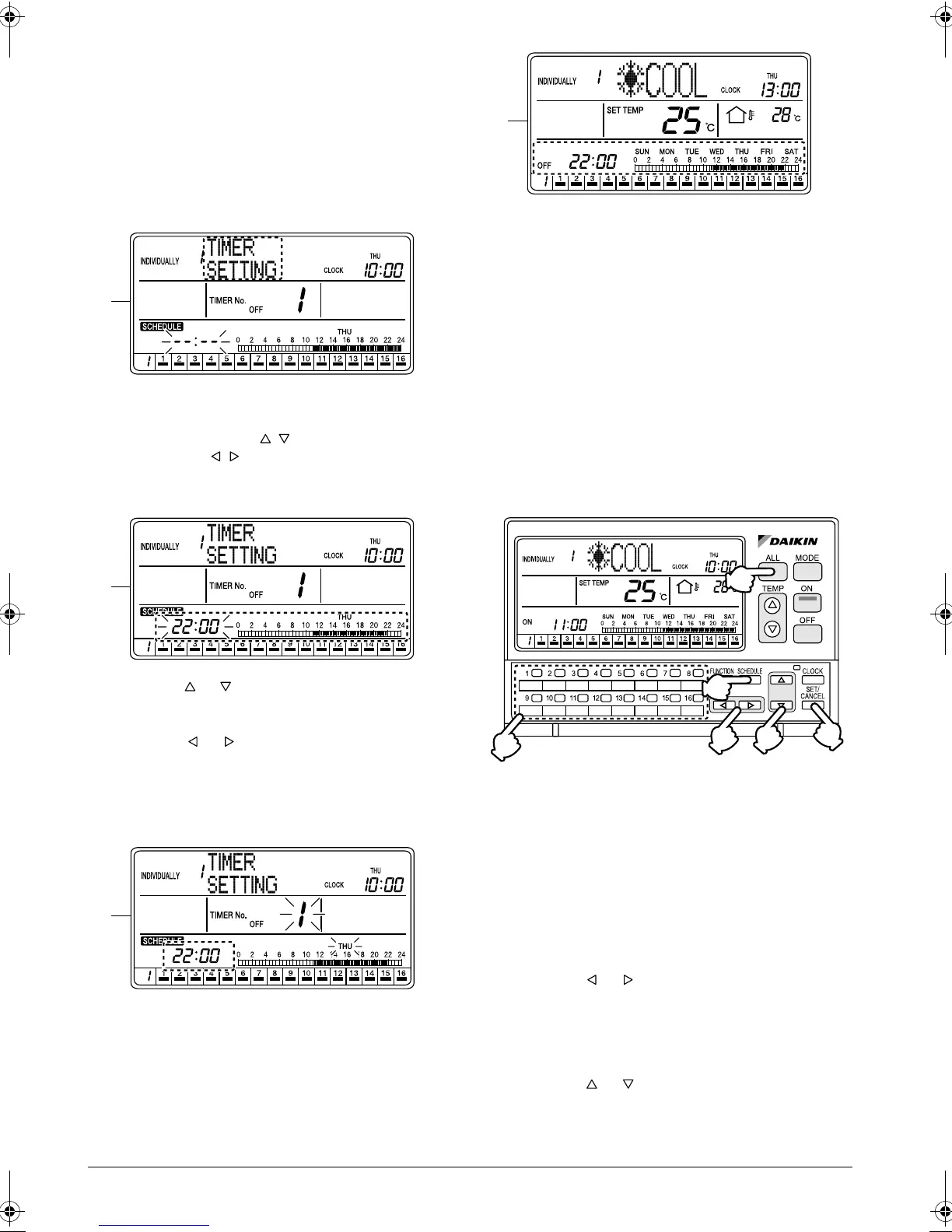
F. Press the SET/CANCEL button (6) once to apply
the setting.
The Timer No. (7) and “day of the week” indica-
tions change from blinking to constant On, and the
set time indication blinks.
When the SET/CANCEL button (6) is pressed
once again, the display returns to screen D (blink-
ing Timer No. (7) and “day of the week” indications)
shown on page 32.
G. If no button is operated for 2 seconds while the dis-
play shows screen G or screen H on page 33, a
guidance message, “ BUTTONS: CHANGE
FUNCTION , BUTTONS: SET TIME, SET/
CANCEL BUTTON: SET,” appears and scrolls in
the operation mode display section (dot matrix).
H.
Using the or button (2), select “
TIME
R SET-
TING”. (This procedure is not necessary since
“
TIME
R SETTING” was selected in the first step.)
Press the or button (5) to set time.
The blinking set time indication and the schedule
bar graph shows the time setting.
* When the button is held pressed, the displayed
time changes faster.
I. Press the SET/CANCEL button (6) once to apply
the setting.
The set time indication changes from blinking to
constant On, and the display returns to screen D
(blinking Timer No. (7) and “day of the week” indi-
cations) shown on page 32.
J. If no button is operated for 1 minute or the SCHED-
ULE button (1) is pressed once, the display returns
to the ALL screen when the setting was made in
the ALL screen, or to the INDIVIDUALLY screen
when the setting was made in the INDIVIDUALLY
screen.
If the set time is ahead of the current time, the
Schedule setting screen appears.
SCHEDULE SETTING - “OFF
DAY” SETTING
Keeping units turned off on a specific
day of the week
[Operating Procedure]
< “OFF DAY” SETTING >
1. While the ALL or INDIVIDUALLY screen is dis-
played, press the SCHEDULE button (1) once.
2. The Schedule setting screen appears.
3. Using the ALL button (2) or one of the individual
group selection buttons (3) (1 - 16), select the air
conditioner (group) to be set.
4. Press the or button (4) to set the day of the
week for “OFF DAY” SETTING.
5. Press the SET/CANCEL button (5) once to apply
the settings.
6. The display changes to the Time setting screen.
Using the or button (6), select “OFF DAY”.
7. Press the SET/CANCEL button (5) once to com-
plete the setting procedure.
G
H
I
J
(1)
(2)
(5)
(3)
(6)
(4)
01_EN_3P124623-10N.fm Page 33 Monday, January 28, 2008 4:58 PM



 To Next Page