41
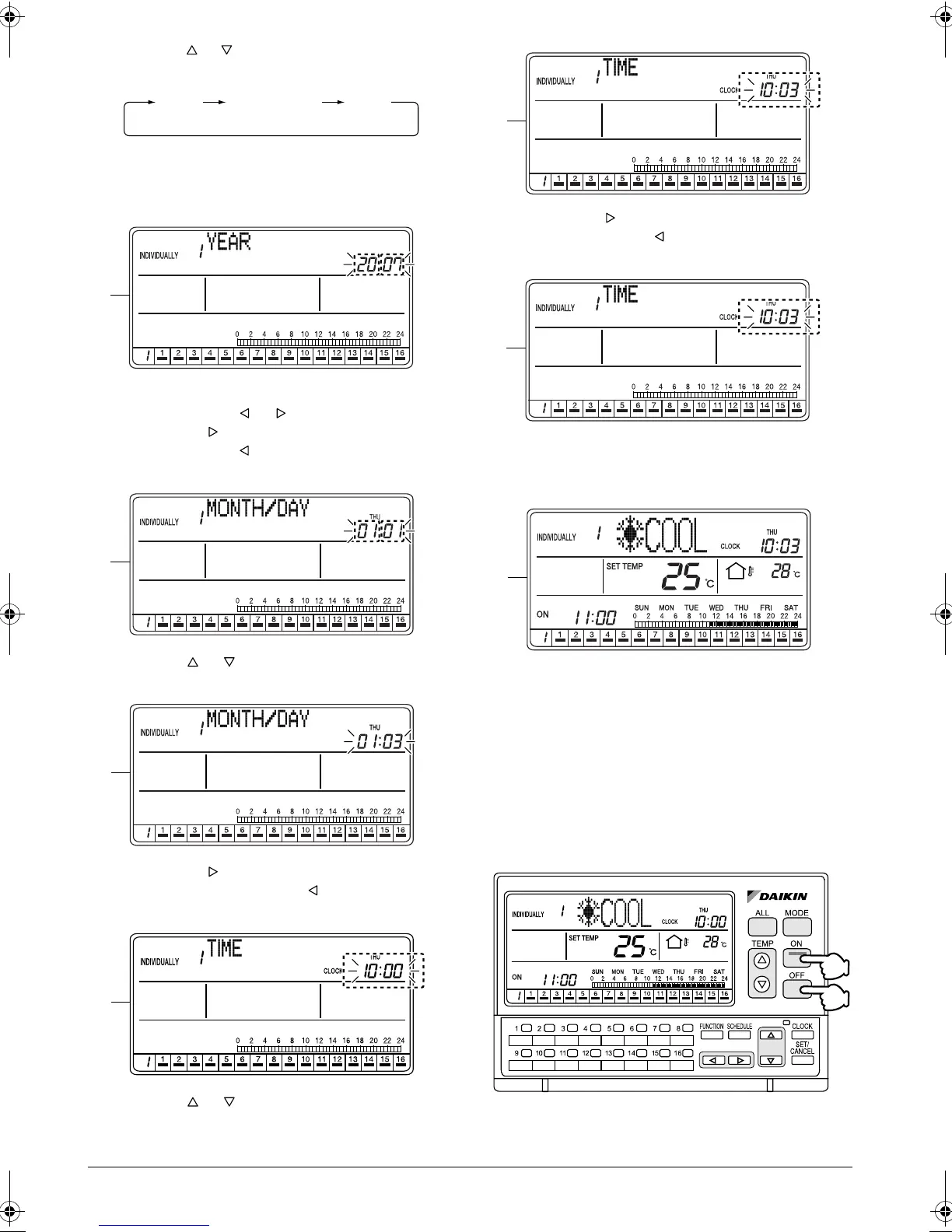
D. When the or button (2) is pressed, the setting
item changes. Select an item to set.
* This manual describes the methods of setting 1.
YEAR, 2. MONTH/DAY and 3. TIME in that
order.
E. While the “YEAR” setting screen is displayed, set
Year by using the or button (3).
Pressing the button increments the year indica-
tion. Pressing the button decrements the indica-
tion.
F. Press the or button (2) to select “MONTH/
DAY”.
G. Pressing the button (3) increments the month/
day indication. Pressing the button decrements
the indication.
H. Press the or button (2) to select “TIME”.
I. Pressing the button (3) increments the time indi-
cation. Pressing the button decrements the indi-
cation.
J. Press the SET/CANCEL button (4) once.
The settings will be applied. This completes the
setting procedure.
K. The set time is displayed in the ALL screen if the
settings were made in the ALL screen, or in the
INDIVIDUALLY screen when the settings were
made in the INDIVIDUALLY screen.
STANDBY MODE
Turning Off the LCD and activating the
energy-saving mode
YEAR MONTH/DAY
TIME
E
F
G
H
I
J
K
(2)
(1)
01_EN_3P124623-10N.fm Page 41 Monday, January 28, 2008 4:58 PM



 To Next Page