37
B. The Schedule setting screen appears.
If no button is operated for 2 seconds while the dis-
play shows screen B to screen D on page 36, a
guidance message, “ BUTTONS: SELECT
TIMER No., BUTTONS: SELECT DAY OF
THE WEEK, SET/CANCEL BUTTON: SET,”
appears and scrolls in the operation mode display
section (dot matrix).
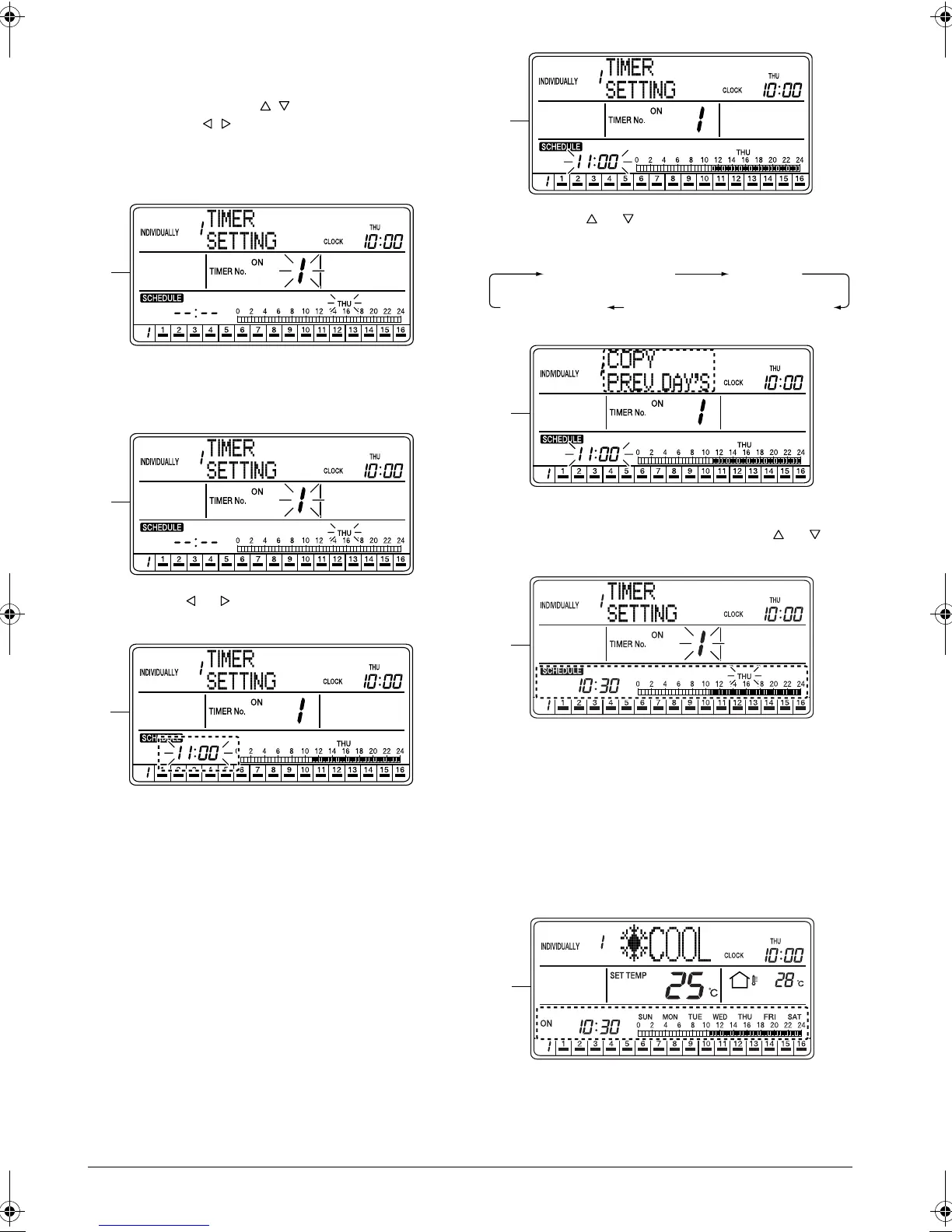
C. Using the ALL button (2) or one of the individual
group selection buttons (3) (1 - 16), select the air
conditioner (group) to be set.
D. Press the or button (4) to select the day of the
week for the “Copy the Day Before” setting.
E. Press the SET/CANCEL button (5) once to apply
the setting.
The Timer No. and “day of the week” indications
change from blinking to constant On, and the set
time indication blinks.
When the SET/CANCEL button (5) is pressed
once again, the display returns to screen B (blink-
ing Timer No. and “day of the week” indications)
shown on page 36.
F. Press the or button (6) to select “COPY
PREV DAY’S SETTING”.
G. The above screen appears when “COPY PREV
DAY’S SETTING” is selected with the or but-
ton (6).
H. Press the SET/CANCEL button (5) once to apply
the setting.
The schedule setting for the day before the
selected day of the week is copied to the selected
day of the week.
The set time indication changes from blinking to
constant On, and the display returns to screen B
(blinking Timer No. and “day of the week” indica-
tions) shown on page 36.
C
D
E
F
TIMER SETTING
OFF DAY
COPY PREV DAY’S SETTINGCLEAR TIMER
G
H
I
01_EN_3P124623-10N.fm Page 37 Monday, January 28, 2008 4:58 PM



 To Next Page