- Select a name, for example Low Pressure - assigns a name to input A.
•
Parameter 3-8 Remote Reset Logic.
- Select as required, for example Normally Closed - the input behaves like a normally closed contact.
5.12 DC Brake with External Zero-speed
Sensor
For loads varying between braking cycles, there are
benets in using an external zero-speed sensor to interface
with the VLT
®
Soft Starter MCD 500 for brake shut-o. This
control method ensures that the MCD 500 braking always
shuts o when the motor has reached a standstill, thus
avoiding unnecessary motor heating.
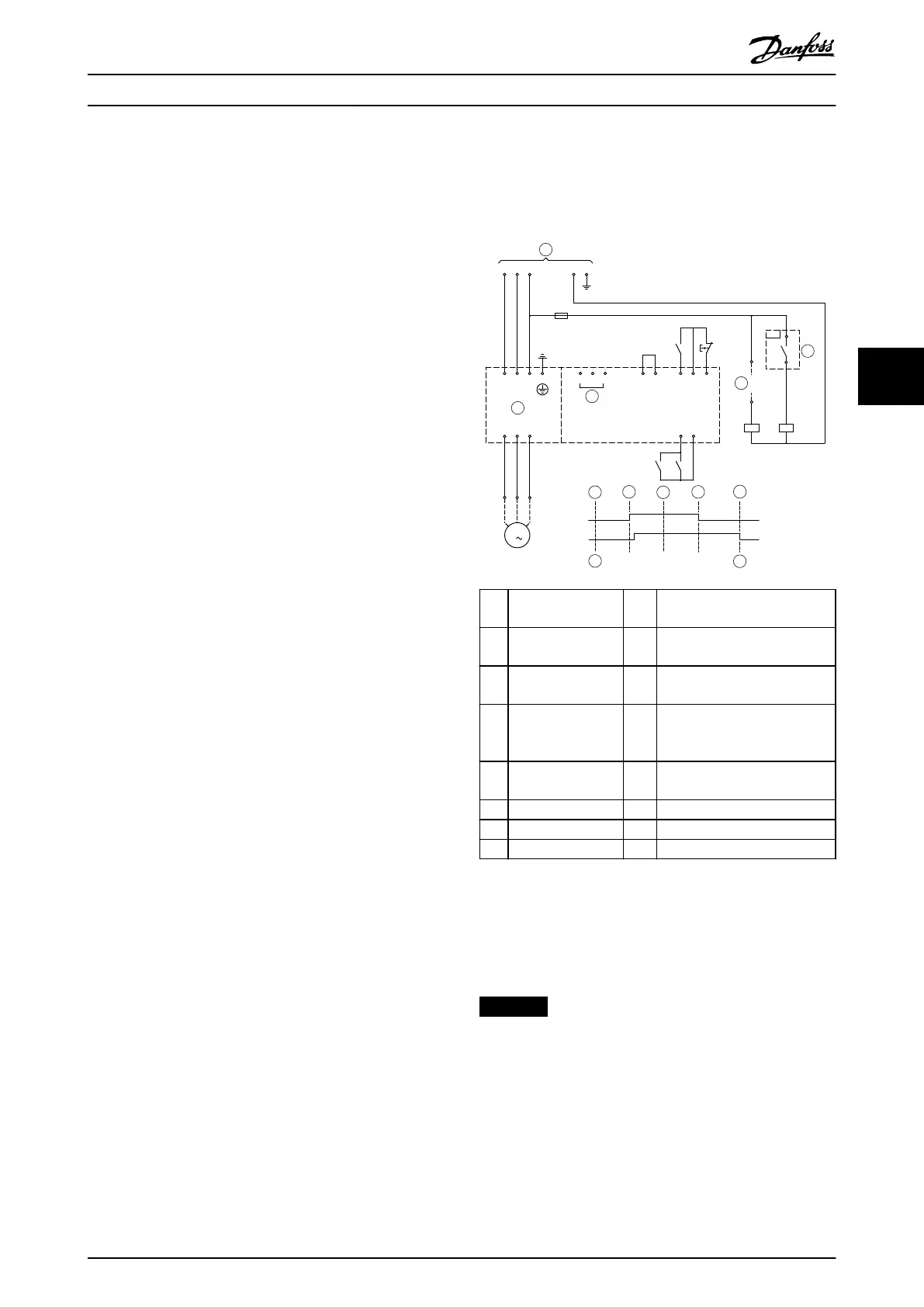
Illustration 5.14 shows how to use a zero-speed sensor with
the MCD 500 to turn o the brake function at motor
standstill. The zero-speed sensor (-A2) is often referred to
as an underspeed detector. Its internal contact is open at
zero speed and closed at any speed above zero speed.
Once the motor has reached a standstill, terminals 11 and
16 open, and the soft starter is disabled. When the next
start command is given, that is next application of K10,
terminals 11 and 16 close, and the soft starter is enabled.
Operate the MCD 500 in auto-on mode and set parameter
3-3 Input A Function to Starter disable.
-F1
L3L2L1 N E
-K10
L1 L2 L3
E
T1 T2 T3
A5A4 A6
15 16 17 18 25
11 16
-K10
-K11
-K10
-K11
T3T2T1
M
3
-K11-K10
-A2
177HA619.20
1
2
3
4
A
5
6
4
B
D
E
C
1 Control voltage 15,
16
Start
2 Motor terminals 17,
18
Stop
3 3-phase supply 25,
18
Reset
4 Starter disable
(shown on soft
starter display)
A O (ready)
5 Start signal (2-, 3-,
or 4-wire)
B Start
6 Zero-speed detect C Run
7 Zero-speed sensor D Stop
E Zero speed
Illustration 5.14 Turning O Brake Function at Standstill with
Zero-speed Sensor
For details on conguring DC Brake, see chapter 5.4.5 Brake.
NOTICE
When using DC brake, connect the mains supply to the
soft starter (input terminals L1, L2, L3) in positive phase
sequence. Then set parameter 2-1 Phase Sequence to
Positive only.
Product Features Operating Guide
MG17K602 Danfoss A/S © 05/2016 All rights reserved. 47
5 5









 To Next Page