■ Running a Job on PSV7000 ◘ Installing Input/Output Media
PSV7000 Operator’s Manual —23—
back
2. Remove the two screws securing each small safety plate as
applicable for your setup (3 mm hex key) and remove the
plate(s). Refer to the figures above.
3. Align the rail on the bottom of the feeder with the desired chan-
nel on the PSV7000 base plate.
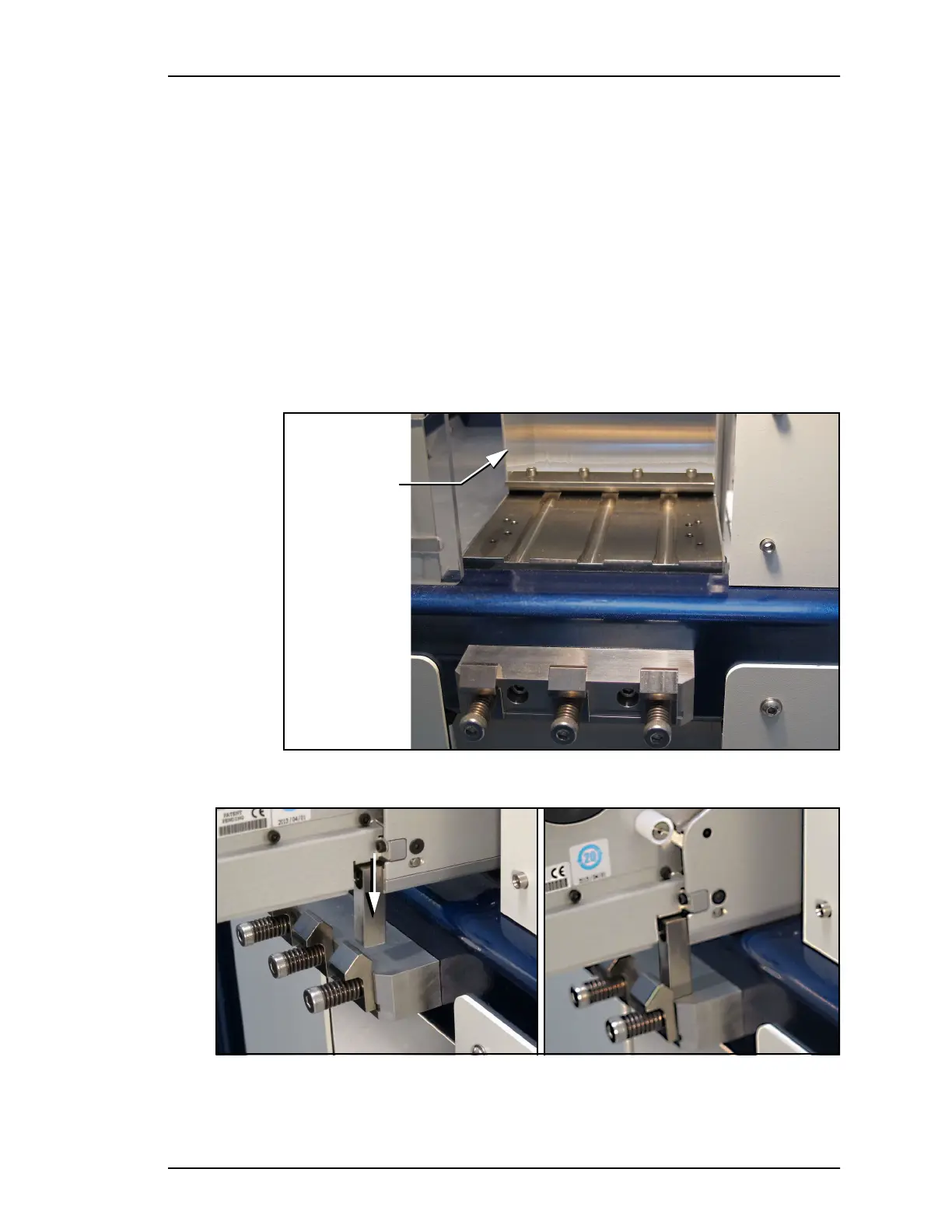
4. With the feeder in the channel, slide it inward. When the feeder
reaches the spring latches, lift it over to the far side of the latches
and push down to secure. Refer to the figures below.
If device tape is already loaded on the feeder, ensure it gets
started down the chute in the workspace.
5. Replace the two safety plates to cover all gaps. Note that the
plates can be swapped to either side of the tape feeder as appli-
cable.
Figure 10: The media slots and spring clamps on PSV7000.
Figure 11: A. Push the mounting block of the Feeder into the spring
clamp. B. Feeder has snapped into place.
Carrier tape
chute on
PSV7000.
A
A
B
B



 To Next Page