Operation ■ Running a Job on PSV7000
—34— Data I/O • 096-0461-001G
back
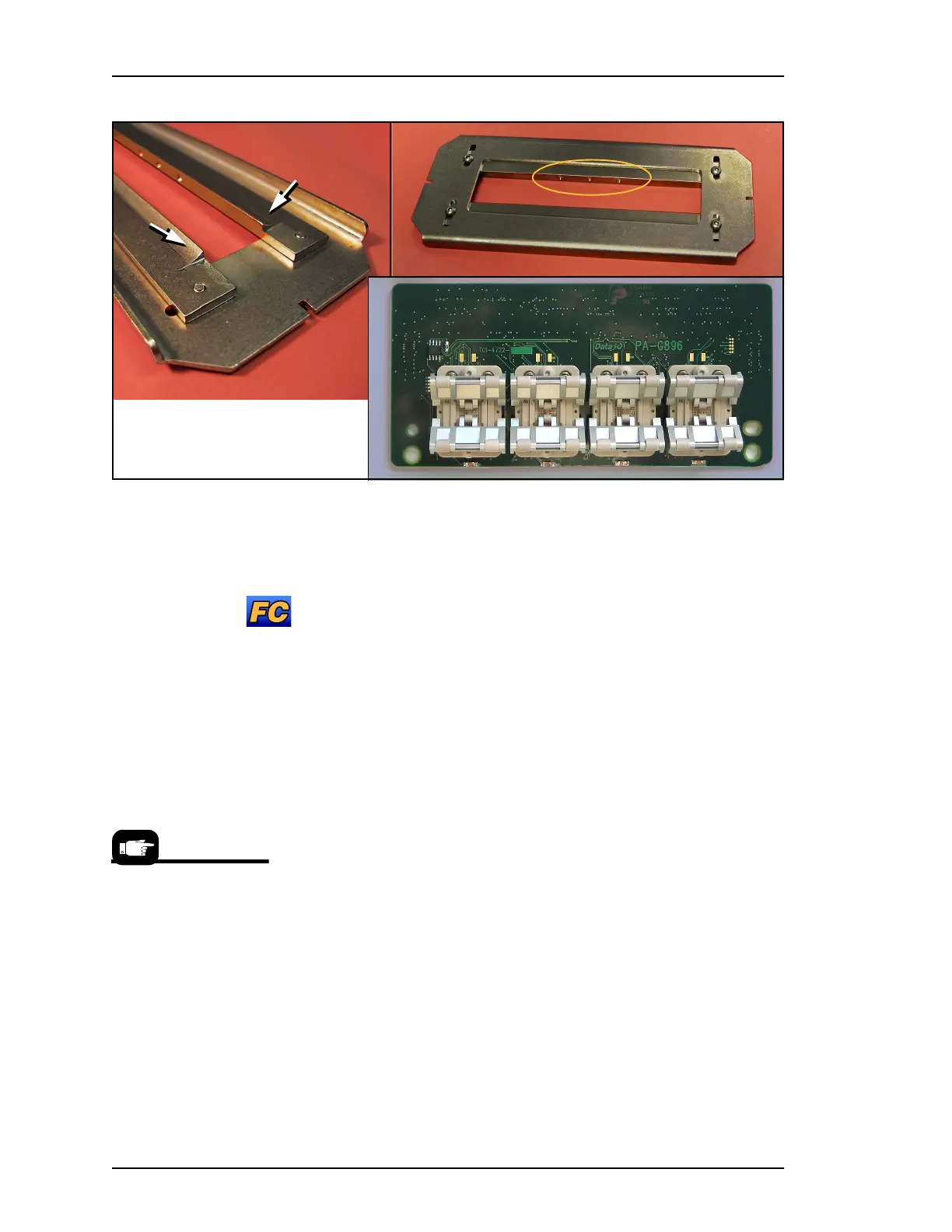
Figure 19: Special Actuation Plate for HIC (High Insertion Count)
Adapters. View A: the three dots identify HIC Actuator Plates.
View B: HIC bars have radii (arrows).
(FC) Adjusting the Actuator Plates
To adjust the Actuator Plates (both types, standard and HIC):
Requirements
• Head is parked.
• Actuator for the target programmer is in the UP position (sock-
ets closed).
• The nearest safety door is open.
1. With a 2 mm hex key, loosen both screws for one actuator slid-
ing bar and slide it inboard (toward center) as far as it will go.
2. Then slide the bar outboard just far enough to allow a device to
pass through and fit into the socket. On HIC Adapters, the bars
should just cover the socket rollers.
3. Tighten the two screws for that bar.
4. Perform these steps for the second bar. The bars should be sym-
metrical in the plate opening.
5. With vacuum tweezers, place a device into a socket to verify
clearance between the bars.
6. Before running the job, (or now if the power is already on) cycle
the actuator down and up to verify the setting.
Bottom side, HIC
A
B
To cycle sockets at the
Gantry window:
1. Click the yellow label
for your target program-
mer.
2. On the
Actuate
tab,
click the
Actuate Socket
button to ON—the socket
opens. Clicking it OFF
closes the socket.



 To Next Page