■ Running a Job on PSV7000 ◘ Socket Adapters and Actuator Plates
PSV7000 Operator’s Manual —33—
back
programmer is between two others, one of the adjacent Actuator
Plates must be in the down position (sockets open).
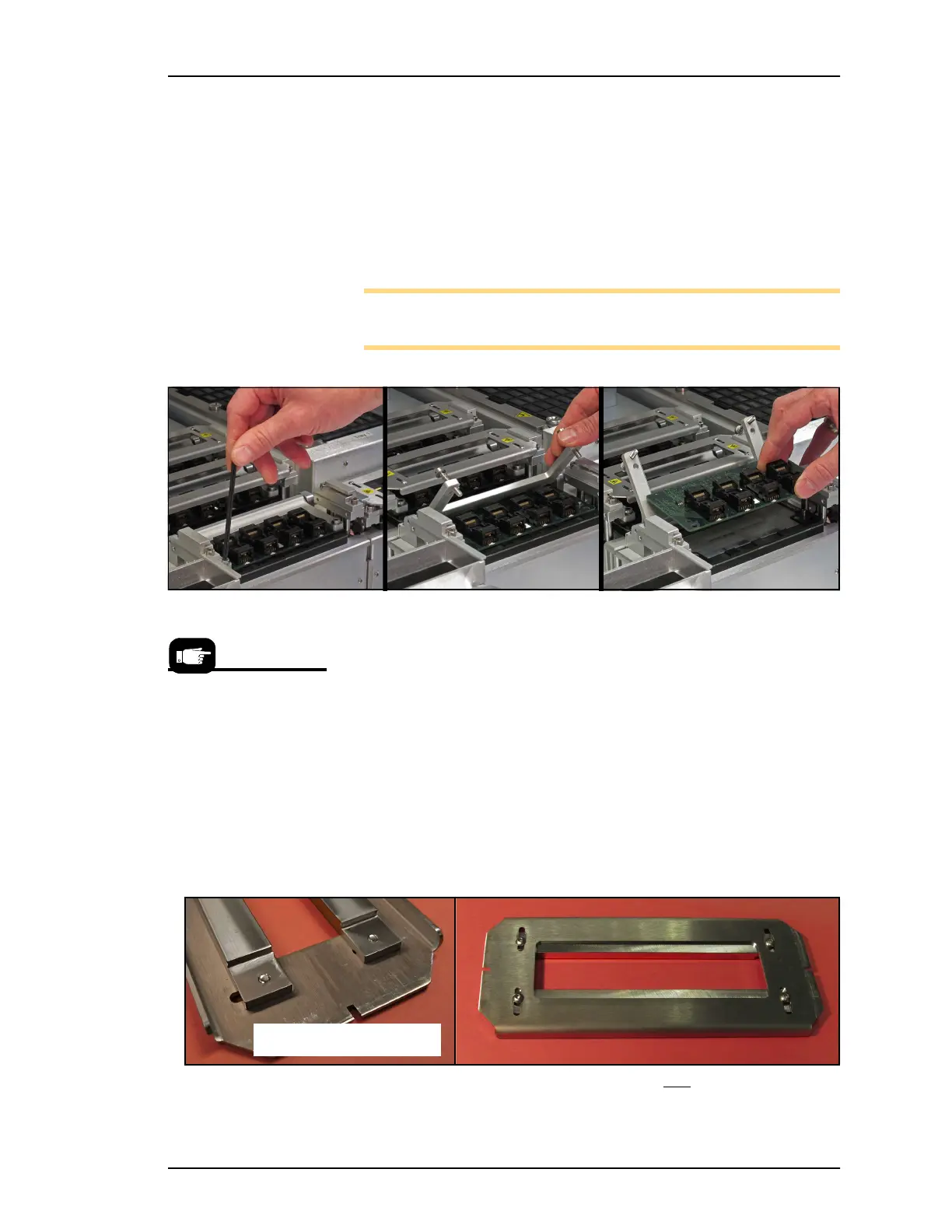
4. Remove the Socket Adapter—
4a. Unscrew the two captive screws with a 4 mm hex key and
open the Adapter Bracket.
4b. Lift the Socket Adapter up off the dowel pins.
Note: Do not touch the gold contact surfaces on the bottom of the
Socket Adapter.
Figure 17: Removing the Socket Adapter from a programmer.
5. Insert the correct Socket Adapter for your target device, mak-
ing sure that it seats on the dowel pins.
6. Screw in the two bracket screws.
7. Install the correct Actuator Plate by placing it into the slot on
the programmer bracket and sliding back until it snaps into
place. Ensure it stops at the detents.
8. See heading below—ADJUST THE ACTUATOR PLATE (unless
you are using the same Socket Adapter as the previous job).
Figure 18: Standard Actuator Plate for Non-HIC Socket Adapters.
Refer to Figure 16 for
installing Actuator Plates.
Bottom side, standard



 To Next Page