Operation ■ Running a Job on PSV7000
—22— Data I/O • 096-0461-001G
back
• The Package File must be taught the Tube locations, if it has not
already been taught.
Adjusting Tube Vibration
If devices do not travel freely in either tube module, adjust the vibra-
tion using the Amplifier and Frequency controls on the front of the
machine.
In general:
1. Put a tube that is not completely full into the first and last lanes
of the Tube-In platform. (If full tubes are used, some devices
may get bounced out.)
2. Set the amplifier control about half way up.
3. Adjust the frequency for best movement.
4. Then fine tune each again—amplifier and frequency.
Repeat for the Tube-Out platform, placing devices at the Tube-Out
drop point manually with a device tweezer.
Installing the Tape Feeder Module Option
PSV7000 can be configured with an optional Tape Feeder for input
media. The Tape Feeder installs on the front of the machine. The left
and right slots accommodate Tape Feeders (not the center slot). Safety
plates cover the opening in the safety door whether a feeder is
installed or not.
To install a Tape Feeder for input:
1. At the monitor, stop any job that is running.
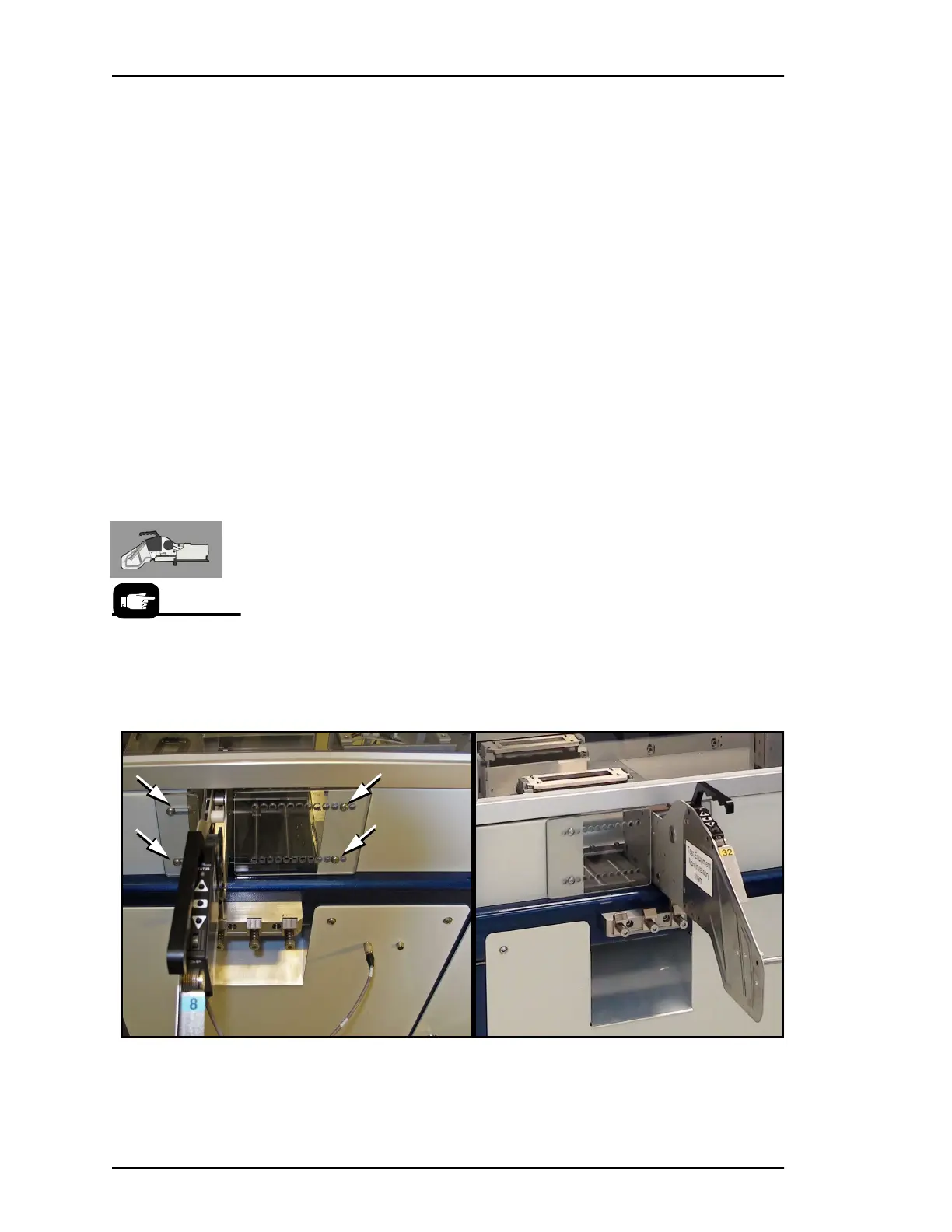
Figure 9: Use a 3 mm hex key to unscrew the two screws (arrows)
securing each of the two safety plates. The location of the safety plates
have been swapped in these images to accommodate the slot in use.
The last two digits of
the Tape Input Feeder
part number indicate
the tape width.



 To Next Page