Operation ■ Running a Job on PSV7000
—62— Data I/O • 096-0461-001G
back
Programming Results Interpreted at the Socket
LEDs at each socket report programming status.
For LumenX programmers, see LED Interpretation on LumenX Pro-
grammers on page 4.
For FlashCORE programmers see LED Interpretation on FlashCORE
Programmers on page 5.
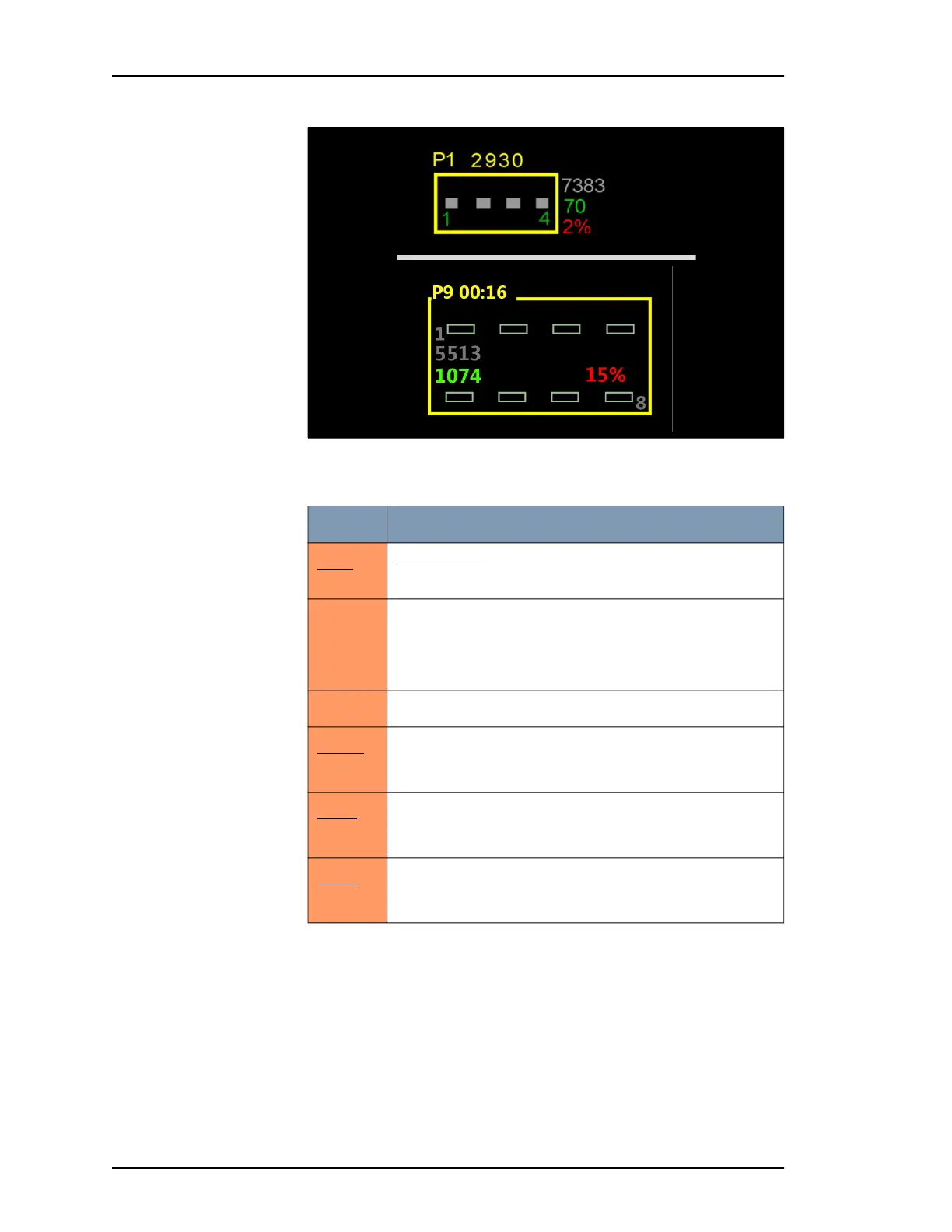
Figure 45: The numbers surrounding the programmer icons in the
Run window; TOP—FlashCORE, BOTTOM—LumenX.
Refer to the table below: (these numbers are examples only).
Value: Indicates:
P1
P9
Programmer 1
Programmer 9
2930
Socket Adapter actuation count. If this number is red, the
Socket Adapter lifetime actuation count has been exceeded.
On LumenX, actuation count only displays when program-
ming is stopped
00:16
LumenX only: Programming time for this cycle
7383
5513
Insertion count of all sockets in this adapter during its life-
time. Number is gray.
70
1074
Pass quantity on this adapter for current job.
2%
15%
Percentage of devices failed on this adapter for current job.



 To Next Page