ES601Plus OPERATING MANUAL
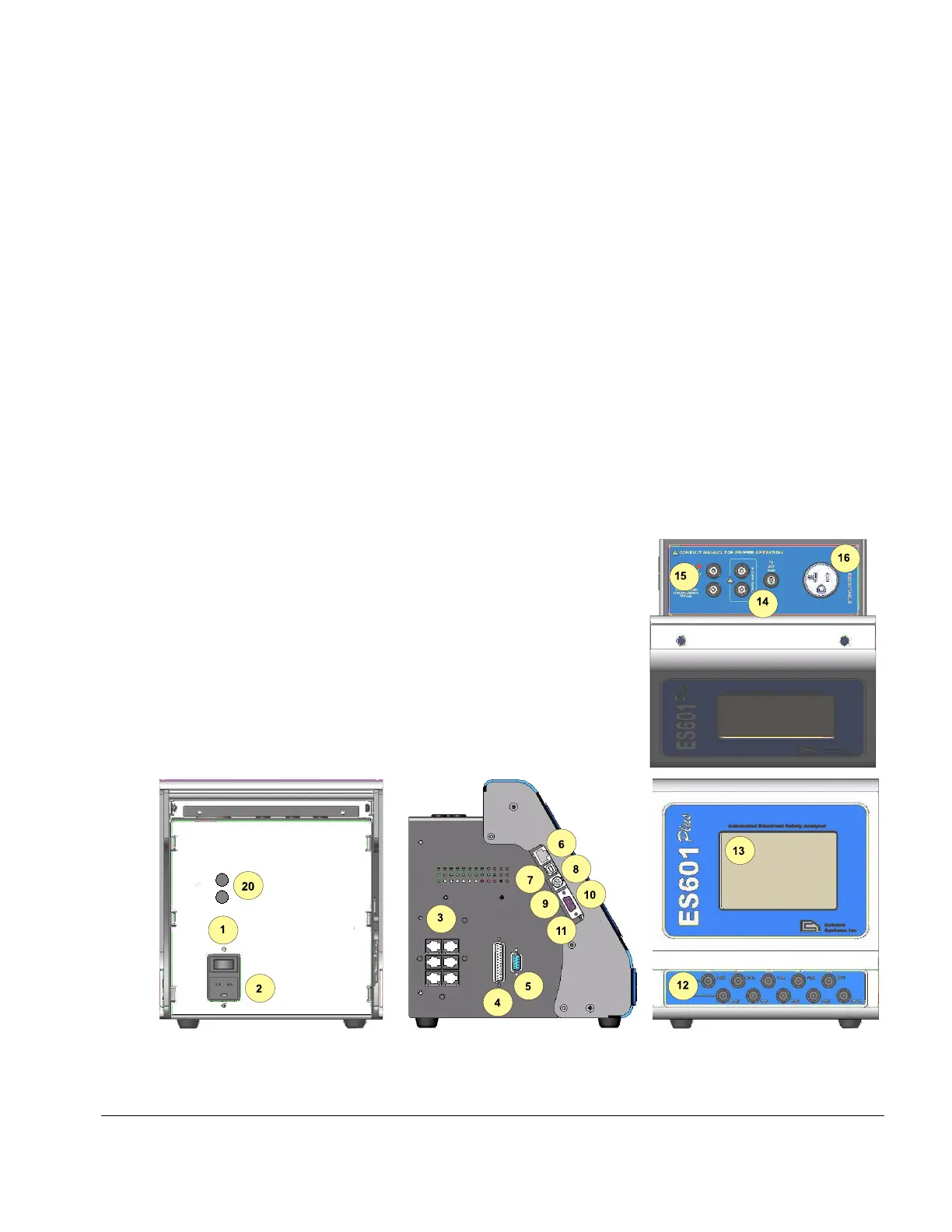
2.3 Interface Layout
REAR PANEL:
1. POWER SWITCH: Two-position (toggle) rocker switch
2. AC POWER INPUT (MAINS SUPPLY)
20. FUSES (2): AGC 1A / 250V
SIDE PANEL:
3. RS-232 Remote Tester Interface (6) for connection to external testing devices
4. Centronics Printer Port for connecting standard Centronics Printer
5. RS-232 PORT serial interface for connecting to serial printer or COM Port of PC
6. ETHERNET INTERFACE PORT provides communication with PC using ES601pc
7. USB INTERFACE PORT provides communication with PC using ES601pc
8. PS/2 INTERFACE for PS/2 Keyboard or PS/2 Barcode Scanner
9. CONTRAST ADJUSTMENT POTENTIOMETER (embedded)
10. RS-232 BARCODE SCANNER INTERFACE
11. FIRMWARE UPLOAD SWITCH toggles between normal and update mode (embedded)
FRONT PANEL:
12. ECG/APPLIED PARTS Universal ECG jacks for connecting applied parts
and ECG leads
13. Graphic LCD, 53 character x 30 lines, backlit, touch-screen
TOP PANEL:
14. Three safety-style banana jacks, which provide signal connections:
RED – Kelvin Cable input for Protective Earth Resistance
BLACK – Kelvin Cable input for Protective Earth Resistance
GREEN – direct connection to Equipment Outlet Earth
15. AUX1 and AUX2 provide connection for special leakage tests
16. DUT Test Receptacle (See Test Receptacle Configuration)
Overview/Chapter 2 # Page 19



 To Next Page