EasyManua.ls Logo

Dell Precision R5500 - Page 80

Dell Precision R5500
104 pages
Print Icon
To Next Page IconTo Next Page
To Previous Page IconTo Previous Page
Loading...
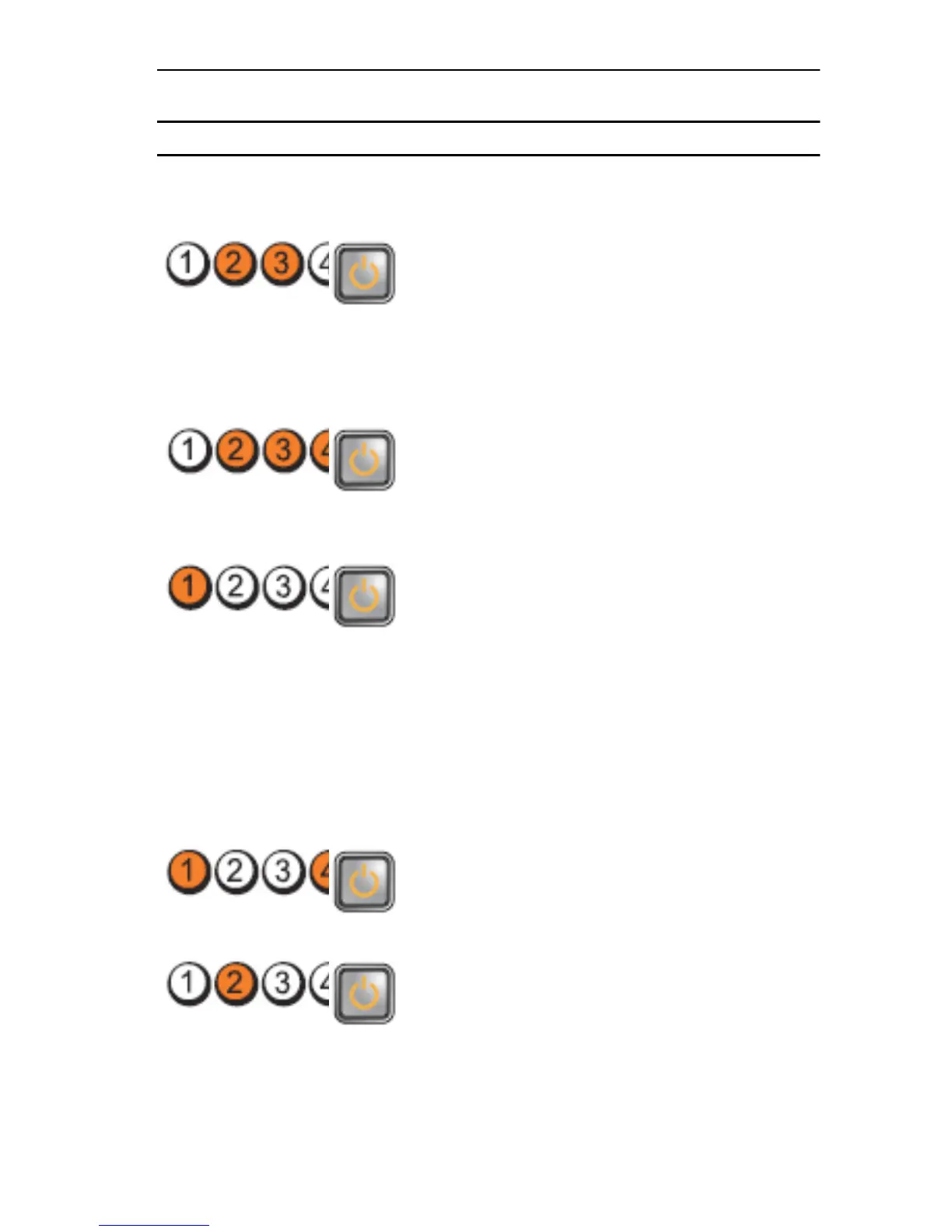
Light Pattern
Problem Description Troubleshooting
Steps
Diagnostic LEDs Power Button LED
same type into
your computer.
A possible CPU or
system board failure
has occurred.
Replace the CPU
with a known good
CPU. If the
computer still fails
to boot, inspect the
CPU socket for
damage.
BIOS may be
corrupt or missing.
The computer
hardware is
operating normally
but the BIOS may be
corrupt or missing.
A possible system
board failure has
occurred.
Remove all
peripheral cards
from the PCI and
PCI-E slots and re-
start the computer.
If the computer
boots, add the
peripheral cards
back one by one
until you find the
bad one.
Power connector
not installed
properly.
Re-seat the 2x2
power connector
from the power
supply unit.
Possible peripheral
card or system
board failure has
occurred.
Remove all
peripheral cards
from the PCI and
PCI-E slots and re-
start the computer.
80

Table of Contents

Other manuals for Dell Precision R5500

Related product manuals