WET Sensor Moisture Meter User Manual 4.0
Options
Data
Device
Soil Type
Soil Set-up
Units
Display
Compensation
Date and Time
Status
Remote
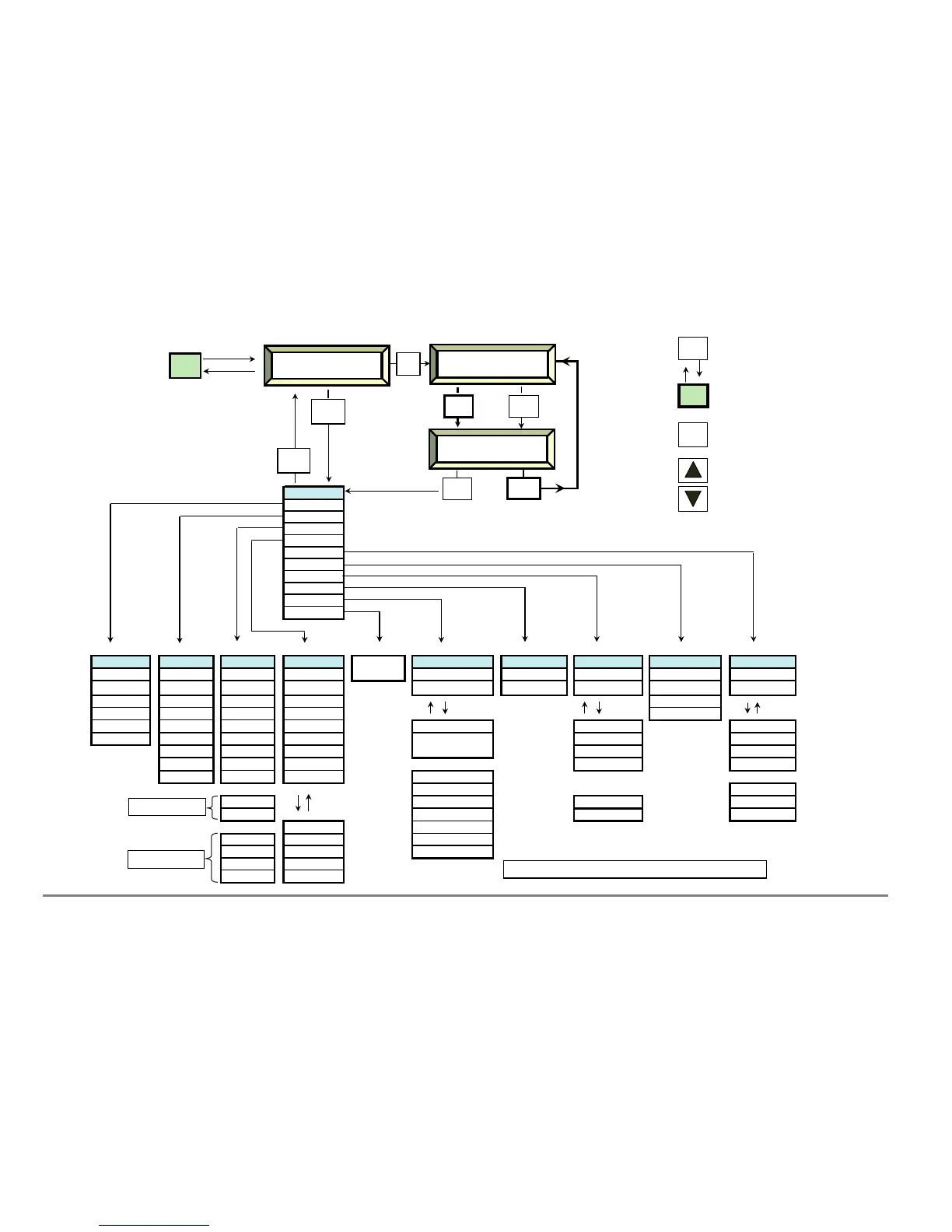
Data Device Soil Type Soil Set-Up Connecting Status Date and Time Compensation
Display (WET) Units
Plot ID
ML1
Organic Organic
to PC Resources Set Date Temperature WET Conductivity
Sample SM200
Mineral Mineral
Versions Set Time
Percent
WET EC
b
ε
b
W ater Content
Sensor Depth EQ2 Custom 1 Custom 1
Resources
Temperature Conductivity
Erase PR1 Custom 2 Custom 2 Mem 100% Batt 97% None mS.m-1
PR1-Special Custom 3 Custom 3 Readings #250 25 C mS.cm-1
EC1/2 Custom 4 Custom 4 20 C µS.m-1
WET Custom 5 Custom 5
Version
Stonewool v ML1 Table
Percent
m3.m-3
Stonewool h ML2 Table 2.0% %vol
or +
Soil name
PR1 Table
coir Parameter EC1/2 Calib'n Note: the availability of options depends on which sensor is selected.
peat-based Capacity WET Calib'n
WET options only available if WET sensor calibration is installed.
Min g/h soil b0
Pot soil b1
WET Sensor Navigation Map 6/10/05
Delta-T Devices
Moisture Meter



 To Next Page