VFD-MS300/MH300 EtherNet/IP Communication Card CMM-EIP01
CMM-EIP01 Operation Manual
20
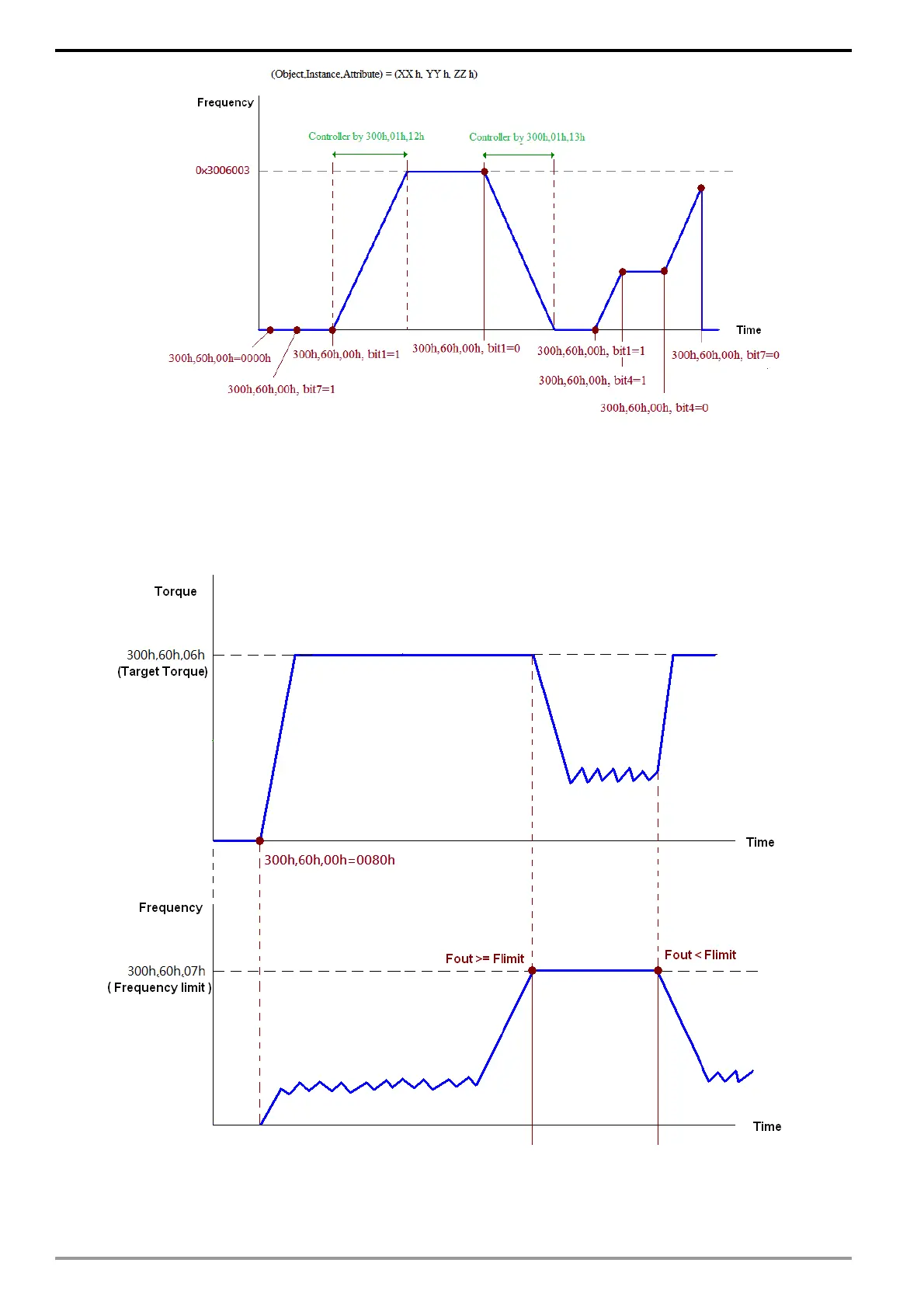
Torque mode:
1. Set the control of MS300/MH300 under the torque mode: Set (Object, Instance, Attribute)
= (300h, 60h, 01h) to 2.
2. Set target torque: Set (Object, Instance, Attribute) = (300h, 60h, 06h), unit = % with a
decimal precision at the tenths position. Example: 100 represent 10.0%.
3. Operation: Setting (Object, Instance, Attribute) = (300h, 60h, 00h) = 0080H indicates
excitation; and the drive will subsequently run until it reaches the target torque.
P.S.1 The current torque can be accessed via (Object, Instance, Attribute) = (300h, 61h, 06h). (Unit: 0.1 %)
P.S.2 Whether the torque has reached the target value can be accessed via bit 0 of (Object, Instance, Attribute)
= (300h, 61h, 00h). (0: not reached; 1: reached)
Note: When performing torque output, if the drive’s speed has reached the speed limit, the output torque will
likely decrease to ensure the speed is within the limit.






 To Next Page