VFD-MS300/MH300 EtherNet/IP Communication Card CMM-EIP01
CMM-EIP01 Operation Manual
35
6 DCISoft Software Configuration
This section describes how to set up the CMM-EIP01 with DCISoft, Delta's
communication software, and it explains the data fields on each setup page. Before
opening the setup pages, it is necessary to select "EtherNet" as the communication mode,
after which you can go to the CMM-EIP01 setup page to do a search by broadcast or a
specific IP. CMM-EIP01 is accessed via UDP port 20006. It is therefore advisable to be
familiar with all relevant firewall settings. In the following section, we provide detailed
information on how to open the setup pages as well as describe the function of each data
field.
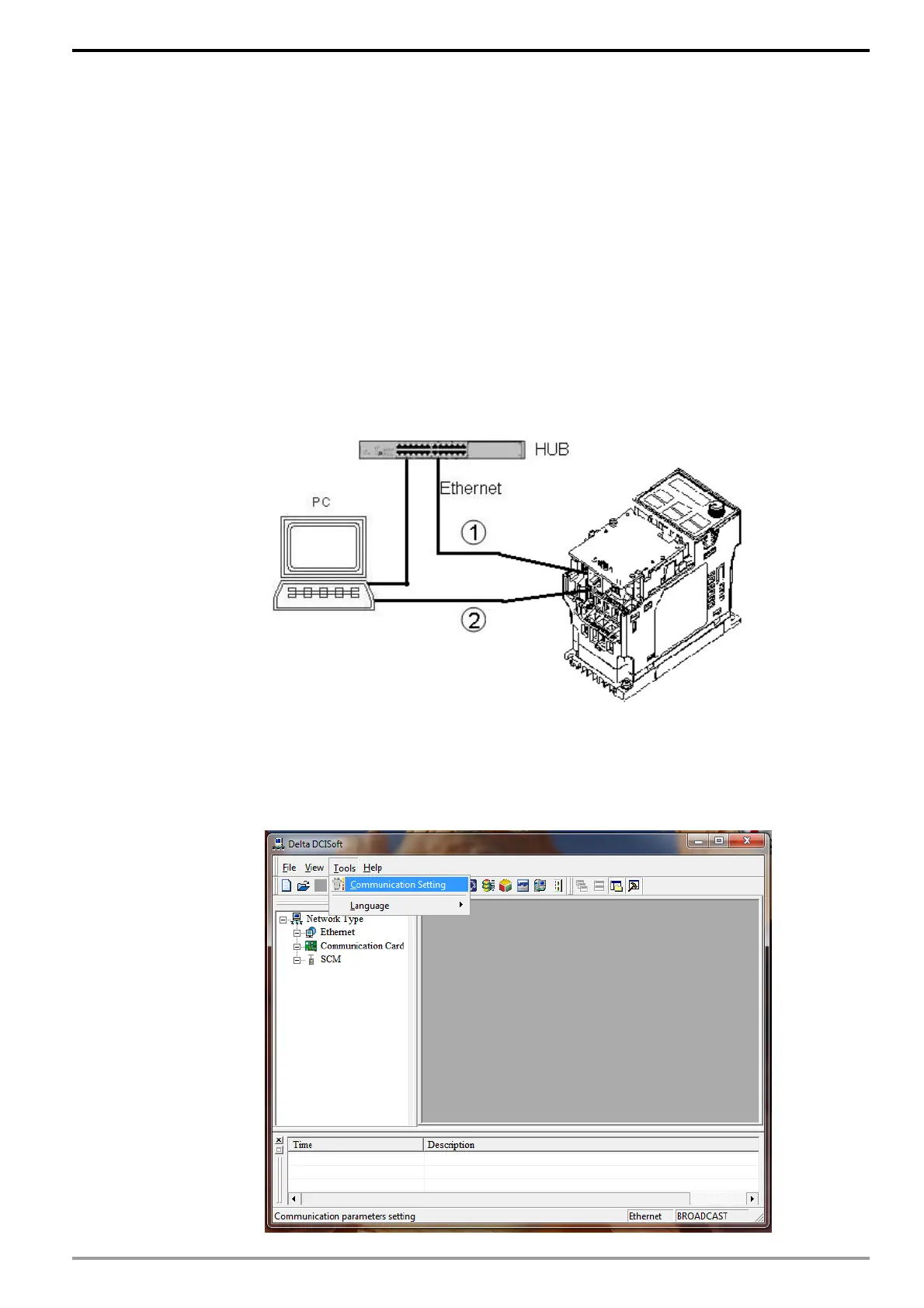
Refer to the following diagram for setting up the connection. The computer can be
connected to the VFD-MS300/MH300 equipped with CMM-EIP01 through a cable or a
hub.
6.1 Communication Settings and Search Modules in DCISoft V1.16
Communication Settings
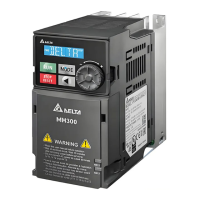
1. Open DCISoft V1.16 on the PC and select "Tools" => "Communication Settings".
VFD-M300 + CMM-EIP01






 To Next Page