VFD-MS300/MH300 EtherNet/IP Communication Card CMM-EIP01
CMM-EIP01 Operation Manual
49
7.4 E-Mail Applications
Function
Description
When the value in a particular address on the VFD-MS300/MH300 matches a specific
configured value, CMM-EIP01 will have the drive execute a command and send an e-mail
message to notify the administrator.
Network
environment
(1) SMTP Server IP: 172.16.144.122
(2) Administrator's e-mail: test@sample.com
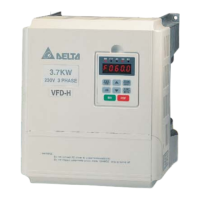
(3) It is configured that when H2103=60, the command "STOP" is executed and a message
is sent to a designated e-mail address
1. Please refer to Section 7.1 for the connection diagram and communication settings.
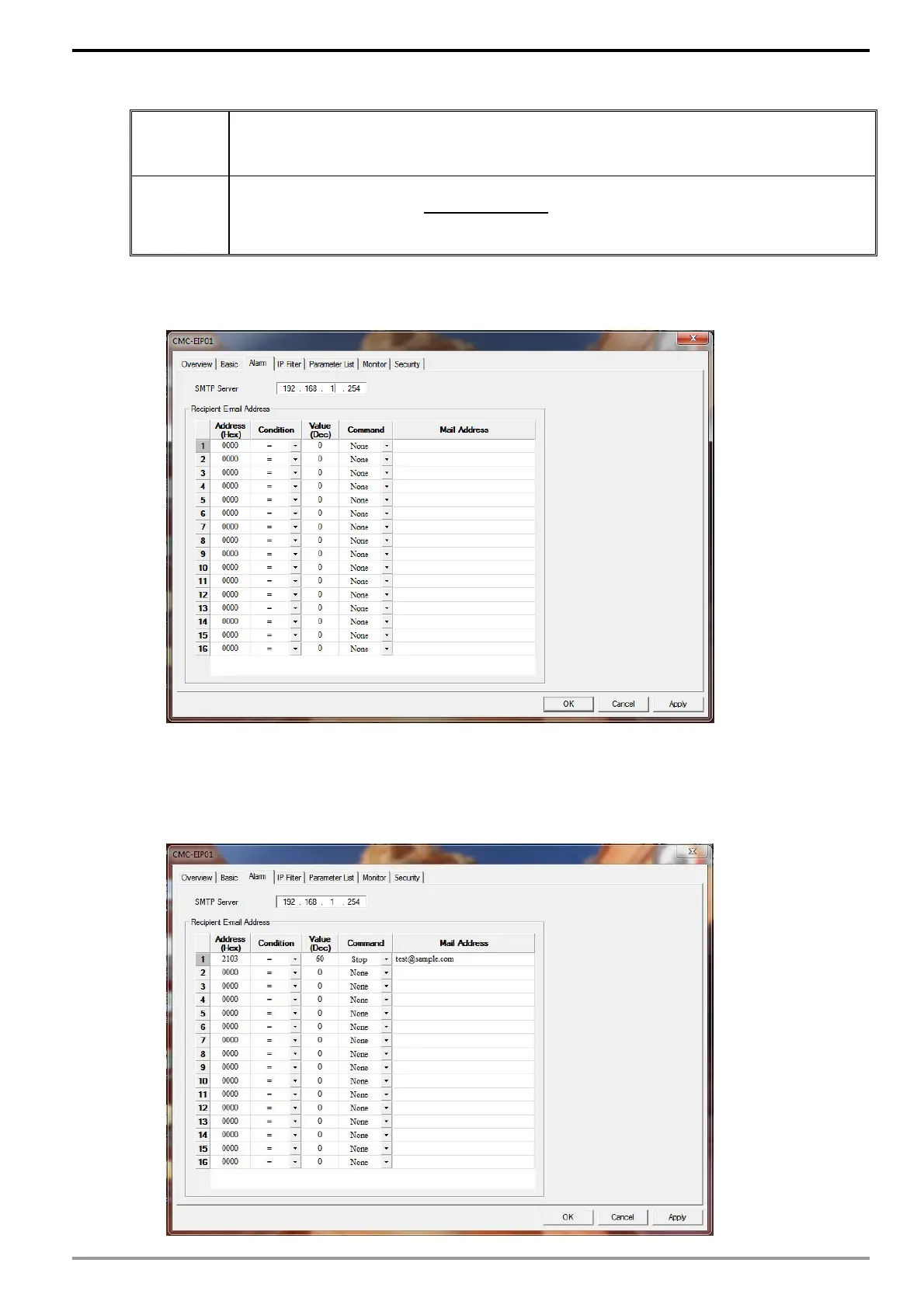
2. Open the configuration page for CMM-EIP01 and select the "Alarm" tab
3. Setting up e-mail and trigger events. Enter "172.16.144.122" as the SMTP server.
Enter "2103" as the Address (Hex) on the first row, "=" in Condition, "60" in Value
(Dec), "Stop" in Command, and "test@sample.com" as the E-mail Address. Click
"Apply" to complete the alarm settings.






 To Next Page