Chapter 2 Getting Started the BHT and System Mode
99
[ 9 ] Deleting Font Files
You can delete font files stored in the flash ROM if you do not need to display Japanese fonts (16-dot
and/or 12-dot fonts) and the user area is insufficient. Deleting those font files allows the memory area
which was occupied by those files to be used as a user area.
Before deleting font files, be sure to upload them to the host PC and back them up for the future use.
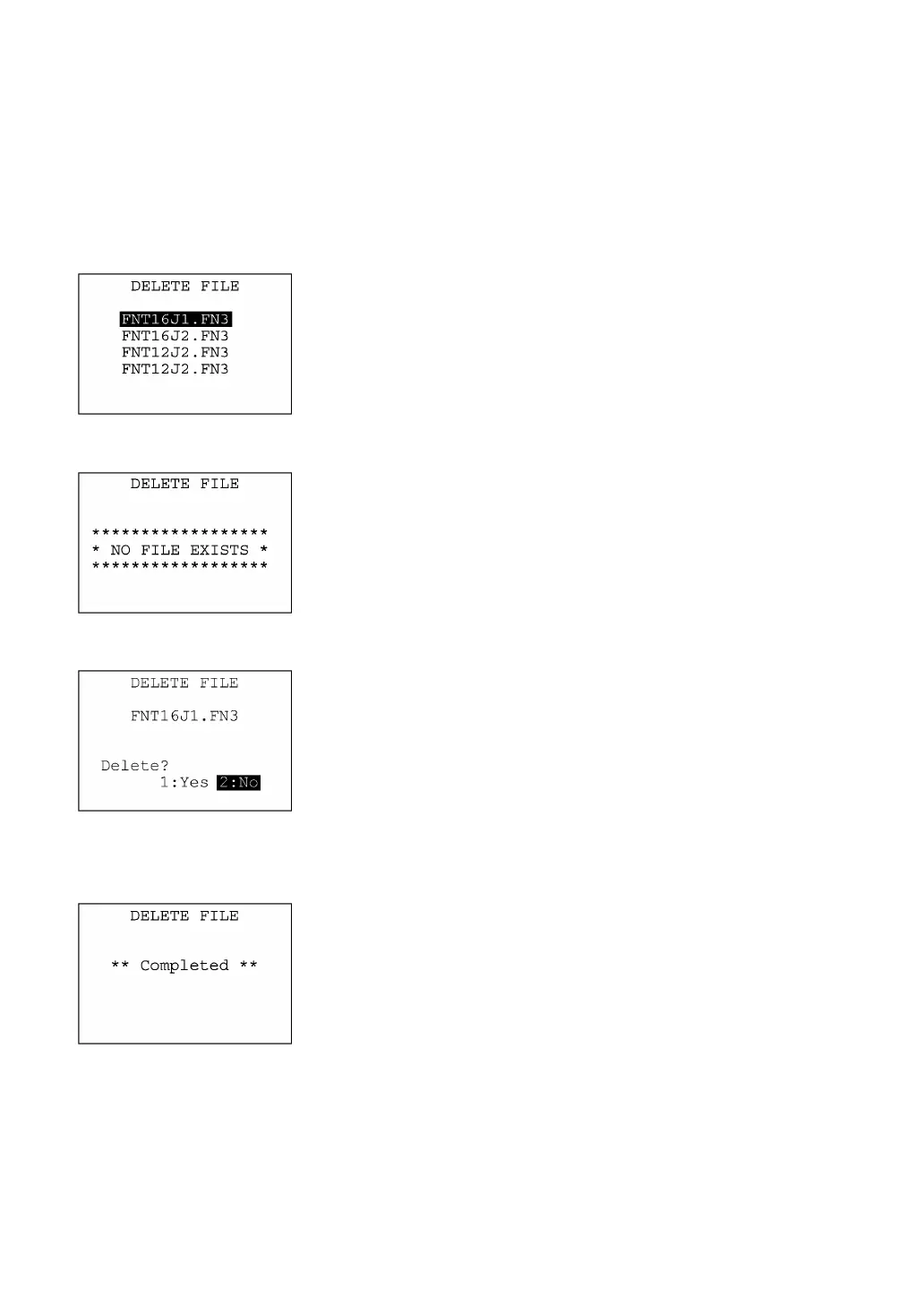
Pressing the 2 key while holding down the SF key on the SYSTEM
MENU calls up the screen shown at left.
Use the F5 and F6 keys to move the cursor to the font file to be
deleted, then press the ENT key.
Press the C key to return to the SYSTEM MENU.
If no font file is resident in the memory, the message shown at left
appears.
Press the C key to return to the file deletion menu.
Selecting a font file and pressing the ENT key calls up the
confirmation screen shown at left.
[1] Yes : Deletes the selected font file.
[2] No : Cancels deletion and returns to the previous file selection
screen.
Select a desired item by using the numerical keys, then press the
ENT key.
Upon completion of deletion, the screen shown at left appears.
Press the C key to return to the file selection screen.



 To Next Page