Chapter 2 Getting Started the BHT and System Mode
9
2.1 BHT System Configuration
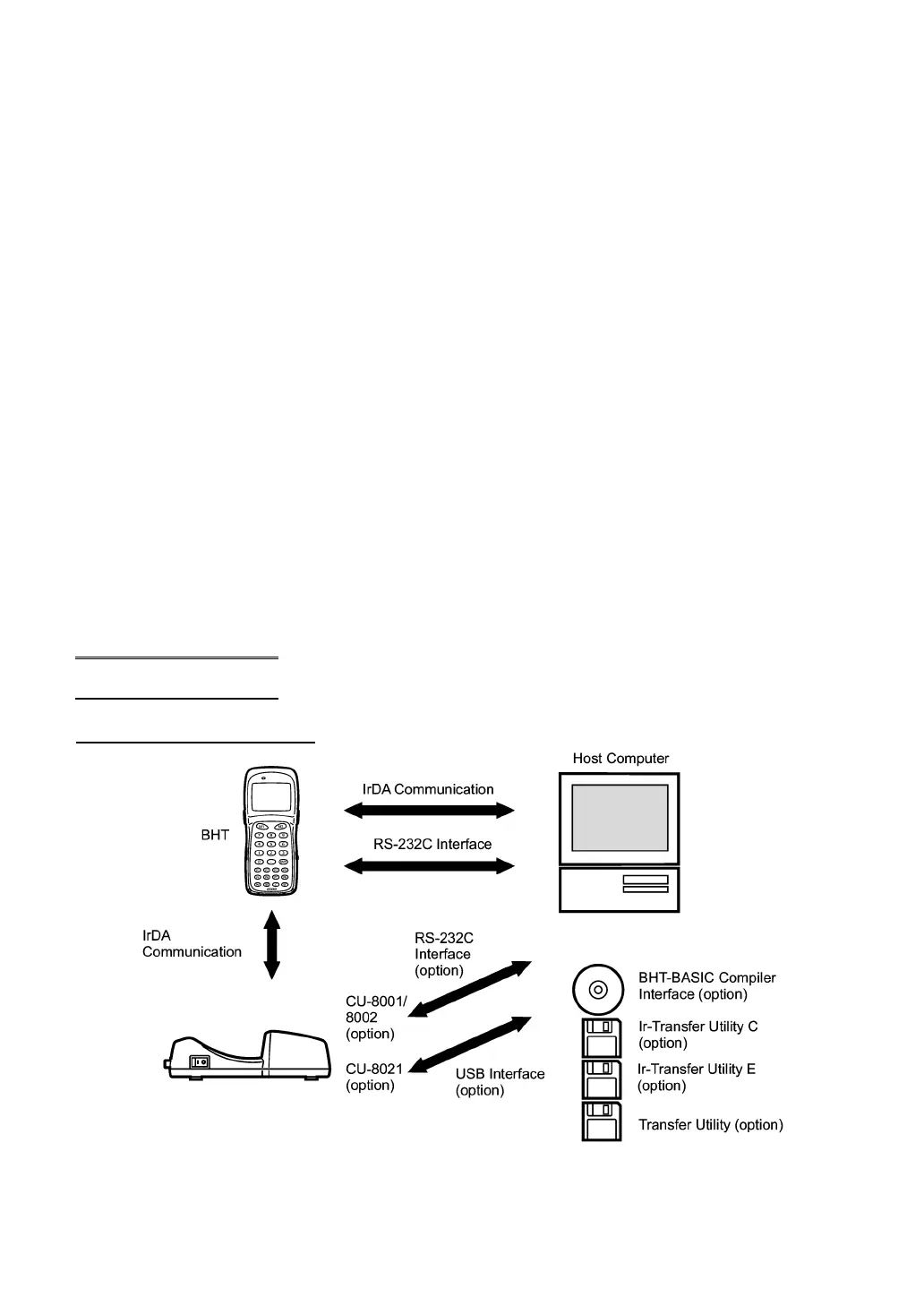
The BHT barcode data collection system requires the following hardware as well as the BHT Bar Code
Handy Terminal (which reads bar codes and accepts keypad entry) as illustrated below:
• Host PC: Allows you to edit, manage and download user programs and
data, as well as downloading system programs.
For host PCs having no IrDA interface ports, the combination of the optical communication unit
CU-8001/8002 and RS-232C interface cable or that of the CU-8021 and USB interface cable is available
as an option.
• CU-8001/8002/8021 (option): Exchanges programs and data with the BHT via the IrDA
interface and with the host PC via the RS-232C interface
(CU-8001/8002) or USB interface (CU-8021).
• RS-232C interface cable (option): Connects the CU-8001/8002 and the host PC with each
other.
• USB interface cable (option): Connects the CU-8021 and the host PC with each other.
Direct cable connection between the BHT and host PC is also possible.
Optional software includes the BHT-BASIC Extension Library, BHT-BASIC Compiler, Ir-Transfer Utility C,
Ir-Transfer Utility E, and Transfer Utility.
System Configuration
IrDA communications system



 To Next Page