13
" Connect the mains cable of the furnace to the furnace and to a mains socket protected
by a 16 A fuse (inert) and a differential-current circuit breaker (30 mA). The green mains
diode above the numeric key pad illuminates.
3.4.1 Start screen display
The start screen display showing the Dentsply logo, the version number of the software as
well as the serial number of the control unit will appear for 6 seconds on screen. The firing
chamber with a possibly vacuum will be filled with air. The following screen will appear:
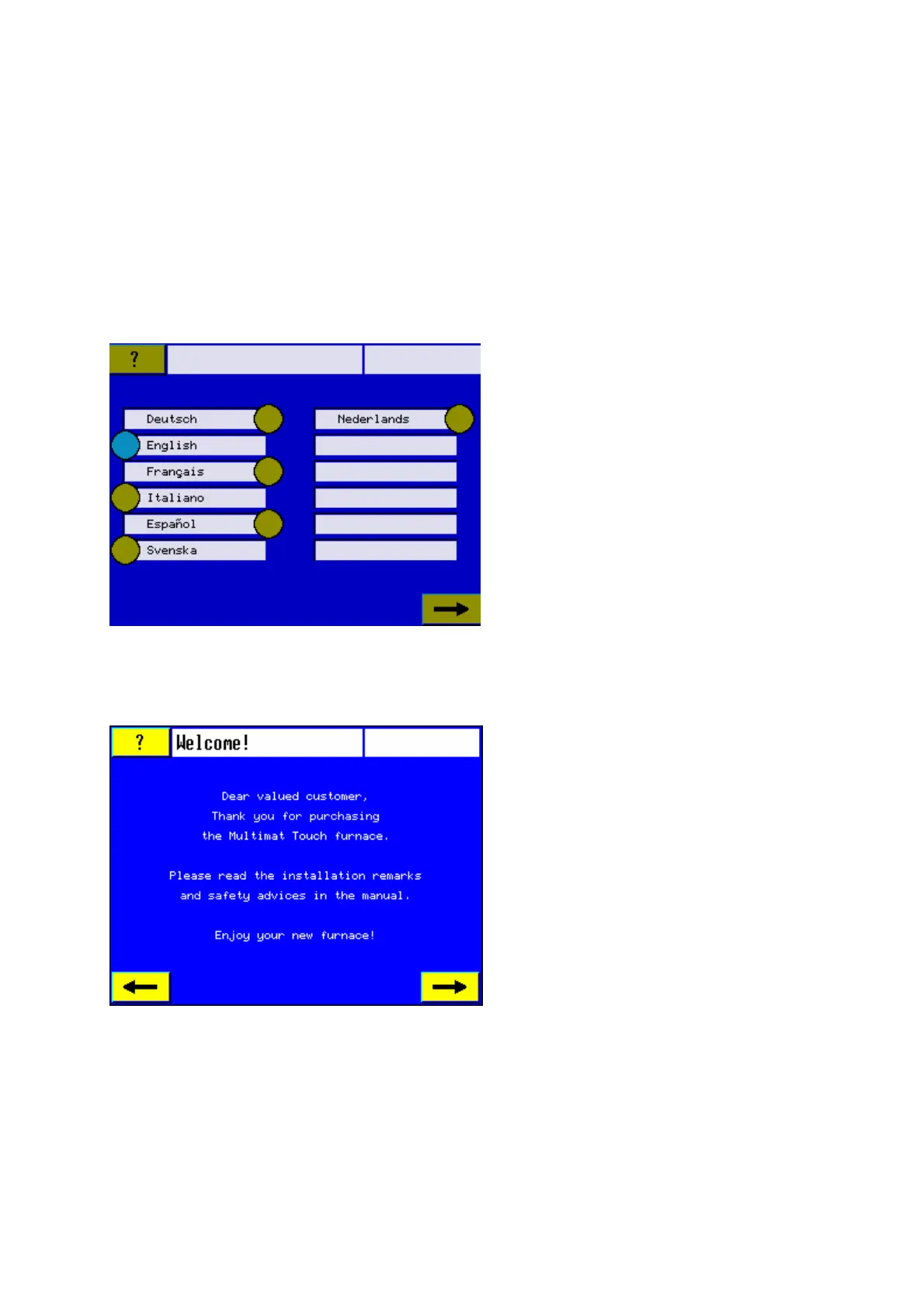
3.4.2 Language selection
3.4.3 Introduction
Touch the Right Arrow key to change
over to the next screen.
Select your language by touching the
appropriate sensor button. The sensor
button changes its color.
Users have unlimited time to select the
language. The language can be also
modified at a later stage (see section
4.5.2.3 Reset language).The language
selection screen will appear only after
choosing it in the main menu (see section
4.5 Main Menu – Furnace Parameters).













 To Next Page