28
5. Create an own program
The various individual steps for selecting the ceramic type have already been described in
chapter
3.4.
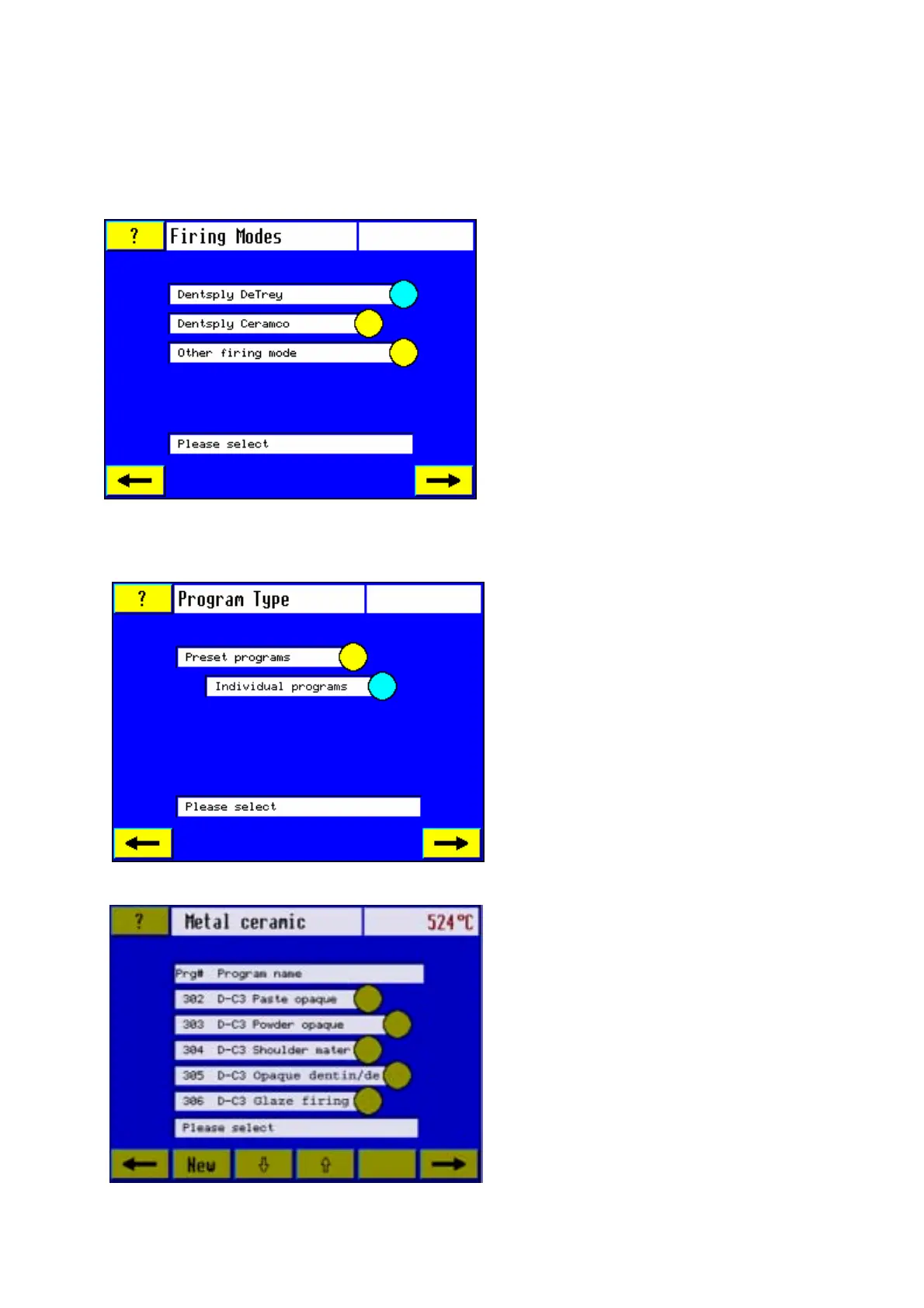
5.1. Firing Modes
5.2 Program type
Select from the options shown.
Touch the relevant sensor button to
select the program type required, e.g.
individual programs. When the desired
program type has been selected, the
furnace will switch over to the next
screen.
5.3 Program list
After selection of a specific ceramic
type, the screen display "Firing Mode"
will appear. Use this screen display to
select the firing procedure by touching
the relevant sensor button.
After the required firing procedure has
been selected, e.g. Dentsply DeTrey or
Dentsply Ceramco, the furnace will
switch over to the next screen.
The soft key sensor bar along the bottom
edge of the screen provides the option to
scroll in the program list.
Select the soft key "NEW" to create a
new program. The furnace will switch
over to the relevant screen.













 To Next Page