15
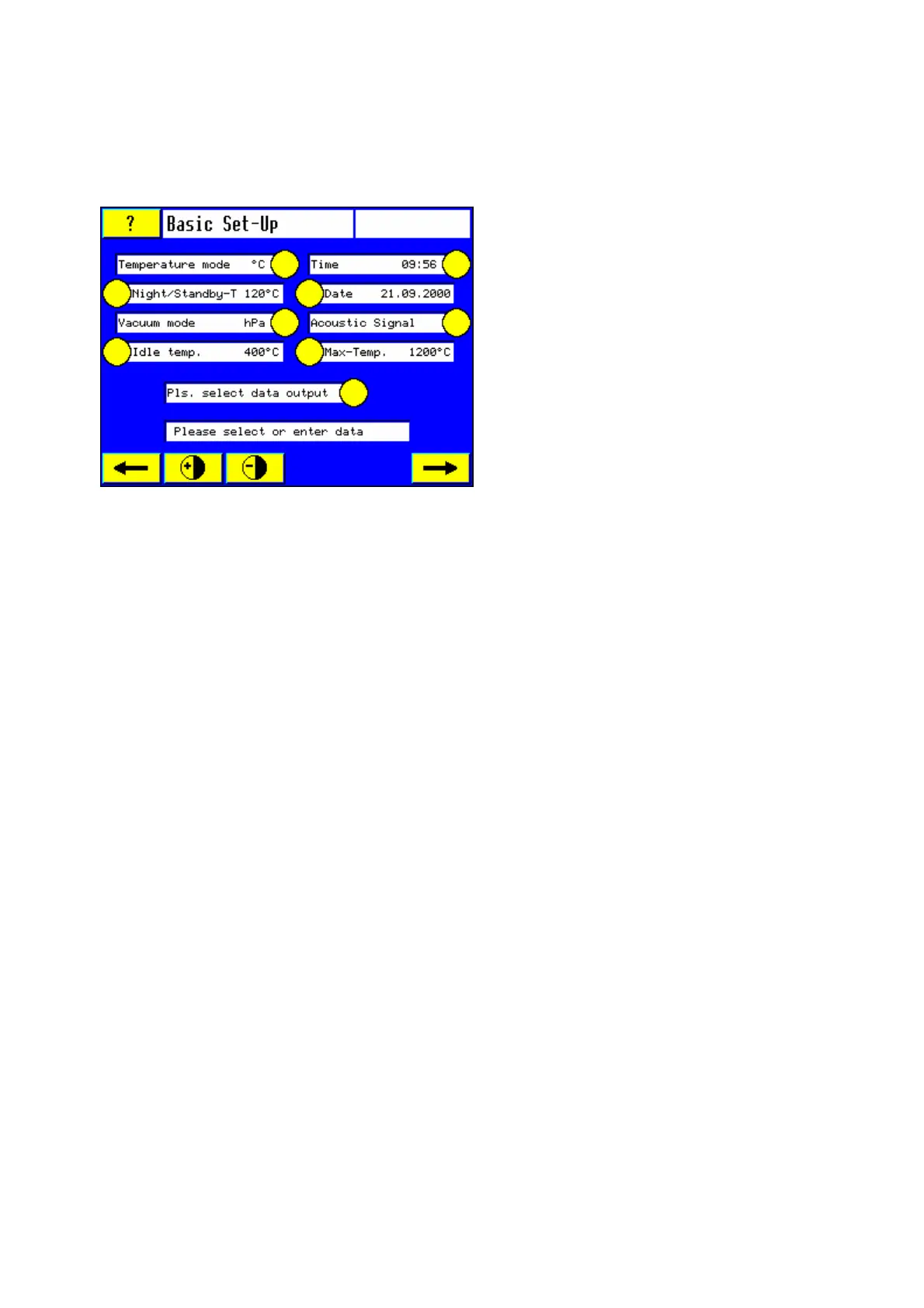
3.4.6 Basic settings
Note: Several basic settings are preset at the factory. You may touch the sensor button "#"
to accept these basic settings or change them as described below.
3.4.6.1 Temperature mode
Touch the yellow sensor button to change between °C and °F.
3.4.6.2 Night/Standby-Temperature
Press yellow sensor button to select the Night/standby temperature (furnace is turned off but
still plugged in mains).
The Night/Standby Temperature is used to prevent humidity to enter the firing chamber. If the
furnace is turned off by using the on/off button the Standby Mode will be activated
automatically as long as the standby temperature is above >100 °C. Night temperature (see
section 4.4. Night mode sensor button).
1. Touch the yellow sensor button (button changes color)
2. Use the numeric keypad to input the new temperature (Range between 100 °C and 300 °C).
Temperature > 100 °C = Night/Standby is ready
Temperature < 100 °C = Night/Standby is not ready
3. Touch the sensor button again or choose another parameter; the standby temperature will
be accepted.
4. Wrong numbers can be deleted by touching the “C” sensor button.
3.4.6.3 Vacuum unit
Touch the yellow sensor button to change between hPa and inHg and Hg”.
For “inHg” and “Hg”” the pressure accuracy will be one digit after the decimal point.
Note:
HPa → 1013 hPa = Normal pressure at sea level
InHg → 29.9 inHg = Normal pressure at sea level
Hg” → 0 Hg” = Normal pressure at sea level (US-version)
3.4.6.4 System Time
1. Touch the yellow sensor button "Time" (color change of the button)
2. Enter a 4-digit number for hours and minutes using the numeric keypad. Format: hh:mm













 To Next Page