24
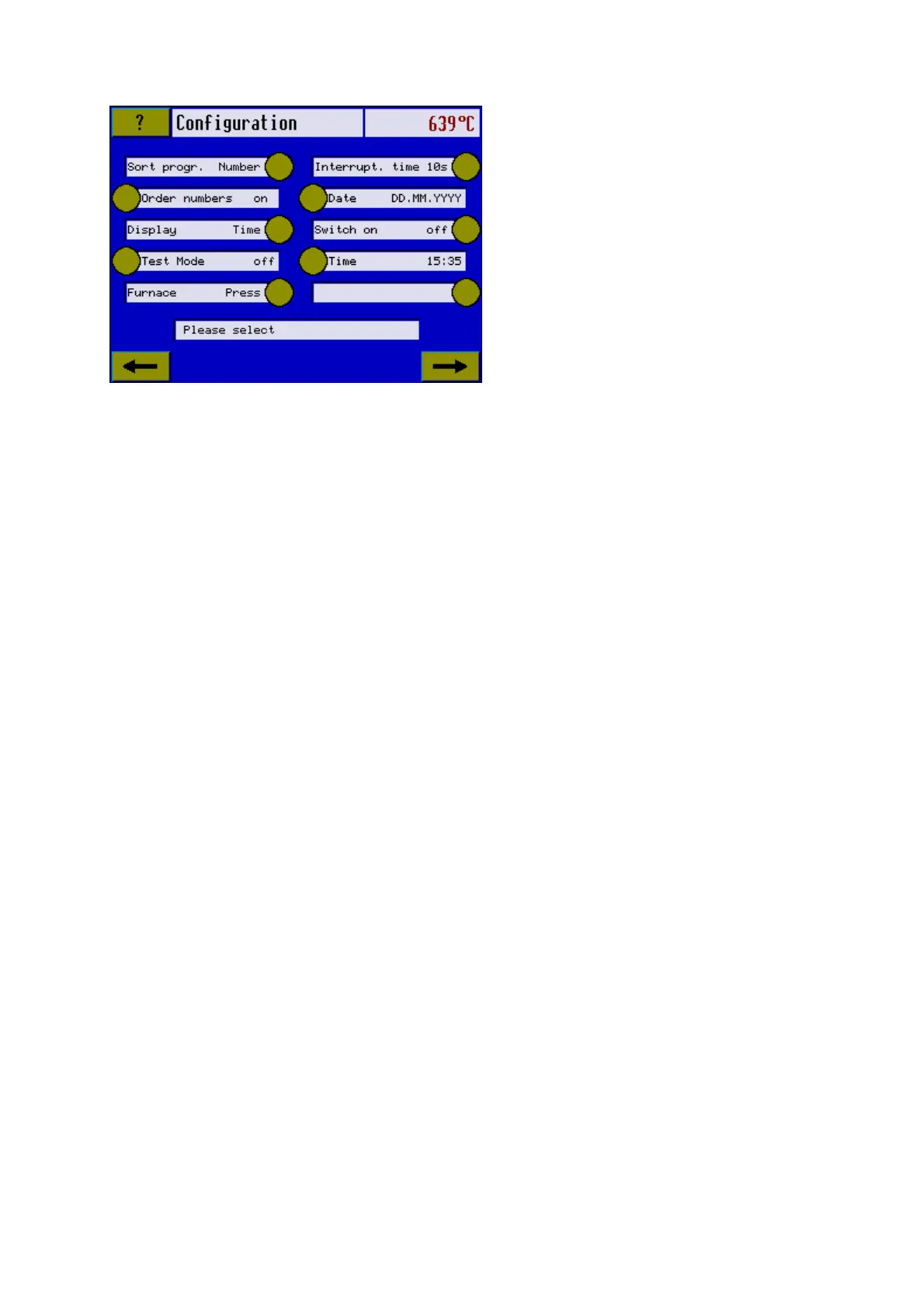
Sort progr. : Number/name sorting
Programs can be sorted either by their program number, therefore numerically, or according
to the program name, therefore alphabetically. (Cf. Section 6.12)
Note: This function can be used only for Latin letters.
Job number “on”
(not yet activated)
Designed to assign “Job” numbers for multiple firing.
Choosing date/time
Here you can select to show either time or date on screen (see section 6.15).
Test mode (only in Service mode)
This mode is designed for saving any software actions to memory.
Furnace Press / Touch (only in Service mode)
For changing between Touch or Press functions.
Failure duration 1-20 seconds (Interrupt time)
Is used for setting the power failure recovery in seconds. 10 seconds are preset (Cf. Section
6.4).
Date Format
The Date Format can be selected as follows
DD.MM.YYYY
YYYY.MM.DD
MM.DD.YYYY
Touch the button until your preferred date format appears.
Switch Power on/off
Is used to activate the power on time. (Cf. Section 6.7)
Time 00:00 – 24:00
Is used for setting the time at which the furnace is switched on automatically provided it is
connected to the power supply. This time can be maximum 24 hours in the future for safety
reasons. (Cf. Section 6.7).
4.5.2 Furnace Parameters













 To Next Page