22
4.4 Keyboard functions
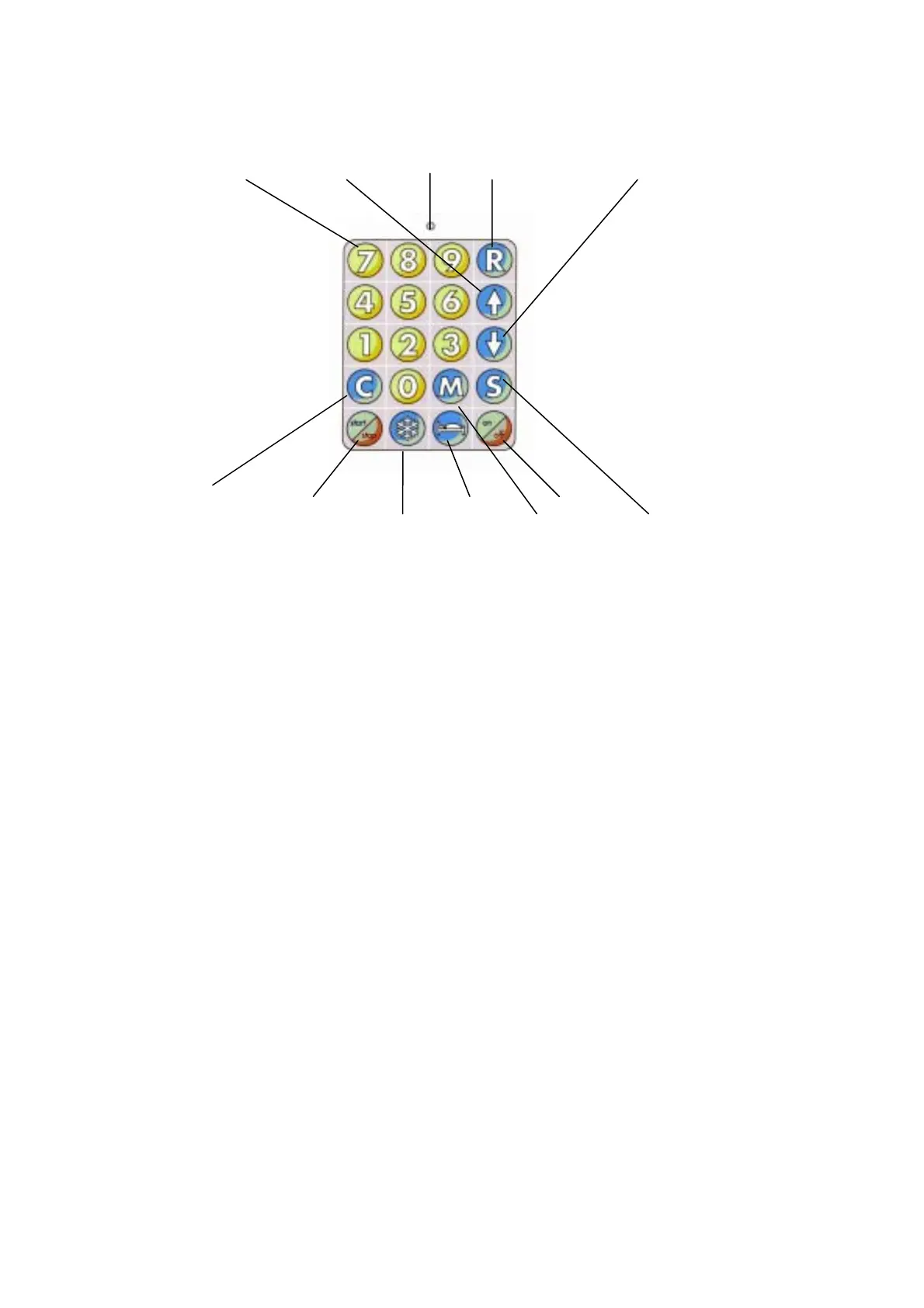
numeric input muffle (lift) up mains recall muffle (lift) down
clear start/stop night mode on/off
quick cooling menu save
Mains LED
This LED is illuminated, when the furnace is connected to mains.
Numeric input
This is used to enter numeric values.
Recall "R"
Press touch button and enter the relevant program number. Press “R” button again to select
and display the required program.
Lift "$"
Press the touch button "$" to move the firing chamber upwards or to stop a downward
movement.
Lift "%"
Press the touch button "%" to move the firing chamber downwards or to stop an upward
movement.
Memory "M"
When this button is touched, the “Main Menu” will be displayed.
Save "S"
The touch button “S” is used to store programs. When this button is pressed, the values will
be stored under a program number. More details about storing programs see section 5.6.
On/off sensor button
Press this sensor button to activate/ deactivate the furnace. For the "off" mode the firing
chamber has to be closed. If the furnace is turned off by using the on/off button the Standby
Mode is automatically activated as long as the standby temperature is > 100° C.













 To Next Page