29
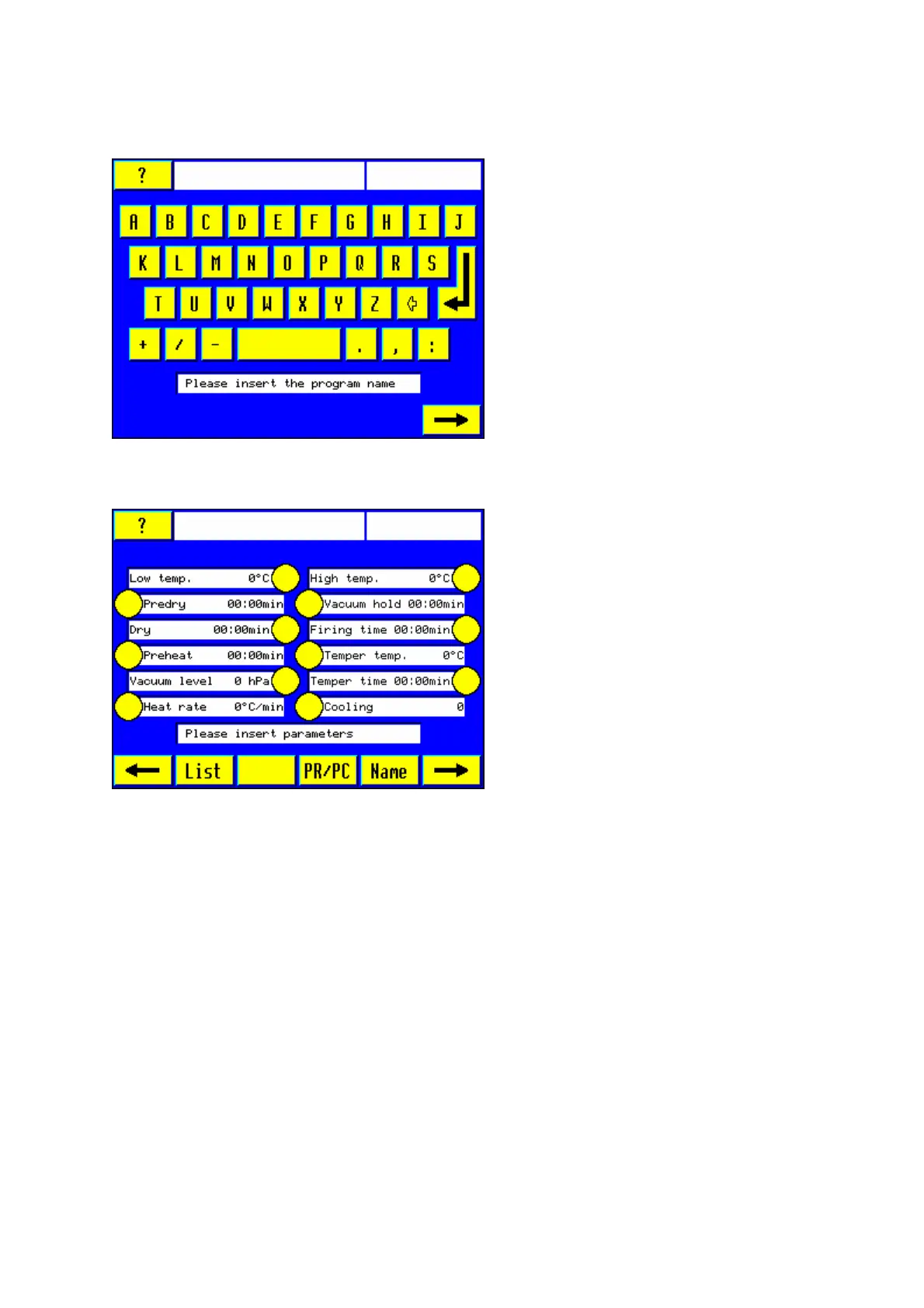
5.4 Text input
Note: Only program names in Latin
letters will be accepted.
Use these letters and characters to enter
the desired program name, e.g. "test".
The text entered will appear in the text
window.
Touch the enter button “↵“ to be able to
write in a second row.
Touch "#" to complete text entry. The
furnace will switch over to the relevant
screen.
5.5 Setting the firing parameters
Input of the numbers using the numeric
key pad.
Note: When entering a time, the colon
between minutes:seconds or
hours:minutes represents a preset
separation. The time value 3 minutes 20
seconds, for instance, will be entered as
0320.
Note: Possibility of changing the program
name subsequently by pressing the
"Name" soft key.
3.5.1 Setting Low temperature
Press the respective yellow touch button. Use the numeric keypad 0-9 to enter for example
the value 500 for 500°C.
5.5.2 Setting Predry time
(firing chamber in its upper position)
This is only to be used if drying at low temperature across an extended period of time is
required. While this drying stage is in progress, the firing chamber will remain in its topmost
stop position.
5.5.3 Setting Drying time
Press the yellow touch button. Use the numeric keypad 0-9 and enter, for example the value
0600 for 6 minutes (cf. Section 6.13)
5.5.4 Setting Preheating time













 To Next Page