ineo+ 353/253/203 1-87
Setup items by operation
1
1.31 Providing notification of the status of this machine (E-mail)
Specify settings for notifying the administrator of the machine status via E-mail.
Using this function provides notification for a specified address when a warning message occurs on this
machine.
Communication by combining POP before SMTP, APOP, SMTP authentication or encryption using SSL/TLS
is available. For details, refer to "Sending scan data by E-mail" on page 1-23.
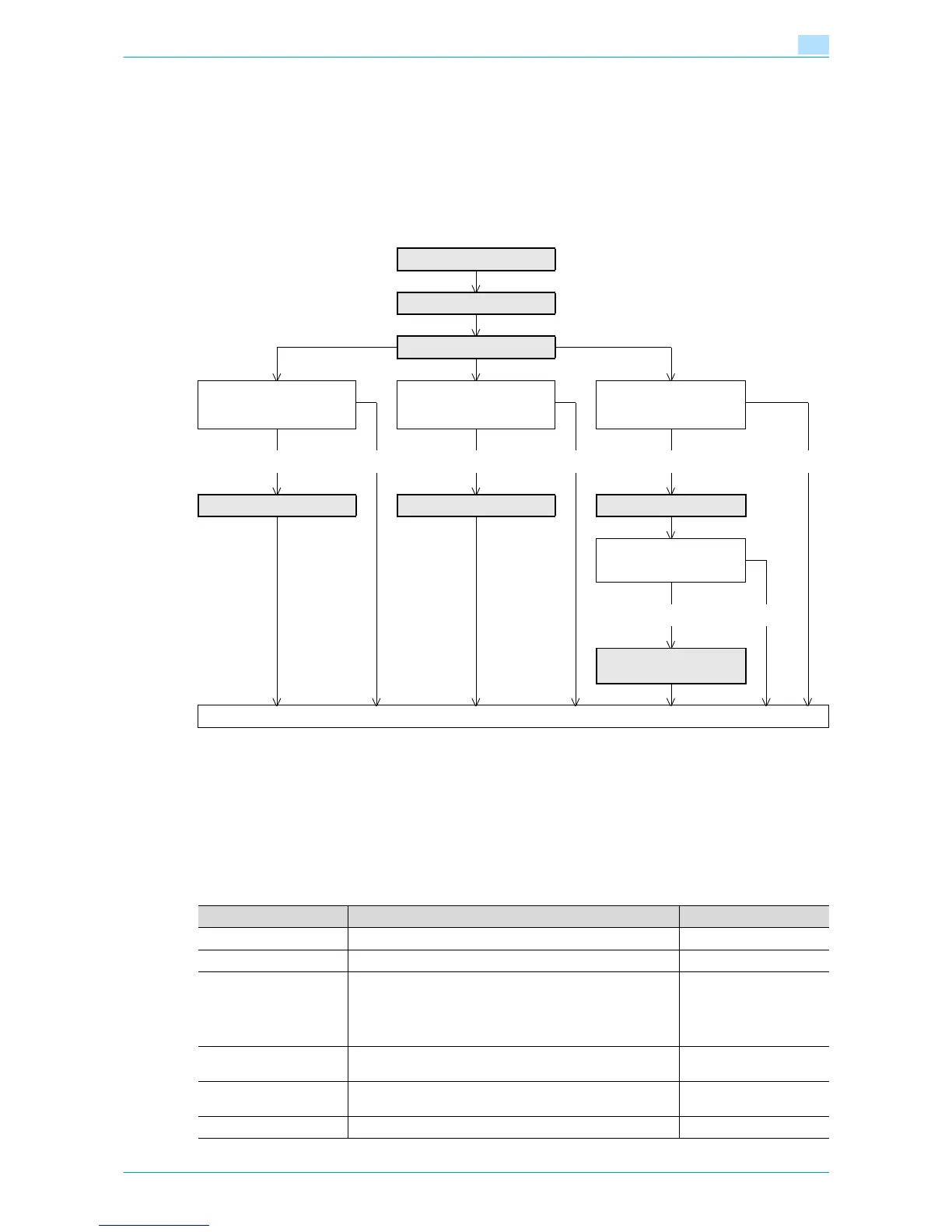
Specify the settings according to the following flowchart.
1.31.1 TCP/IP Settings
Specify settings to use this machine in a TCP/IP network environment.
For details, refer to "Specifying general settings for TCP/IP-based communication" on page 1-2.
1.31.2 E-mail TX (SMTP)
In Administrator mode of Web Connection, select the Network tab - "E-mail Setting" - "E-mail TX (SMTP)".
Specify the following settings.
TCP/IP Settings
E-mail TX (SMTP)
Status Notification Setting
Communicate with the
SMTP server using
SSL/TLS?
SMTP Authentication?POP before SMTP?
Yes No Yes No Yes No
SMTP over SSL/Start TLS SMTP Authentication POP before SMTP
➀ POP over SSL?
➁ APOP?
Yes No
➀ POP over SSL
➁ APOP Authentication
Finish
Item Definition Prior confirmation
E-mail TX Setting Select the "E-mail TX Setting" check box.
E-mail Notification Select "ON".
SMTP Server Address Specify the SMTP server address. (Format: "***.***.***.***",
Range for ***: 0 to 255)
If the DNS server is specified, the address can be specified
using the host name.
This item can also be specified with IPv6.
Address of the server
Port Number Default setting: 25
Specify the port number.
Port number for the serv-
er
Connection Timeout Specify the time period before the server connection times
out.
Max Mail Size Select whether to limit the size of sent messages.










 To Next Page