3 • Display Device Screens | Dexcom G7 User Guide 35
Receiver
Meals
Enter carbs for the meal.
Back Next
30 grams
1
2 3
4
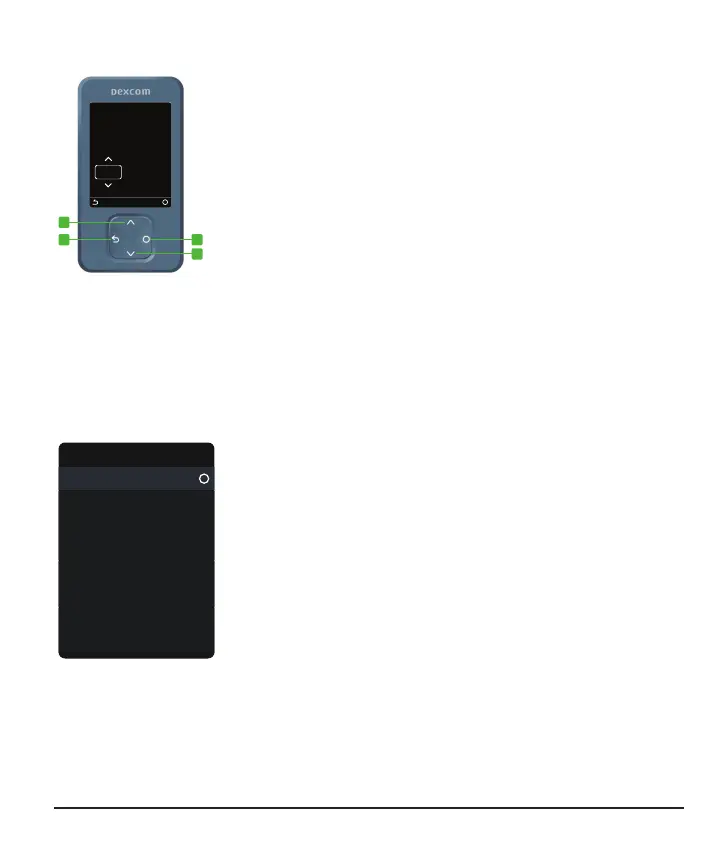
Use the navigation button to move around in the
receiver. The receiver screens show you which
side of the button to press.
1.
Scroll up
2.
Go back
3.
Select
4.
Scroll down
Use the Menu from the home screen to get to other features.
Menu
Reports
Settings
Events
Information
Help
Power Off
Replace Sensor
Stop Sensor Session
l
Reports: See summary reports (go to Reports chapter)
l
Events:
l
Enter events — like insulin doses and BG meter
values
l
Use your BG meter value as a calibration (optional)
l
Settings:
l
Change alert settings (go to the Alerts chapter)
l
Set alerts to vibrate only or change their sounds
l
Pick a trend graph height
l
Change the screen brightness
l
Information:
l
See how much time you have left in your sensor
session and your pairing code
l
Test the speaker
l
Replace Sensor and Stop Sensor Session: Stop this
sensor and start a new one (go to the Next Sensor
Session chapter)
l
Power off: Turn off the receiver — no sensor readings
or alerts when powered off



 To Next Page