SD12 - Getting Started
1-14
1.3.6 Channel Types ........................................................................
The SD12 has 4 different channel types which are laid out in banks of 12 on the console worksurface and can be identied by their
colour.
By default, the Input Channels will be assigned to Layer 1 on the left and right sections of the console.
The output channels (Groups, Auxes and Matrices) will be assigned to Layer 2.
Control Groups will be assigned to Layer 2. These bank assignments can be customised by the user and saved in a session at any time.
Holding any left or right section bank or layer button down for a couple of seconds will switch the left and right worksurface sections to
the same bank level or layer.
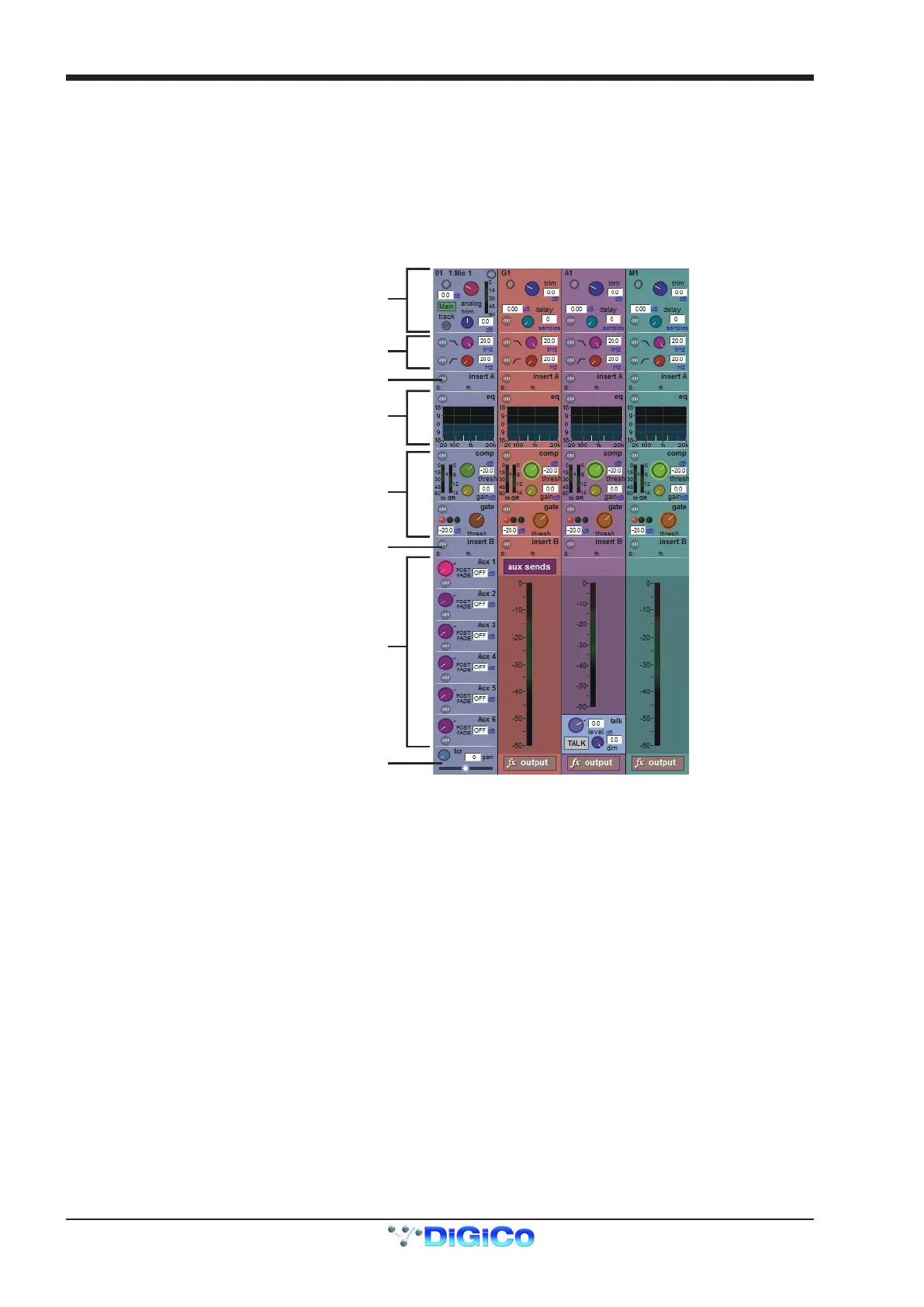
The controls on each different type of output channel are identical but an input channel has a number of additional of features.
Input Module - Touch to Expand
Analogue Gain/Digital Trim
Phase - Gain Tracking
Main/Alt Input Select
Inputs
Insert A Routing & On/Off
HPF/LPF
4 Band Dynamic EQ
Touch To Expand
Multiband Dynamics
Touch To Expand
Insert B Routing & On/Off
Aux Sends
Touch to Assign Rows
Channel Pan
Mute Indicators
Channel Label
Routing Module - Touch to Expand
Gang & Safe Indicators
Groups
Auxes Matrix



 To Next Page