SD12 - Getting Started
1-26
1.9.2 Dynamics................................................................................
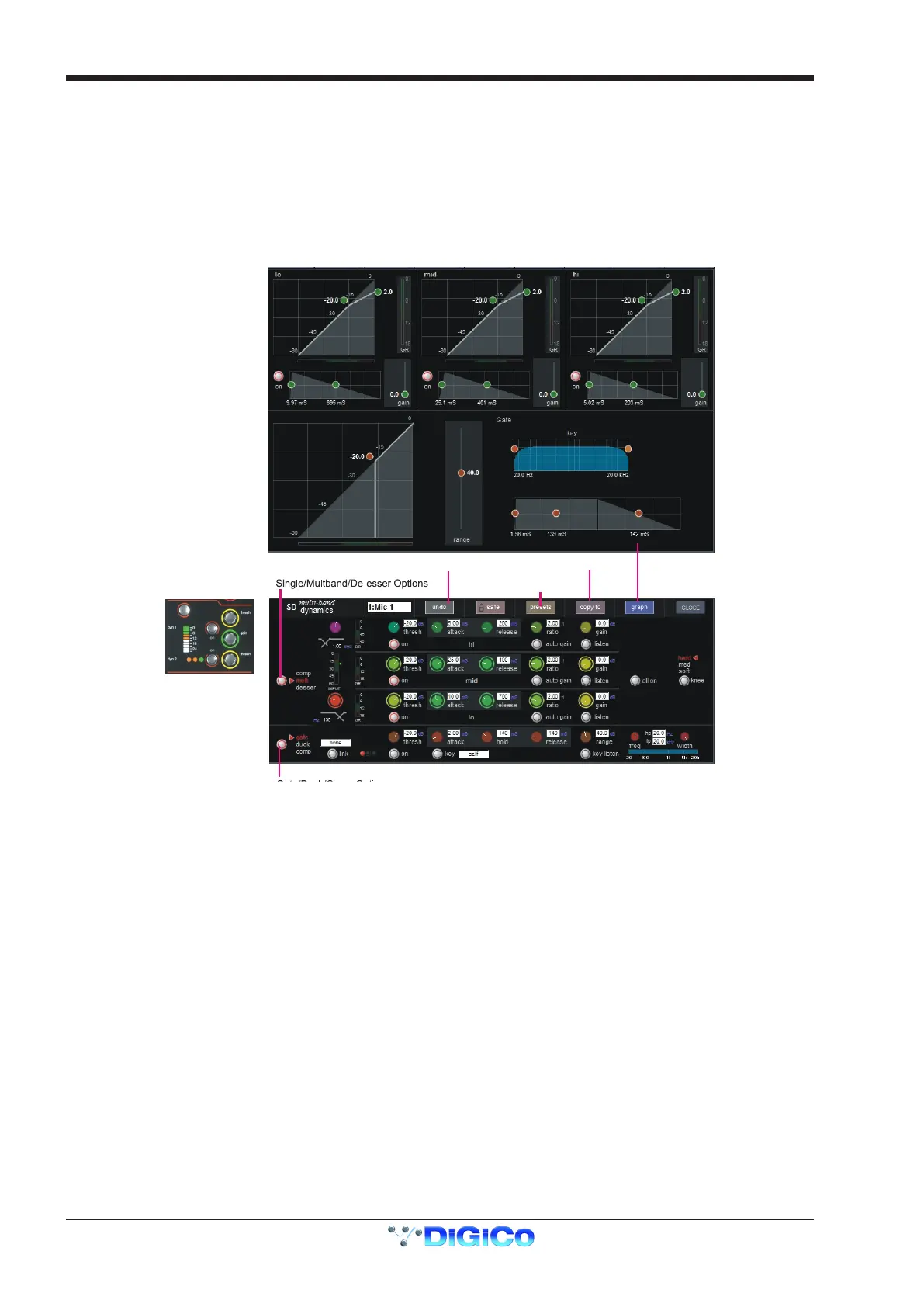
The dynamics are accessed by touching the words Comp or Gate just below the EQ graph on screen to open the dynamics panel.
There are two dynamics modules, the rst of which can function as a simple compressor, a 3 way multiband compressor, or a de-esser,
according to the comp/multi/desser button to its left. The second (lower) module can function as a gate, a ducker or a compressor with
an external sidechain, according to the gate/duck/comp button to its left.
The worksurface controls beneath the screen control the various parameters. Touching the Close button in the top right corner of the
panel will close it.
The Graph button will display user congurable parameters that can be adjusted by screen touch and are shown in a graphical format
Dedicated Threshold, Gain controls and In/Out switches can be found on the right hand side of that section's worksurface. These can
control the Assigned channel's dynamics whether the on screen dynamics panel is open or not.
Dynamics Presets
Dynamics Copy
Dynamics Undo
The Assignable encoders and switches beneath the screen can be assigned to any of the main dynamics controls. Hold the Assign
Switch button on the left of the input section and touch the dynamics control required on the screen. The selected control is shown by
the Status Display.
Multiband Compression is available on all channel dynamics modules. Click on the dynamics mode select button on the left of the
display to access the 3 dynamics bands
Each band includes all of the parameters as those found in the single band compressor. The link function remains available for the
whole compressor, and is not assigned to any band. The bands can be switched on individually using the on buttons in the left-hand
side of each band, or together using the all on button to the display’s right.
The crossover frequency between bands is controlled using the purple and red pots to the left of the hi and lo bands. Each crossover
has a range of 20Hz to 20kHz, and the crossover frequencies are displayed below each pot. Each band can be auditioned by pressing
the listen button below each gain pot which solo’s that band to the mix (not the solo buss), in effect temporarily switching off the other
bands.
Pressing multi-band again returns the compressor to single-band.
The channel strip’s compressor threshold and gain controls adjustment all three bands’ controls, maintaining any relative offsets. The
individual controls are mapped to the assignable rotaries below the screen.
Note: Beyond the link function, the single and multi-band compressors have completely separate settings: No settings are copied be-
tween them, and the settings of each remain unchanged when the other is active.



 To Next Page