SD12 - Getting Started
1-28
1.10 The Matrix
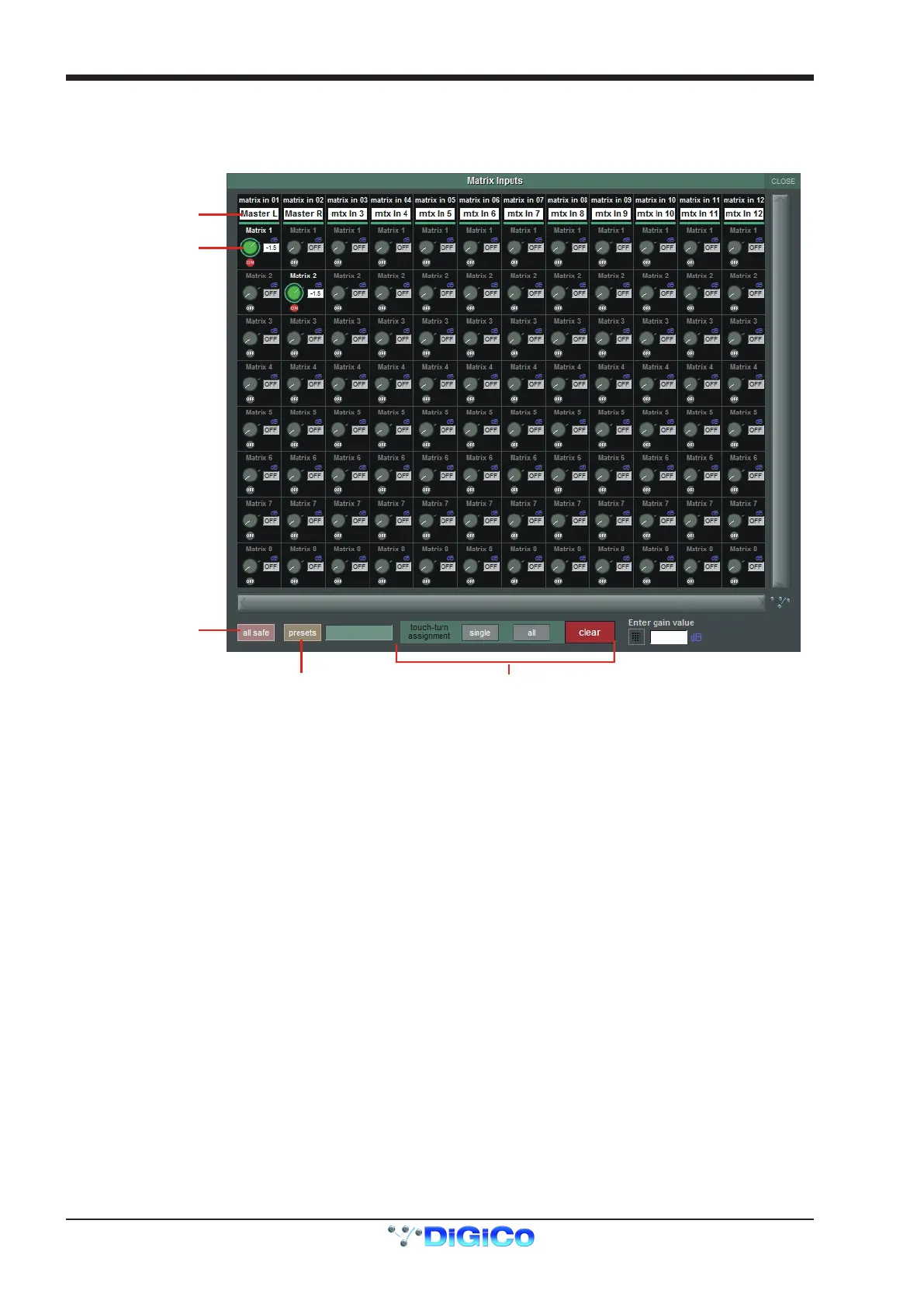
To open the Matrix Inputs panel, touch the Matrix button on the Master Screen. The window that opens allow you to route inputs to the
Matrix Output Channels, and set the Matrix crosspoint levels.
To route an input, touch the top of the appropriate Matrix column. This opens a standard SD12 input routing page.
Matrix Input Routing
Matrix Presets
Touch Turn Assignments
Matrix Snapshot
Safe
Matrix Crosspoint
Level Control
The example above has the Master Stereo Buss routed to the inputs of Matrix 1 and Matrix 2 (Labelled as Master Left & Master Right).
By adjusting the crosspoint levels, you can change how much of each side of the Master buss is fed to these Matrix Channels.
There are three modes of level adjustment: multi, single and all.
Multi (active when no other mode is selected): Touch one or more level “knob” on screen, then adjust using the Touchturn control.
Single : Touch any level “knob” and adjust. Touching another “knob” will deselect the rst.
All : All “knobs” are adjusted at the same time.
When adjusting more than one crosspoint, their relative levels are maintained.
The clear button cancels all active Touch Turn assignments.



 To Next Page