19
Getting Started
DIGNOケータイ3
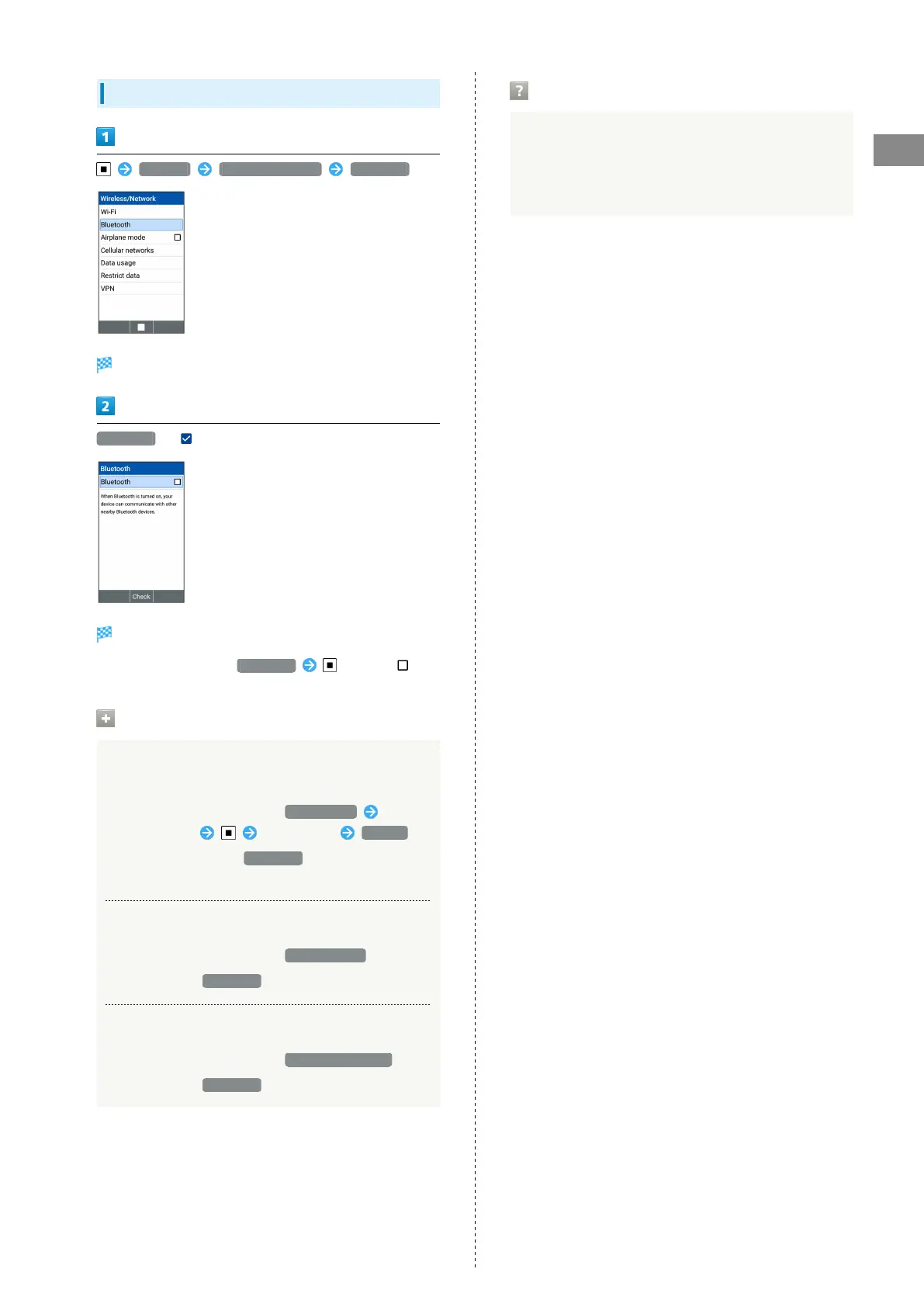
Enabling Bluetooth
®
Settings Wireless/Network Bluetooth
Bluetooth
®
settings open.
Bluetooth ( )
Bluetooth
®
is enabled.
・
To disable Bluetooth
®
, Bluetooth (Unchk) ( ).
Operations for Bluetooth
®
connection
Specifying Handset Name Shown on Other
Devices
On Bluetooth
®
settings screen, Device name Select
name entry box Enter name Rename
・
You can make settings Bluetooth is ON.
・If you enter emoji, you may not change the device name.
Viewing File Received via Bluetooth
®
On Bluetooth
®
settings screen, Received files
・
Available when Bluetooth is ON.
Receiving All Data on Phonebook via Bluetooth
®
On Bluetooth
®
settings screen, Receive Phonebook
・
Available when Bluetooth is ON.
Troubleshooting
Q. Cannot Activate Bluetooth
®
Function
A. Is Airplane Mode enabled? If you enable Airplane Mode
with Bluetooth
®
function ON, Bluetooth
®
function is
disabled.


 To Next Page
 Loading...

