ASE 150 Operator’s Manual
88 Doc. 065207-02 9/08
5.8.1 Removing the Static Valve from the System
1. Turn off the ASE 150 main power switch.
2. Follow the instructions in Section 5.4
to disconnect the gas source
and remove the right-side panel.
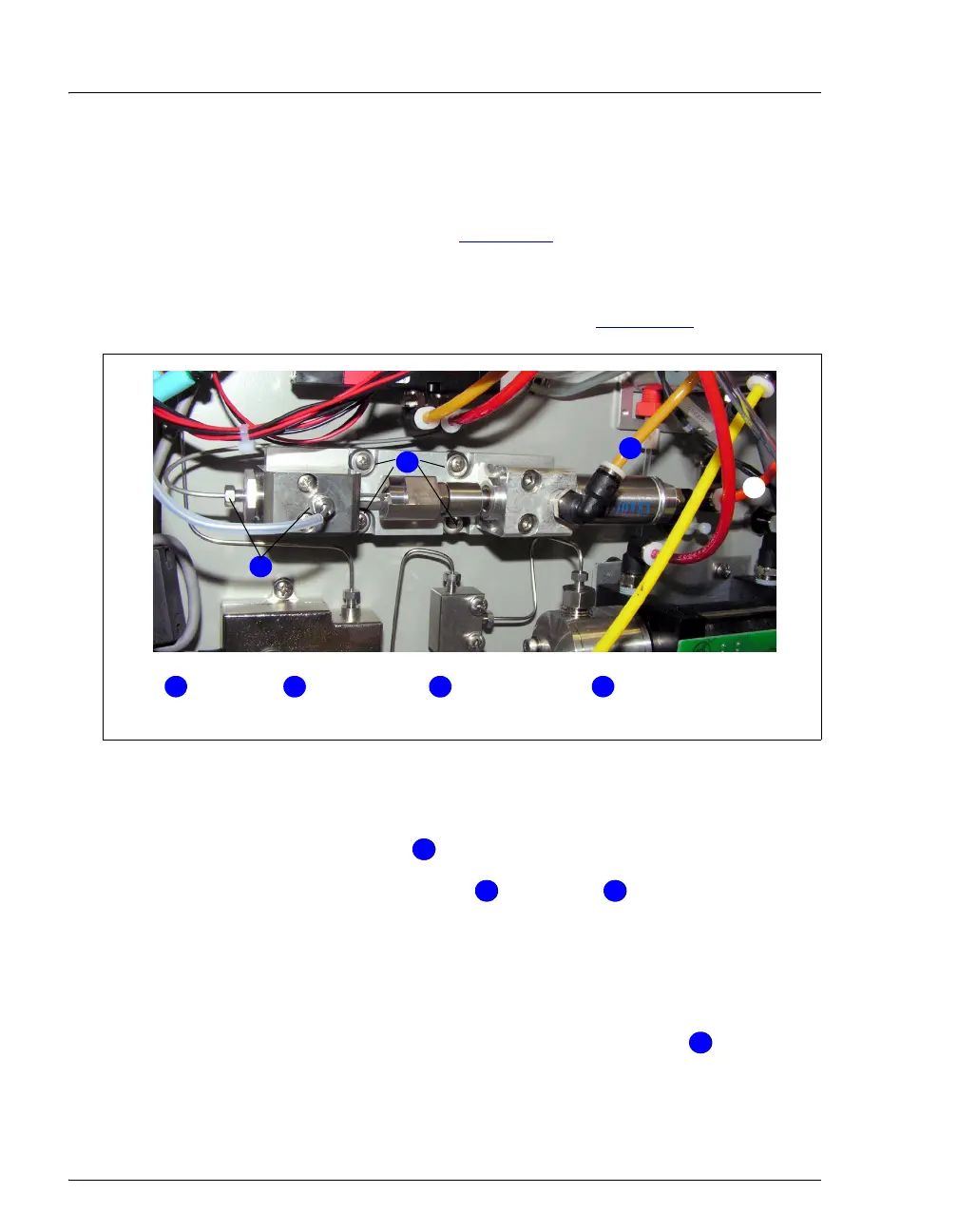
The static valve is installed on the lower left side of the component
panel, below the pressure relief valve (see Figure 5-20
).
3. Using a 1/4-inch open-end wrench, disconnect the two Hastelloy fluid
lines from the valve .
4. Disconnect the dark yellow and orange tubing from the press
fittings on the valve.
To disconnect a press fitting, use your fingers (or a small open-end
wrench) to press the ring on the fitting in, while at the same time
pulling the tubing out.
5. Using a 2.5-mm hex wrench, remove the four screws that secure
the static valve to the ASE 150.
Figure 5-20. Removing the Static Valve
Mounting Screws (4)Hastelloy
Lines (2)
1
4
2
1 4
2
3
Dark Yellow
3
Orange Tubing
1
1
1
2
1
3
14



 To Next Page