Danish Interpretation Systems User Manual
# Menu Settings Description
2.
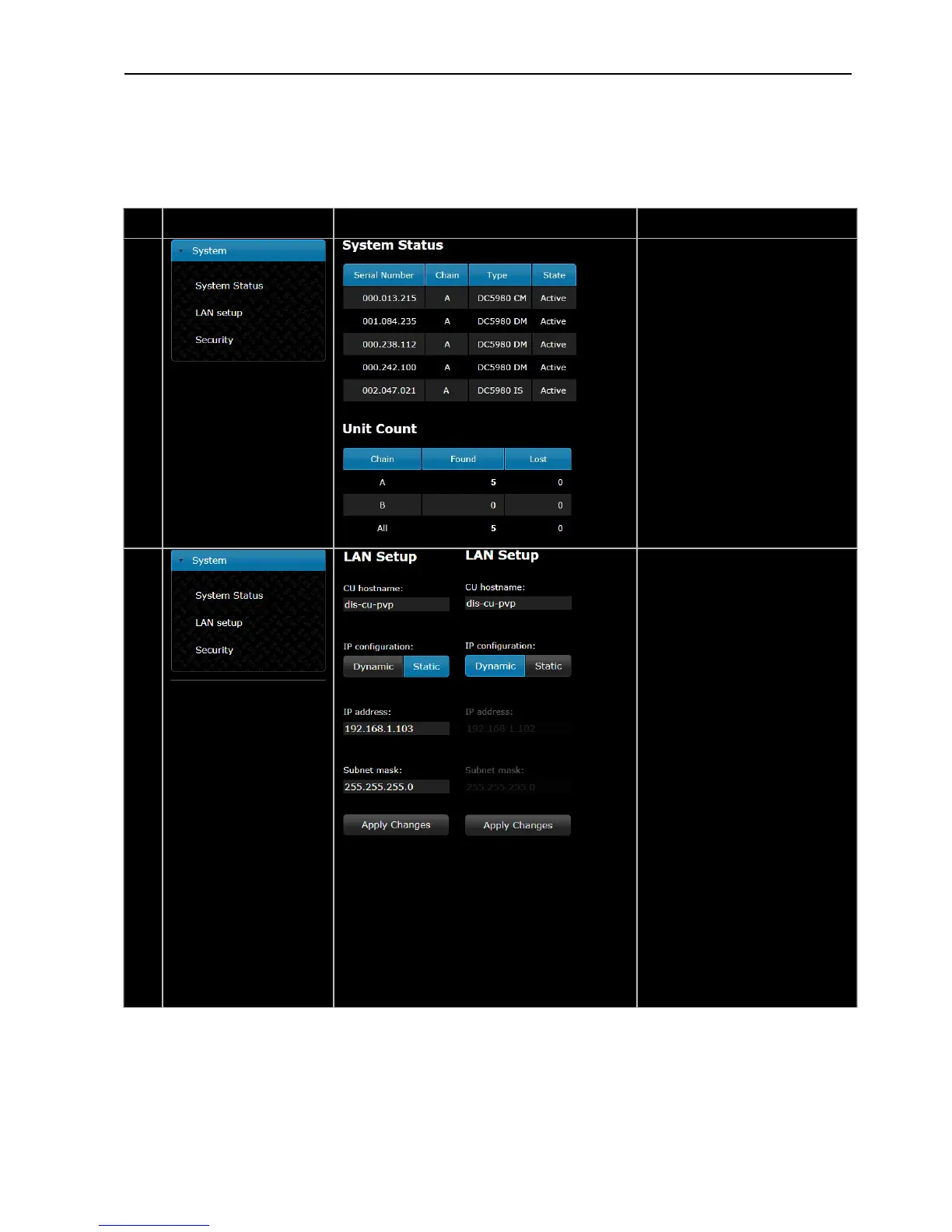
UnitStatus –
Shows the connected conference
unitswith Serial Number and Type
ofunits. The ‘State’ field shows ifa
unitis‘Active’(connected)or‘Lost’
(notconnected).
Ifaunitisshownas‘Locked’the
unitisnotcompatiblewiththeDDS
5900System
UnitCount –
Shows the number of connected
unitsoneachchain.
3.
CUhostname–
Ahostnamecanbeassignedtothe
CU5905.Thisnamecanbeusedto
connect to the CU 5905 with a
browser instead of using the IP‐
address.
After a hostname is assigned, type
thefollowinginthebrowser:
http://’hostname’.local
where ‘hostname’ is to be replaced
withtheassignedname.
IPcon guration–fi
Select ‘Dynamic’ if the CU is
connectedtoanetwork withDHCP
server.Otherwiseselect‘Static’and
assignafixedIPaddresstotheCU.
DefaultIPaddr .1.essis192.168.10
Select ‘Apply Changes’ to save
changesmade.
TheactualIPaddresscanalwaysbe
found in this screen or using the
interactivemenuontheCU5905:
LAN setup * IP address setup * IP
address*ActualIPaddress.
User Manual DDS 5900
25



 To Next Page