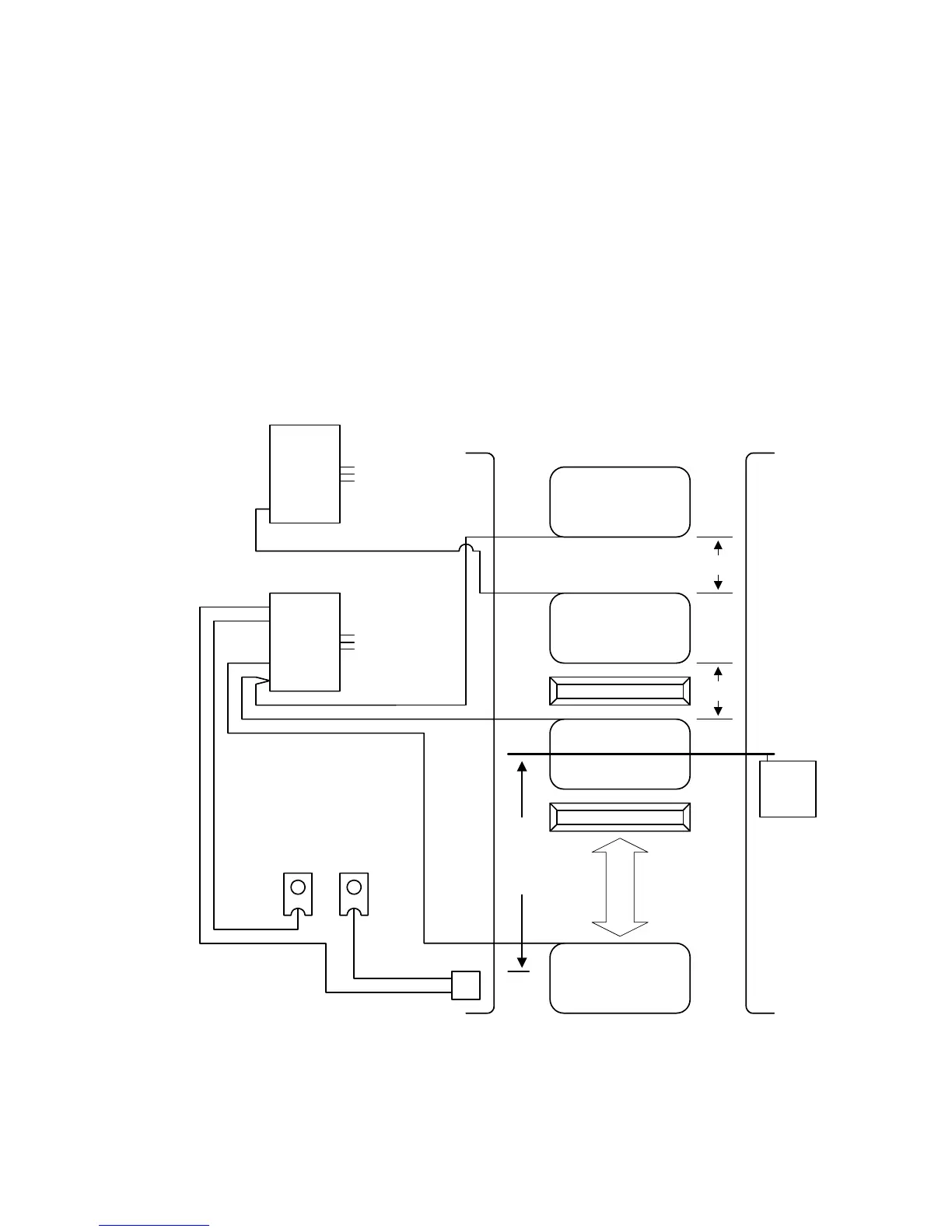
2.4.4 TWO-WAY LANE APPLICATION
• Plug a 9406 loop detector into the UP loop port on the 1601 circuit board and connect the
EXIT loop to terminals TB-1.
• Use a 9405 loop detector plugged into the DOWN port on the 1601 circuit board. Connect
the DOWN loops, wired in series, to terminals TB-1 and the ARMING loop to terminals TB-2.
• If the optional arming loop is not used, use a 9406 detector plugged into the DOWN port on
the 1601 circuit board and connect the DOWN loops, wired in series, to terminals TB-1 on
this detector.
• The timer (SW-1, switch 7) should be OFF. The arm will rotate down after the vehicle clears
the down loops.
• SW-1, switch 4 must be ON.
• Spacing of the loops is critical when using this configuration. Be sure that the loops are
spaced as shown in the diagram.
Access
Control
Device
10 Ft Min.
Arming Loop
(Optional)
Down Loop
Exit Loop
Down Loop
Traffic
Speed Bump
Speed Bump
4 ft 4 ft
COM
N.O.
TB 2
TB 1
9405 Loop
Detector
TB 1
9406 Loop
Detector
614
1601 Terminals
DOWN
PORT
UP
PORT
Figure 18
25



 To Next Page