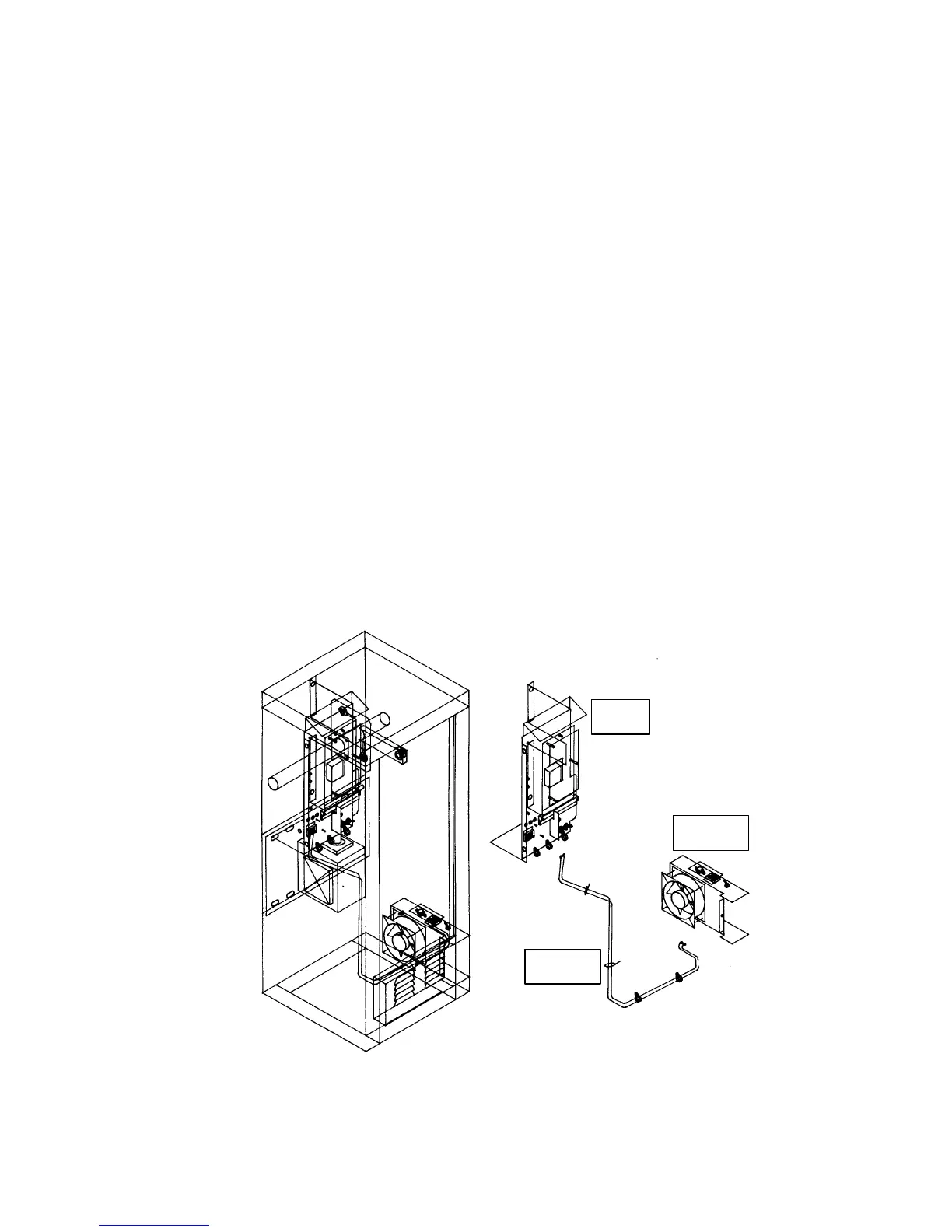
4.2.3 FAN KIT INSTALLATION
Use the optional fan kit in areas where hot humid climates are the norm. The fan kit prevents a build
up of moisture inside the cabinet in this type of environment.
1. Be sure that power to the operator is OFF at the circuit breaker panel since connections
will be made to the high voltage terminal strip.
2. Mount the fan assembly to the lower right inside wall of the cabinet to the mounting
screws provided so that the terminal strip is positioned on the bottom.
3. The fan will also be secured to the duct at the bottom of the cabinet. Use the screw
provided.
4. Connect the BLACK wire from the wire assembly to the 117 VAC terminal on the fan.
Connect the WHITE wire to the NEUT terminal on the fan.
5. Route the wire assembly as shown below. Use the supplied cable ties to secure the wire
assembly. Be sure that the wire assembly is clear of all moving parts.
6. Connect the BLACK wire to the 117 VAC terminal on the high voltage terminal block.
Connect the WHITE wire to the NEUT terminal.
Switch Settings
OFF - Turns the fan off.
ON - Turns the fan on continuously.
AUTO - This is the normal setting. The fan will automatically turn on when the
temperature inside the cabinet rises above 90°F, and will turn off when the temperature
drops below 90°F.
Cable
Assembly
Fan
Assembly
Control
Panel
Figure 32
41



 To Next Page