EasyManua.ls Logo

dolycon CT100 Series - Periodic Maintenance

dolycon CT100 Series
163 pages
Print Icon
To Next Page IconTo Next Page
To Previous Page IconTo Previous Page
Loading...
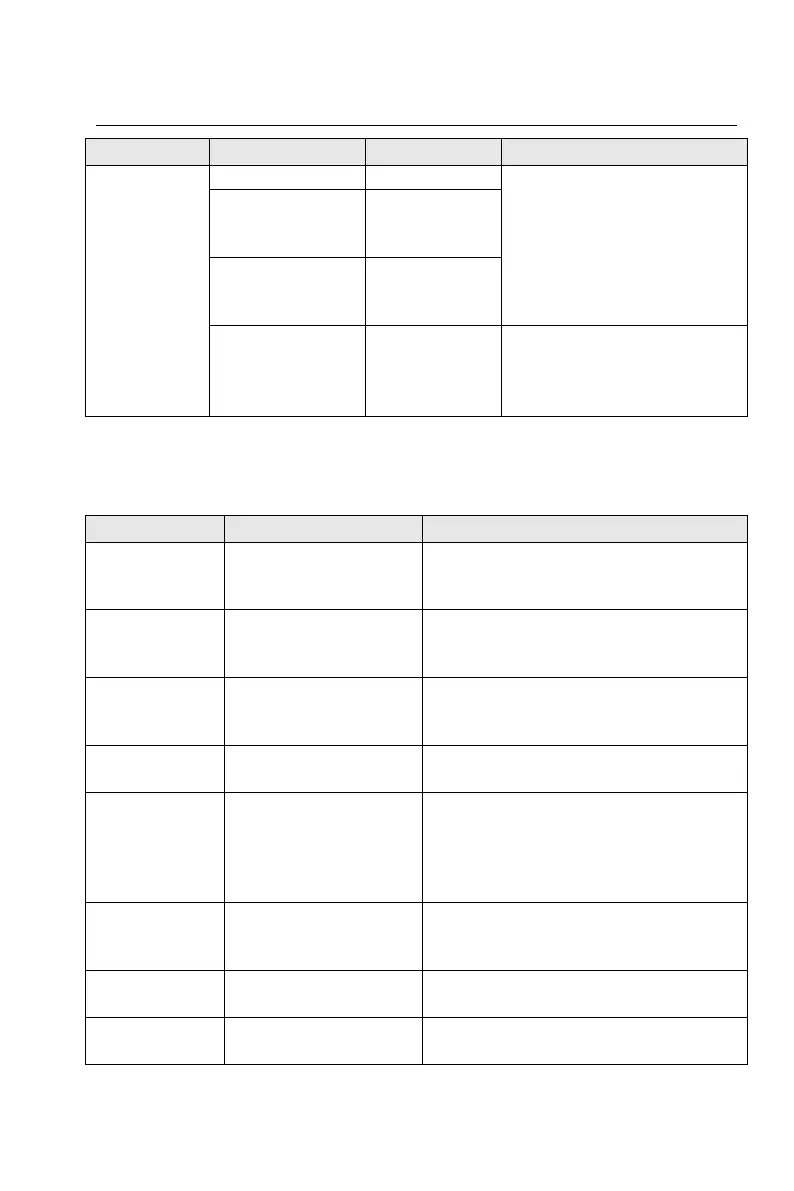
CT100 inverter Daily maintenance
149
Check item
Check content
Method
Criterion
voltage
Inverter output
current
Ammeter or
displayed
parameters
Inverter output
voltage
Voltmeter or
displayed
parameters
Rectifier bridge,
converter
module
temperature
F05.13 and
F05.14
The difference between
displayed temperature and
ambient temperature is not
more than 40.
8.2 Periodic maintenance
Table 8-2 Periodic (three months) maintenance
Check item
Check content
Method
Control
terminal
screws
Whether the screws
are loose
Tighten
Main circuit
terminal
screws
Whether the screws
are loose
Tighten
Grounding
terminal
screws
Whether the screws
are loose
Tighten
PCB board
Dust or sundries
Clean up sundries with dry
compressed air
Fan
Abnormal noise and
vibration, the
cumulative time is
more than 20,000
hours
1. Clean up sundries
2. Replace the fan
Electrolytic
capacitor
Whether to change
color, with or without
smell
Replace the electrolytic capacitor
Radiator
Dust or sundries
Clean up sundries with dry
compressed air
Power
components
Dust or sundries
Clean up sundries with dry
compressed air

Table of Contents

Related product manuals