Operation Section
74
Sideshift Attachment Control (If
Equipped)
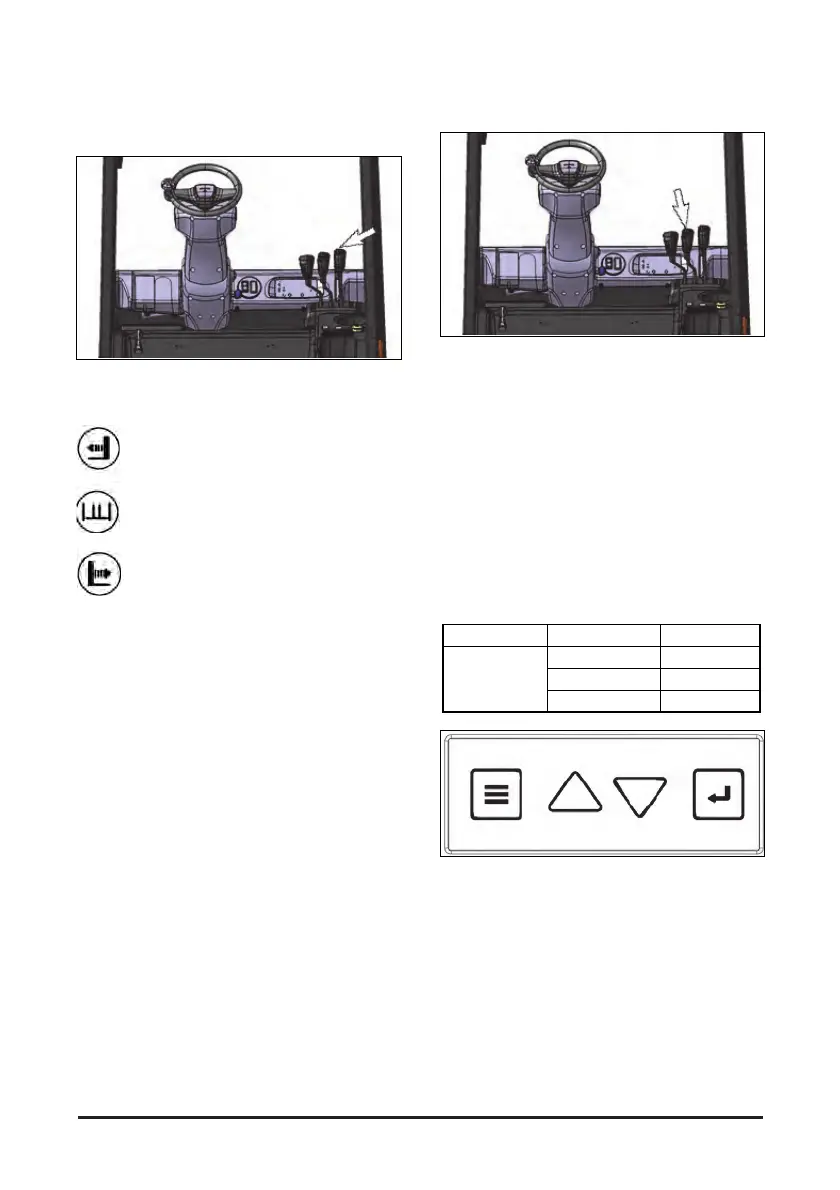
The sideshift attachment control is located at the
operator’s right side front. The sideshift attachment
control lever is the lever at the right.
Sideshift Left(1) - Push the lever forward
smoothly to shift the carriage to the left.
Sideshift Hold(2) - Release the sideshift
attachment lever. The lever will return to
the center(hold) position and sideshifting
action will stop.
Sideshift Right(3) - Pull the lever back
smoothly to shift the carriage to the right.
NOTE: To prevent a sudden change of position of
the load, operate all lift, tilt and attachment
controls smoothly.
Auto tilt control (If provided)
The auto tilt controller is on the left side of the tilt
knob. Press the auto tilt switch to turn on the switch
lamp and push the tile knob forward. The mast will
stop at 90 degrees angle.
NOTE: To prevent sudden position shift of the load,
operate the lift, tilting and side shift
controller smoothly.
Speed limit (If provided)
This option is a function to limit the maximum speed
of the vehicle when it is inside by detecting the
outside or inside when the vehicle is moving from
outside to inside or from inside to outside.
One of three speed modes can be selected.
Model Mode Description
Electric
Mode 1 1500 rpm
Mode 2 2000 rpm
Mode 3 2500 rpm
The speed limit mode selection proceeds in the
following order.
1. Press the Mode button.
2. "8" is blinked in 7 Segment.
3. Use the Up/Down buttons to select a mode.
4. If you press the Enter button, after outputting
“0”, ress the Enter button or “0” disappears from
the 7 Segment after a certain period of time.
5. Setup is complete.


 To Next Page