Operation Section
73
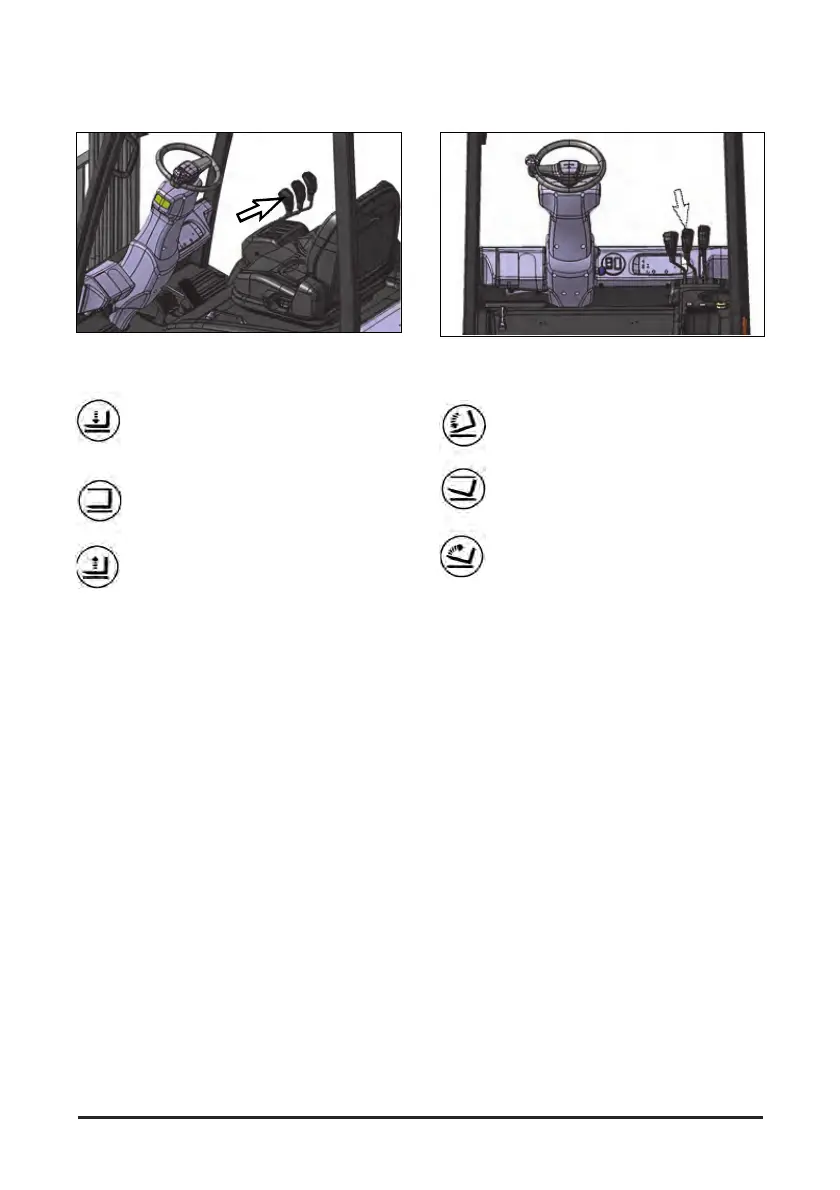
Lift Control Lever
The forks’ lift control is located at the operator’s
right side front. The lift control lever is the lever at
the left.
Lower(1) - Push the lever forward
smoothly to lower the lift forks.
Hold(2) - Release the lift lever. The lever
will return to the center(hold) position and
the forks will remain in the position they
are in.
Raise(3) - Pull the lever back smoothly to
raise the lift forks.
NOTE: To prevent a sudden change of position of
the load, operate all lift, tilt and attachment
controls smoothly.
Tilt Control Lever
The forks’ tilt control is located at the operator’s
right side front. The tilt control lever is the lever at
the center.
Tilt Forward(1) - Push the lever forward
smoothly to tilt the forks forward.
Hold(2) - Release the tilt lever. The lever
will return to the center(hold) position and
the forks will remain in the position they
are in.
Tilt Back(3) - Pull the lever back smoothly
to tilt the forks back.
NOTE: To prevent a sudden change of position of
the load, operate all lift, tilt and attachment
controls smoothly. Never tilt an elevated
load forward past vertical.


 To Next Page