70
ED900 02-202008125330
dormakaba ED900 Installation Instructions – Double egress door Chapter 21
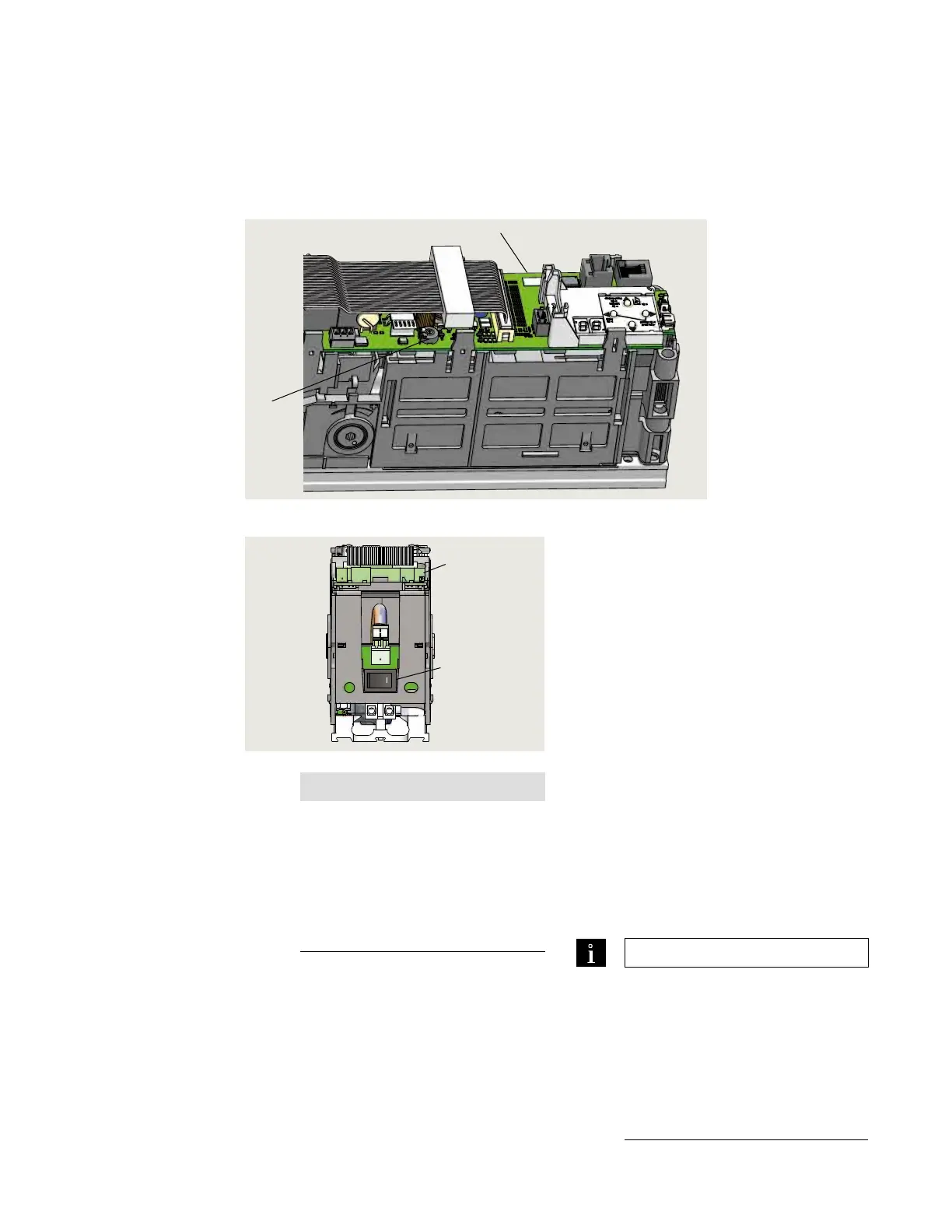
. Set power fail closing speed
Power fail closing speed
1 Power fail closing
speed
potentiometer
2 Control board
Fig. 21.1.1 Power fail closing speed potentiometer
1
2
o
1
2
Fig. 21.1.2 Power on switch
1 Power on switch
2 Terminal board
.. Power fail closing speed
potentiometer.
• Single turn
• Factory setting: fully CCW
• CCW increases closing speed.
• CW decreases closing speed.
• /" [- mm] flat blade screwdriver
required for adjustment.
.. Setting door closing speed upon
power failure.
. Turn ED power switch OFF.
. Manually open door to ° angle and let
it close.
. If door closes in less than seconds, turn
potentiometer / turn CW and retry
test.
. Continue retrying test after
potentiometer adjustment until the door
closing time is a minimum of seconds
.. Repeat setting closing speed for
second door.
NOTICE
Error message E73:
If door closes in less than three
seconds, error message E 73
(System error 3, braking circuit) will
be displayed.
Reference: Appendix B,
Troubleshooting.
TIPS AND RECOMMENDATIONS
Minimum second closing time is
required to meet requirements of:
• A., Accessible and Usable
Buildings and Facilities,
Section ...
• ADA Standards for
Accessible Design,
Section ...



 To Next Page