80
ED900 02-202008125330
dormakaba ED900 Installation Instructions – Double egress door Chapter 24
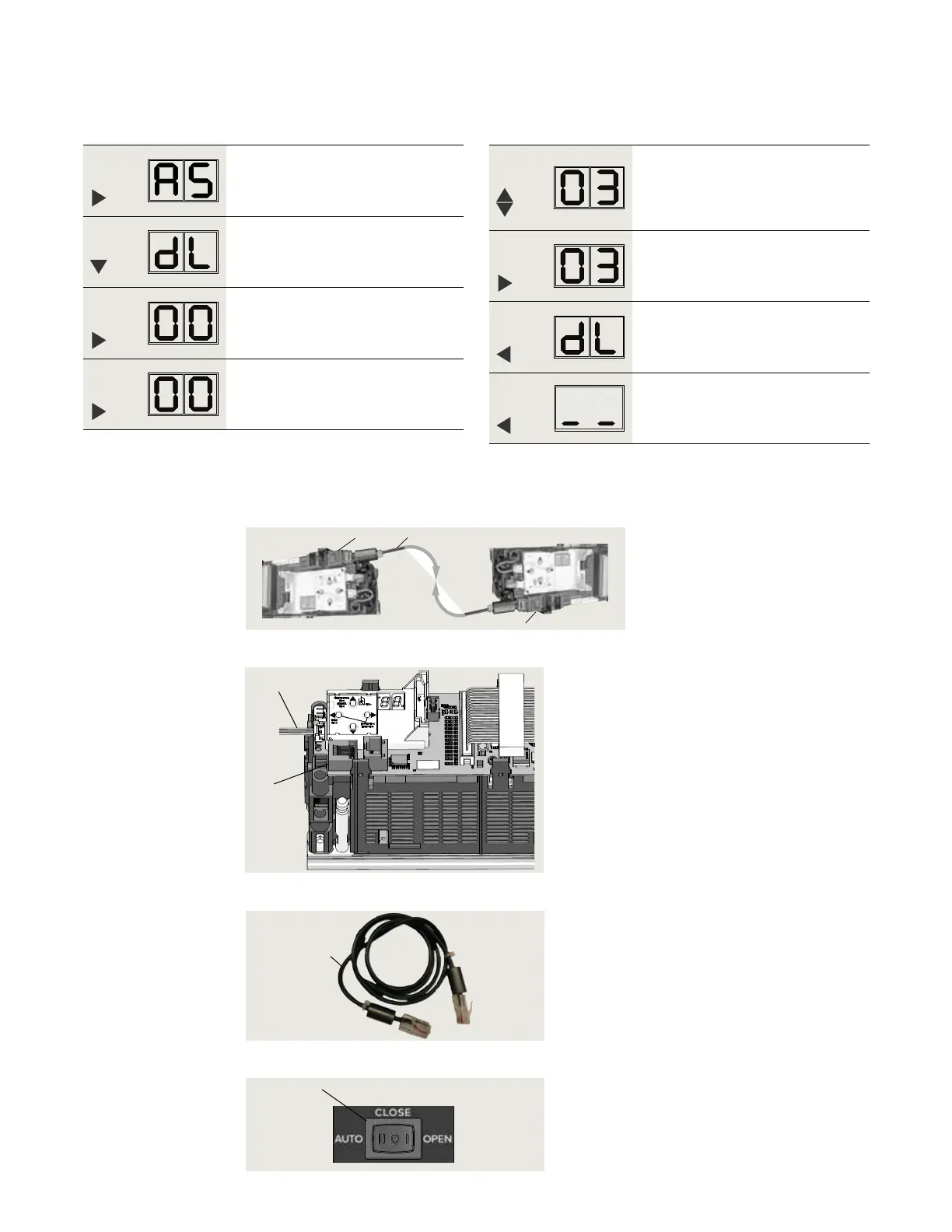
Step
Press
Press and hold PRG > s to enter
program mode, AS parameter
displayed.
Step
Press
Scroll to dL parameter.
Step
Press
Displays "" , factory setting.
Step
Press
"" starts flashing.
.. Inactive door, set parameter dL.
. Set program switch to CLOSE.
. Set parameter dL (door type) for inactive door.
Step
Press
Scroll to select parameter value
("" as an example).
Step
Press
Saves value entered. Display stops
flashing.
Step
Press
Returns to door type parameter.
Step
Press
Exits program mode. Operator is ready
for operation.
. Connect communication cable between operators
Fig. 24.3.1 Double door operators, communication cable
1 RJ45 jack
(horizontal) for
communication
cable
2 Communication
cable
2 Communication
cable 08125243
Fig. 24.3.3 Communication cable
.. Install communication cable.
. Set program switch to CLOSE.
. Connect communication cable to active
and inactive operator RJ jacks.
. Secure cable to header
.. Test door operation
. Set program switch to AUTO.
. Test double door operation.
• Use knowing act device
Fig. 24.3.4 Program switch
1 Program switch,
3 position
1
4
Fig. 24.3.2 RJ45 jack
1 RJ45 jack
4 Program switch
cable
1
1
2
2



 To Next Page