76
ED900 02-202008125330
dormakaba ED900 Installation Instructions – Double egress door Chapter 23
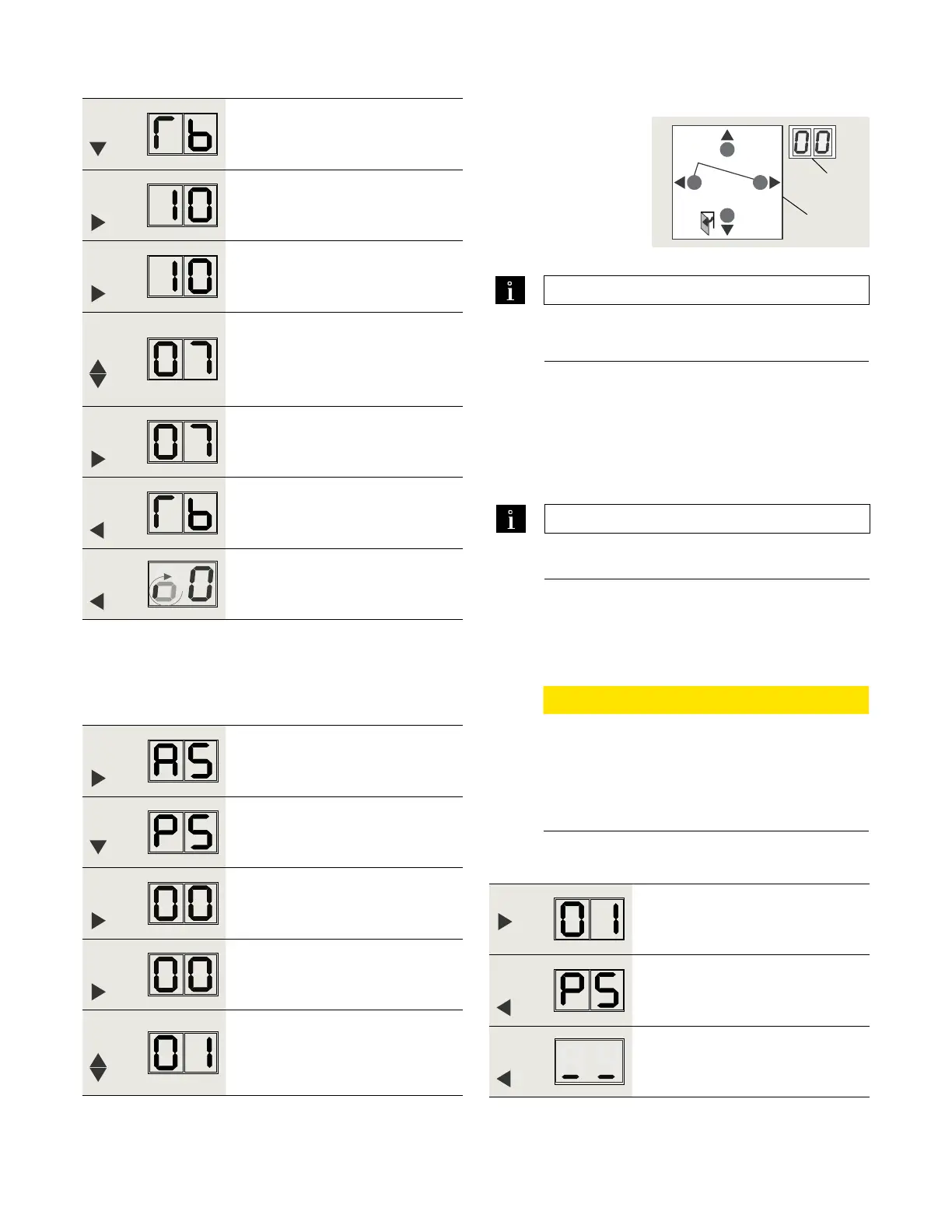
Step
Press
Scroll to Tb parameter.
Step
Press
Displays "" , factory setting.
Step
Press
"" starts flashing.
Step
Press
Scroll to select parameter value.
"" is example, for door widths of
" to /"
Step
Press
Saves value entered.
Display stops flashing.
Step
Press
Returns to door width parameter.
If single door, exit program mode
(Step ).
Step
Press
Exits program mode. Display indicates
"ready for learning cycle".
.. Set parameter Tb, door width.
.. Parameter dL, door type.
Fig. 23.2.2 4 button keypad,
2 digit display
3 Four button
keypad
4 Two digit display
TIPS AND RECOMMENDATIONS
Reference Chapter for door width
parameter values.
TIPS AND RECOMMENDATIONS
Parameter dL factory setting is , single door.
4
3
> 3s Reset
< 3s Quit
> 3s
PRG
< 3s
LEARN
Fact-Setup
> 3s
> 8s
. Set parameter PS, program switch type
.. Full width cover or Key switch panel option –
set parameter PS to .
Step
Press
Press and hold PRG > s to enter
program mode, AS parameter
displayed.
Step
Press
Scroll to PS (Program switch type)
parameter.
Step
Press
Displays "" , factory setting.
Step
Press
"" starts flashing.
Step
Press
Scroll to select parameter value "",
External mechanical program switch
connected to operator terminal board.
CAUTION
Key switch panel options – program switch
wired to ED terminal board.
Reference Appendix D.
Parameter PS (Program switch type) must be
set to .
Step
Press
Saves value entered. Display stops
flashing.
Step
Press
Returns to program switch parameter.
Step
Press
Exits program mode.












 To Next Page