Viewing The Instrument Pages
73
5.5 VIEWING THE EVENT LOG
The module maintains a log of past alarms and/or selected status changes.
The log size has been increased in the module over past module updates and is always subject to
change. At the time of writing, the modules log is capable of storing the last 250 log entries.
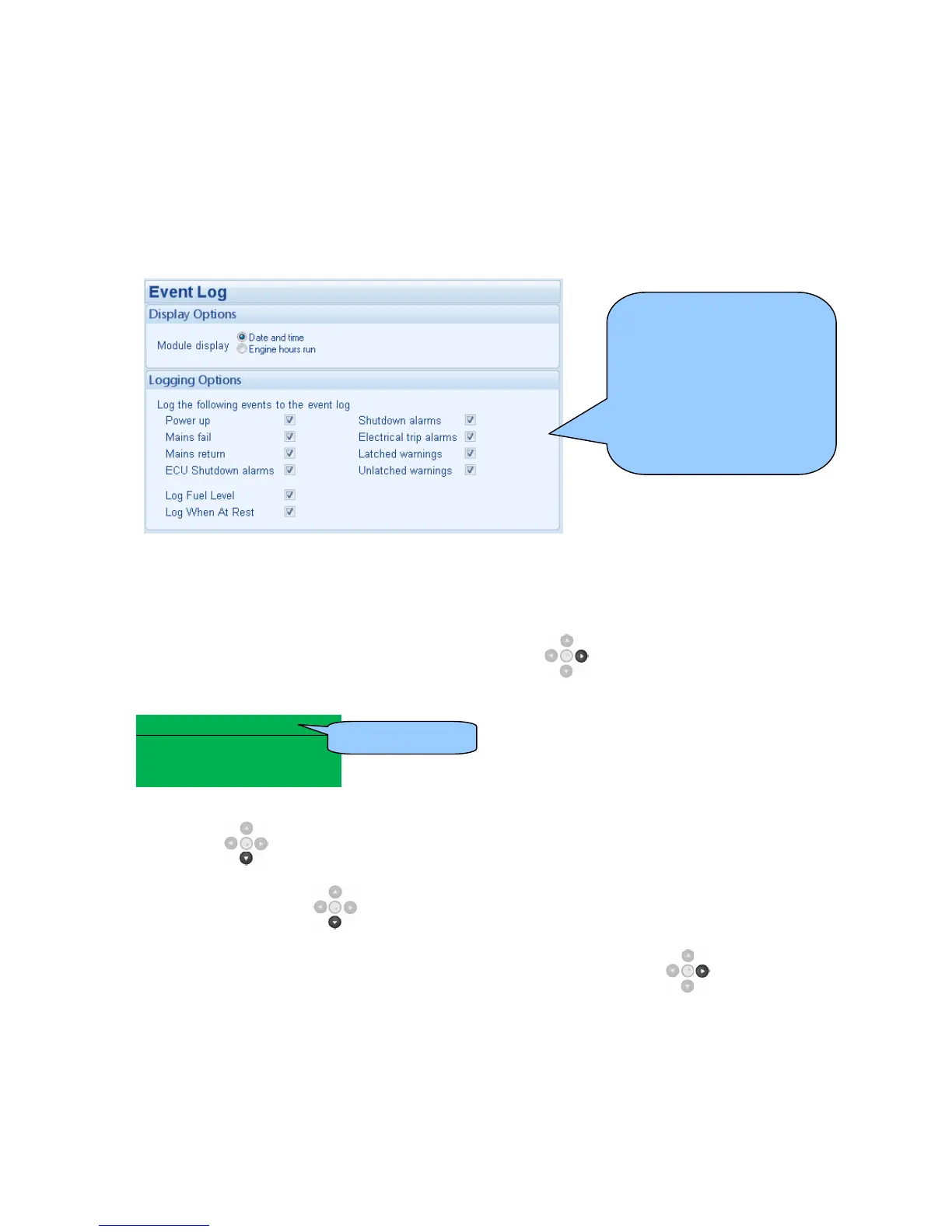
Under default factory settings, the event log only includes shutdown and electrical trip alarms
logged (The event log does not contain Warning alarms); however, this is configurable by the
system designer using the DSE Configuration Suite software.
Once the log is full, any subsequent shutdown alarms will overwrite the oldest entry in the log.
Hence, the log will always contain the most recent shutdown alarms.
The module logs the alarm, along with the date and time of the event (or engine running hours if
configured to do so).
If the module is configured and connected to send SMS text
To view the event log, repeatedly press the next page button until the LCD screen displays the
Event log :
Event log 1
Oil Pressure Low
Shutdown
12 Sep 2007, 08:25:46
Press down
to view the next most recent shutdown alarm:
Continuing to press down
cycles through the past alarms after which the display shows the
most recent alarm and the cycle begins again.
To exit the event log and return to viewing the instruments, press the next page button to
select the next instrumentation page.
Example showing the
possible configuration of the
modules event log (DSE
Configuration Suite
Software)
This also shows the factory
settings of the module (Only
shutdown alarms and the
mains status are logged).
This is event 1.


 To Next Page