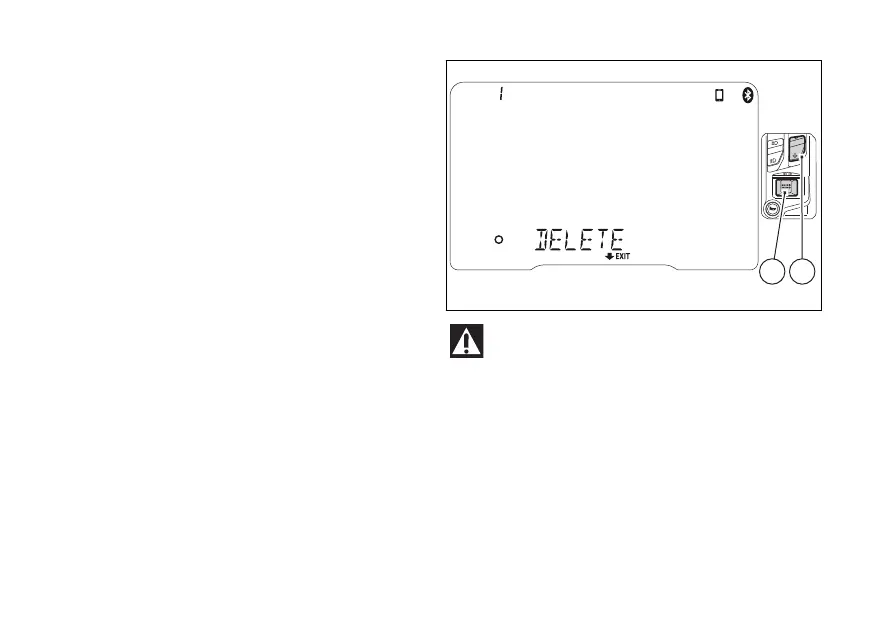
Deleting associated device(s)
This function allows the user to delete a device from
the list of paired devices.
entering BLUETOOTH SETTING MENU
function (Fig 89), use (1) and (2) to select the
device to be deleted from the list shown.
Once the device is selected, press (4). The
instrument panel displays “DELETE”. Press again
(4) to confirm, or press (2) for 2
seconds to cancel deletion of the device. By
confirming the device deletion, the instrument
panel will display “WAIT”.
As soon as the deletion procedure is completed, the
device is removed from the list and the number of
paired devices will be automatically updated.
If the list includes no devices, the instrument panel
will show “NO DEVICE”.
Ducati does not ensure a correct connection to
the Ducati Multimedia System of Bluetooth
navigators that are not provided in the following kits:
- Kit of Ducati Zumo satellite navigator 350
- Kit of Ducati Zumo satellite navigator 390
- Kit of Ducati Zumo satellite navigator 395
Fig 95
142













 To Next Page