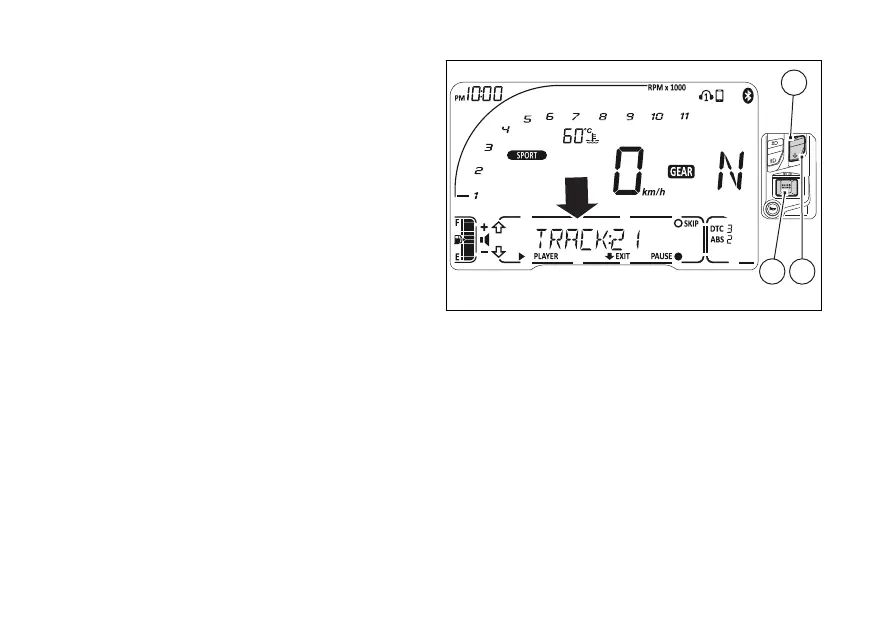
Once the Player is on (PLAYER ON), press (1)
for 2 seconds to open Player control mode.
The name of audio file is shown in rolling mode in the
Menu and Player control graphics is available.
If instrument panel is not receiving track name, it
pauses the track being played and will show the
message “NOT AVAILABLE” in rolling mode.
If the contains no tracks that can be
read, the instrument panel shows again the message
“NOT AVAILABLE”.
When the Player is turned on, within Player control
page, (1), (2) and (4) can only be
used to control the Player.
- Volume up: Press (1) once.
- Volume down: Press (2) once.
- Pause / Play: Press (4) for 2 seconds.
- Skip / Next track: Press (4) once. Each
press corresponds to a track skipped.
Press (2) for 2 seconds to quit Player controls
(although maintaining Player ON). The instrument
panel will display “PLAYER” and “ON”.
Player controls:
- player and its volume can no longer be
controlled via the instrument panel;
- (1), (2) and (4) have the
normal functions.
Fig 110
155













 To Next Page