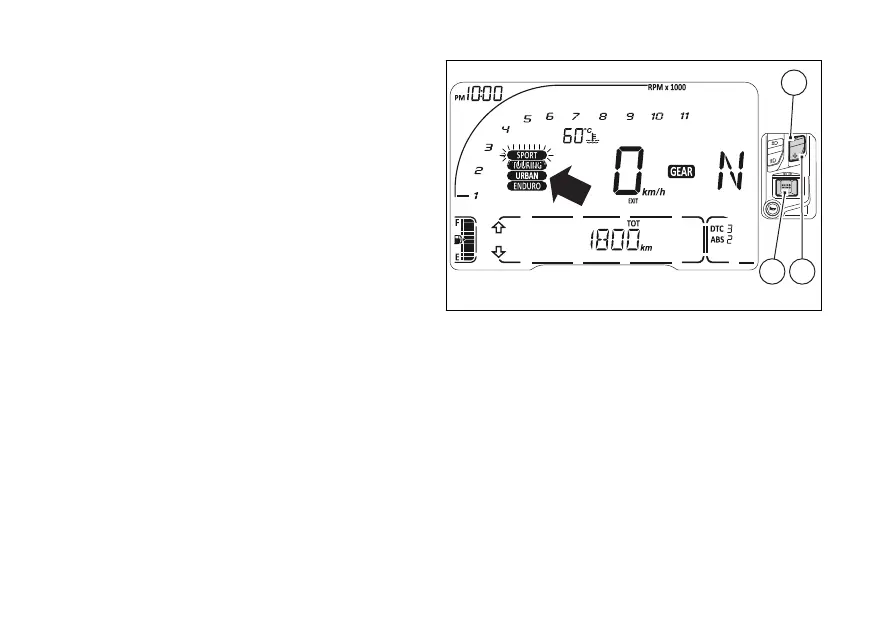
Riding mode change function
This function allows changing vehicle riding mode.
Press (4) for 1 second to change the riding
mode.
The display shows the four riding modes (SPORT,
TOURING, URBAN and ENDURO) and “EXIT” option
under the speed indication.
The name of “SPORT” riding mode flashing
and the corresponding arrow is steady. Use (1)
or (2) to change selected item (riding mode name
flashing and steady arrow) by scrolling the available
riding modes through to “EXIT”.
Once desired mode is selected, press (4) to
activate it.
If (4) is pressed when “EXIT” is selected
(flashing frame), the instrument panel will quit
without saving the new riding mode.
Upon change of riding mode, the instrument panel:
- if vehicle speed is ≤ 5 Km/h (3 mph) and
control is "closed", the instrument panel will
confirm the selected riding mode, the name of
Riding Mode flashes for 3 seconds and
instrument panel goes back to “standard page”
displaying.
- if vehicle speed is ≤ 5 Km/h (3 mph) and
control is "open", the instrument panel will
display the warning “CLOSE GAS” in rolling
mode within the Menu. Only when
control is "closed" does the instrument panel
confirm the selected riding mode and go back to
standard page displaying.
Fig 22
56












 To Next Page