This manual describes the Eagle Eye Pro Timing System, a comprehensive electronic timing and computer software system designed for track and field events. The system provides accurate and efficient timing, recording, and management of athletic competitions.
Function Description:
The Eagle Eye Pro Timing System is a sophisticated solution for athletic event management, offering precise timing, video recording, and data analysis capabilities. It integrates hardware and software components to streamline the entire timing process, from athlete registration to results publication. The system is designed to handle various track and field events, including races, hurdles, and relays, and can be adapted for cross-country events.
Key functions include:
- Timing: Capturing precise finish times for athletes using a high-speed camera and a wireless trigger system.
- Video Recording: Recording high-speed video of the finish line at up to 100 frames per second (fps) for detailed review and verification of results.
- Athlete Management: Importing athlete data, assigning bib numbers, and managing event entries.
- Race Management: Arming the wireless trigger, starting races, recording events, and marking event markers (bookmarks) in the video.
- Results Processing: Saving results, generating reports, and sharing data via USB, Dropbox, or ad hoc wireless networks.
- Video Analysis: Reviewing recorded video, applying on-screen overlays, and exporting video segments for further analysis or media use.
- Display Integration: Connecting to LED scrolling displays to show real-time race information and results.
Important Technical Specifications:
The system typically includes the following hardware components:
- Timing Computer: A Lenovo Thinkpad notebook computer with sufficient processing power and operating system (Windows 7 or later) to run the Eagle Eye Pro Timing Software.
- Video Camera with Lens: A high-speed camera for capturing finish line video. The manual mentions a Basler Pylon GigE camera as an example.
- USB Software Key: A USB dongle required to activate and run the Eagle Eye Pro software.
- Wireless Trigger System: Consists of a receiver (USB powered), a transmitter unit (9-volt battery powered), an antenna, and an audio cable. The transmitter sends a signal to the receiver to initiate timing.
- Data Cables: Includes a 300-foot Ethernet cable and a 6-foot practice data cable for connecting the timing computer to the camera and other peripherals.
- Camera Mounting Kit: Includes a clamp, extension arm, and geared tripod head for stable camera positioning.
- Backpack: A dedicated backpack for carrying all system components.
- USB Switch: A device for connecting multiple USB storage devices or computers to share results files.
- USB Extender: Allows extending the distance between the timing computer and the display board up to 300 feet using additional data cables.
- Gigabit PoE Ethernet Switch: An optional component that supports 9k jumbo frames, allowing the camera to be placed up to 1200 feet from the timing computer and providing power over Ethernet (PoE).
- LED Scrolling Display: An optional display board, typically 15 feet long, for showing race information.
- Sennheiser Trigger (Generation 1): An original Sennheiser trigger system (transmitter and receiver) that can be used as an alternative to the standard wireless trigger.
Software Specifications:
- Eagle Eye Pro Timing Software: The core application for managing timing, video, and data.
- Meet Management Software Integration: Compatible with Hy-Tek, RaceTab, and RaceberryJAM for importing athlete data and exporting results.
- File Formats: Supports various file formats including .evt (event files), .xls (Excel spreadsheets), .seq (video sequences), and .avi (video files).
Usage Features:
- System Setup: Detailed instructions for setting up the camera, wireless receiver, and other hardware components, including camera placement, alignment, and adjustment.
- Athlete Import: Athletes can be imported from Excel (.xls) or .evt files generated by meet management software.
- Race Timing: A clear workflow for timing races, including arming the wireless trigger, starting the race, recording, marking event markers (bookmarks) in the video, and stopping the race.
- Video Review: Tools for reviewing recorded video, adjusting the timeline, and marking event markers to identify specific moments in the race.
- Data Management: Features for saving results, assigning bib numbers, and managing event data.
- File Sharing: Multiple options for sharing results files, including USB drives, Dropbox, and ad hoc wireless networks, facilitating collaboration with meet management software.
- Creating Event Files: Instructions for creating .evt files for import into meet management software, or using Excel .xls files for direct import into Eagle Eye Pro.
- Video Analysis: Tools for on-screen overlay, output to .avi, and export of .seq files for detailed motion analysis.
- Pre-Meet Precautions: Important checks for hard drive space and firewall settings to ensure smooth operation.
- Customizable Display: The software allows customization of the race clock display, including font, size, color, and position.
- Proof of Performance/Images: Supports printing images from video sequences for proof of performance.
- Record & Review Simultaneously: Allows recording and reviewing video concurrently.
- Practice Mode: A virtual grabber feature for practicing the timing process.
- Cross Country Timing: Specific instructions for setting up and using the system for cross-country events, including camera options, manual vs. automatic start, bib number entry, and camera alignment.
- User-Friendly Interface: The software features a graphical interface designed for intuitive and efficient operation.
Maintenance Features:
- Troubleshooting: The manual provides a comprehensive troubleshooting section covering common issues such as software errors, no start detection, camera detection problems, poor image quality, and reading hip numbers.
- Software Updates: Users are directed to the Eagle Eye website for the latest software updates.
- Manual Updates: The manual itself is available online for updates.
- Video Tutorials: Links to video tutorials are provided for additional support.
- Second Computer Installation: Instructions for installing the software on a second computer for backup or additional functionality.
- Damaged/Lost Keys: Information on replacing damaged or lost USB software keys, which are essential for system operation.
- Battery Management: Recommendations for using high-quality 9-volt batteries for the wireless transmitter and ensuring the timing computer's battery is charged.
- Hardware Care: General advice on protecting hardware, such as ensuring proper cable connections and avoiding physical damage.
- Firewall Management: Instructions for configuring firewall settings to allow the timing software to operate correctly.

 Need help?
 General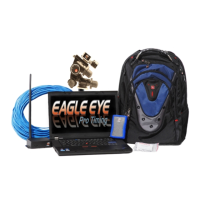

 To Next Page